Software News

Sort By: Post DateTitle Publish Date
Shutterbug Staff  |  Dec 24, 2019

We've been singing the praises of Luminar software for some time now and now photographer and YouTuber Pierre T. Lambert has discovered it as well. In the below video, he shows you how to make your photos epic in under two minutes while using the new Luminar 4 program.

Jack Neubart  |  Aug 02, 2012  |  First Published: Jun 01, 2012

CES is not a big imaging software show as evidenced by the short list of new products, though we did find a new camera profiling tool, updated monitor calibration tools, an old favorite Raw converter brought back to life under a new name, and software for editing on the fly and sharing photos.


ArcSoft introduced a Mac version of Perfect365. This software uses advanced facial recognition technology for one-click portrait touch-ups, letting you effortlessly adjust up to 21 individual facial features. Perfect365 allows you to add creative effects such as eye shadows, blushes, lipsticks, colored contact lenses, under-eye circle removal, and blemish removal. The software is available as a free download (www.perfect365.com) or in a premium edition ($39).

Jon Canfield  |  Jul 01, 2009

Various software vendors have introduced new products and enhanced existing applications for everything from basic image processing to advanced plug-ins.

Cynthia Boylan  |  Dec 18, 2014

IInstagram has introduced five new creative filters for its popular, photo-sharing app: Slumber, Crema, Ludwig, Perpetua, and Aden.

Henry Anderson  |  Aug 10, 2021

The power of Adobe's imaging software never ceases to amaze. In the below video, software guru Colin Smith of photoshopCAFE demonstrates how to use a time-saving tool in Photoshop, Lightroom and Adobe Camera Raw that fixes the color of a photo instantly in a single click.

Jon Sienkiewicz  |  Apr 16, 2023

Here is my dilemma. Since discovering OpenAI’s DALL•E 2 image generator a few weeks ago, I’ve had good success and great fun creating images I’m truly proud of. No, it’s not photography, but it’s still pretty amazing. More importantly, however, it raises a fundamental question: Is it ethical to publish AI-assisted images instead of photos of living, flesh and blood models, even with clearly-worded disclaimers? Frankly, I’m torn by this predicament.

Ron Leach  |  Nov 01, 2017

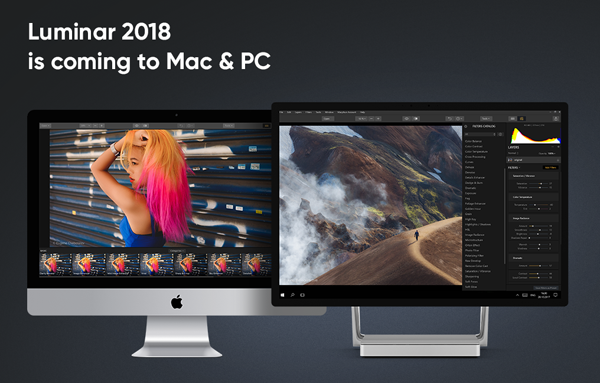
There’s a lot going on at Macphun these days: The company’s name is changing to Skylum, indicating they’re no longer a Mac-only software developer, and they just announced their first cross-platform product, in the form of Luminar 2018—a major update to their popular image-editing program for both Mac and Windows computers.

Henry Anderson  |  Jun 22, 2022

Adobe is constantly adding new features to Lightroom so it’s easy to miss some of the coolest fresh stuff. That’s why we like to highlight cool new Lightroom tools that you may have missed.

Ron Leach  |  Apr 06, 2017

The art of portrait photography requires a lot of skill to both capture compelling images and process them effectively. In the forward-looking video below, Adobe takes a look at how emerging technologies could enable you to do just that on a mobile device in the not-too-distant future.

Shutterbug Staff  |  Aug 04, 2023

Show your best images to the world and earn bragging rights when your photograph is selected to join the Shutterbug Photo of the Day gallery. It doesn't matter whether you shoot with a smartphone or a Hasselblad—if you have the talent, let it be recognized.

George Schaub  |  Sep 13, 2016

Creating a web page for your images these days is fairly easy, and there are numerous web apps available that offer a wide variety of colors and backgrounds. But organizing your images before you even consider the template (or “skin” as it is called in the trade) is perhaps the biggest challenge, given the proliferation of images we all have made with various cameras and mobile devices stored on flash drives, hard drives, and even memory cards.

The Editors  |  Oct 05, 2018

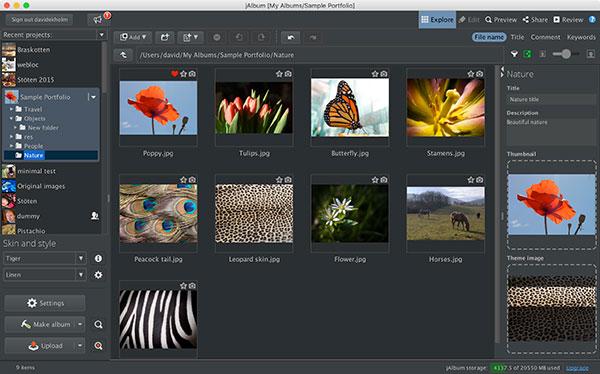
If you want to build an online photo album or digital portfolio of your images to share on the web, there are many ways to do it. But one of our favorite options has been the jAlbum photo gallery software, which we have reviewed several times over the years.

Jon Sienkiewicz  |  Nov 15, 2024

AI Retouching is coming to Aftershoot soon, and you're invited to join the waitlist to become a beta tester.

Jon Canfield  |  Jul 13, 2012  |  First Published: Jun 01, 2012
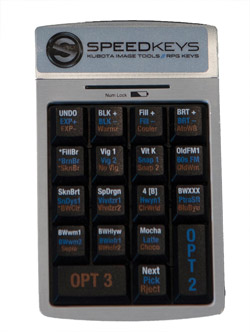
Photographers, especially those dealing with large numbers of images, are always looking for ways to speed up the workflow and spend less time in front of a computer and more time behind a camera. Applications like Lightroom have improved the process tremendously, making cataloging and image adjustments easier and faster than before. If you have adjustments that you apply frequently, you can use presets to make it a single-click process, applying a number of adjustments in one operation.


Kevin Kubota has been providing presets and tools for both Photoshop and Lightroom users for quite a while now, and one of his products is a combination of a package of presets for Lightroom and a mini keyboard from RPG Keys that looks much like a numeric keypad on your keyboard. Available as a bundle for $349, or as a rental for $19.95 per month after a $49 setup fee, you get over 100 presets that do everything from black-and-white conversions to skin tone enhancements (and a number of interesting edge effects).

Sponsored  |  Feb 17, 2021

When you want a sky that just rocks, don't let grey sky stop you shooting landscapes. Dull days and adverse light are easily fixed by Landscape Pro.

Pages

X