| |

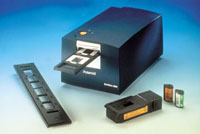
Agfa's
DuoScan T2500, recently seen at the PMA trade show, is a
36-bit scanner that has the ability to scan prints up to
8x14" or transparencies from 35mm up to 8x12".
|
|
Scanners. Scanners
convert graphic photographs into digital form by passing a light emitting
element across an original image, transforming its analog form into a
collection of pixels that can be stored as a digital file. Both flat-bed
and film scanners use similar methods to accomplish this, with the addition
of some form of backlighting necessary to scan slides or negatives. While
film scanners are popular for digitizing slides or negatives, flat-bed
scanners, that were once limited to only scanning prints, are morphing
into hybrids that can also digitize film with a quality not possible even
a few years ago with dedicated film scanners.
Scanners are rated by many specifications, including color depth, resolution,
and dynamic range. Some of this was covered in the "Digital Q&A"
article by Bob Shell and I last year, but if you missed it, here's
a quick review. Color depth refers to the number of bits assigned to each
pixel (picture element). These days even inexpensive flat-bed scanners
offer a 36-bit color depth which assigns 12 bits for each red, blue, or
green pixel. The more bits you have for each color, the more photo-realistic
the final scanned image will appear. Because 36-bit scanners capture more
detail than 24-bit models, the resulting images are easier to edit with
image manipulation software like Adobe Photoshop.
A scanner's resolution is measured by the maximum number of dots
or pixels per inch it can read and the higher the number, the higher the
quality. Resolution can be rated as optical as well as interpolated. Optical
resolution is the raw resolution inherently produced by the scanner's
hardware. When the resolution requested through the scanner driver exceeds
the scanner's optical resolution, software resamples the image data
and uses algorithms and fills in spaces between pixels. If you limit your
use of interpolated resolution to just double the scanner's optical
resolution and tweak the resulting image using the Unsharp Mask command
of an image-editing program, like Adobe Photoshop, these interpolated
scans can be quite usable. Using interpolation, sometimes referred to
as "enhanced," beyond twice the optical resolution results
will produce images that may not be as usable. Most flat-bed scanners
with film scanning ability let you digitize transparencies and negatives
at over 2000dpi resolution, but scanning 35mm slides and negatives at
these higher resolutions may only produce larger files, not better image
quality.
A scanner's dynamic range is a combination of the optical density
that can be achieved by the hardware and the total number of bits that
can be captured. This measurement can be literally interpreted as the
range of f/stops that can be captured from a digital photograph. The greater
the dynamic range, the greater the number of tones that can be captured,
and the better the final scan's image quality will be. Until recently
only expensive scanners offered a dynamic range over 2.5, now affordable
scanners perform at 3.0 or higher. By comparison, a Kodak Photo CD scan
has a dynamic range of 2.8, while a Pro Photo CD scan is 3.2.
Kodak's Photo CD. The Photo CD process has been around for some
time, but I often get the feeling that Kodak doesn't know what a
great product they have. I made my first Photo CD disc in the summer of
'92 from 35mm color negative film that my wife and I shot at Walt
Disney World. To me, one of the best features of the Photo CD is that
someone else does all the work of scanning my slides and negatives. To
make your own Photo CD, all you have to do is take your negatives or slides
to a local photofinisher who offers the service and they will turn your
analog film images into digitized photographs. To produce a finished disc,
a Photo CD Transfer Station converts your analog images into digital form
and creates a finished disc by using a high-resolution film scanner, a
computer, image processing software, a disc writer, and a color thermal
printer. Each image is pre-scanned and displayed on the system's
monitor, where the operator checks the orientation (portrait or landscape)
of the image and creates a final, high-resolution scan. During the process,
the digital image is adjusted for color and density, and each 18MB image
is compressed to 4.5MB using Kodak's Photo YCC format and is written
onto a CD. A thermal printer creates a contact sheet-like index showing
the images transferred to disc and is inserted into the cover of the CD's
jewel case.
Originally there were six different kinds of Photo CDs, but now a new,
more flexible strategy has simplified the number of categories to two:
the Photo CD Master Disc and the Pro Photo CD. The Photo CD Master Disc
format is specifically designed for 35mm film and each disc can hold 100
images. The image files use a format Kodak calls Image Pac, which contains
five different scans at five different resolution scans. This is often
referred to as a "five res" scan. On a Photo CD Master Disc
you'll find images stored in the following resolutions:
Base/16--128x192 pixels
Base/4--256x348 pixels
Base--512x768 pixels
Base*4--1024x1536 pixels
Base*16--2048x3072 pixels
The Pro Photo CD is designed for anyone who shoots large-format film,
whether they are an amateur or professional. Besides 35mm, Pro discs accept
images from 120 and 70mm rolls and from 4x5 sheet film. The Pro disc offers
a sixth, Base*64 resolution image that yields an image size of 4096x6144
pixels.
Alternatives. There was a time when the only way you could digitize 35mm,
roll film, or large format film was by using a film scanner or a scanning
process like Kodak's Photo CD system. As flat-bed scanner prices
dropped through the floor and the under $100 scanner become a reality
instead of a fantasy, manufacturers began looking for new functions to
add value to their products. One of the first "new" features
being touted by scanner companies is the ability to scan film in addition
to prints. If you've been around the digital carousel a while, you
know that using flat-bed scanners to digitize film is nothing new, and
transparency adapters have been available for some time as an option for
many flat-beds. In most cases these adapters were nothing more than "light
box" lids for the scanner and provided a method to backlight negatives
or transparencies so they could be digitized by the moving CCD elements.
This method always produced a digitized image, but the adapter was often
cumbersome and always expensive--sometimes costing more than the scanner
itself. Now all that's changing. Transparency adapters have gone
from being expensive options to inexpensive options and even standard
equipment for some low-priced scanners.
In recent years, companies, such as Agfa, have introduced new technology
that allows their DuoScan scanners to provide a different, separate location
for digitizing 35mm, roll film, or large format film--instead of on the
glass--that produces even better results than conventional transparency
adapters. Agfa calls this technology "TwinPlate" and feels
it provides better control over the scanner's optical path, resulting
in sharper scans with higher color quality. They believe the DuoScan system
is the easiest way to produce film scans. Instead of attaching a transparency
adapter to a flat-bed scanner, the DuoScans have a "reflective drawer"
that lets you insert slides (or negatives of any size) into adapters for
scanning. The user can even prepare the drawer for transparency scanning
at the same time that he or she is scanning reflective copy on the glass.
Another advantage is that the transparency drawer lets you scan the transparencies
directly, instead of through a glass plate. If you do not scan through
glass, you'll get a better scan and avoid the possibilities of moiré
or Newton-ring patterns from the glass (see page 128). The biggest advantage
of DuoScan, Agfa claims, is that each scanning bed--reflective or transparent--is
optimized for that particular method of scanning. Most scanners'
transparency units are designed for reflective or transmissive and compromise
to achieve the second method. Since DuoScan scanners have two scanning
mechanisms, Agfa claims, that optimal results for both types of scans
are possible.
Like other members of the DuoScan family, Agfa's least expensive
DuoScan, the T1200, offers separate beds for scanning film or prints.
The 36-bit T1200 flat-bed scanner offers 600dpi resolution for reflective
scans up to 8.5x14" color and 2400dpi for transparencies up to 8x10".
The film scanning bed produces a dynamic range of 3.0 and an optional
batch slide holder kit lets you scan several 35mm originals at one time.
The DuoScan T1200 costs $699. What if your few scanning needs are occasional?
Can you say: "How about a scanner that will digitize 4x5 sheet film
for under $400?" Even lower in price is the Epson Perfection 636,
a 36-bit flat-bed scanner with an optical resolution of 600dpi and an
interpolated resolution of 9600dpi. This $299 scanner sports a SCSI II
connection and includes drivers for Mac OS and Windows computers. The
optional 4x5 transparency unit, usually an expensive add-on, costs $99.
The transparency adapter lets you produce 2400dpi film scans with a dynamic
range of 3.0--remarkable for an inexpensive package--for slides and negatives
up to 4x5". Epson provides film holders for 4x5 sheets, 120 roll
film, and 35mm slides.
Crystal Ball Time. I'd like to make a prediction here and now: Other
than for high-end publishing, dedicated film scanners, as we have come
to know and love them, will disappear for many graphics applications.
The introduction of products like the Epson Perfection 636 flat-bed scanner
with optional film adapter will pull the plug on all but high-end film
scanners. Users always chase the lowest possible cost solutions to their
problems and if they can get an inexpensive scanner that will digitize
film and flat artwork, they are going to purchase them by the pallet load.
As more companies add film scanning capabilities to their flat-beds, there
will be competitive pressure to increase the quality of the scans and
decrease the cost of the scanner. That's already starting to happen
with product announcements that include Plustek's $199 flat-bed
scanner with transparency adapter as standard equipment. Plustek's
9636T is a 36-bit flat-bed scanner with a built-in 4x5 film adapter. In
addition to being able to scan prints up to 8.5x11.7" in size, the
9636T can digitize negatives and transparencies. Priced at under $200,
the scanner has an optical resolution of 600dpi and a maximum (interpolated)
resolution of 9600dpi. The 9639T is TWAIN compliant and is designed to
work with Windows computers via their parallel port connection. Apparently,
there is no stopping this trend.
All Glass Isn't
The Same
Those of us
who were around during the heyday of multi-projector slide shows wouldn't
drop a single slide in a tray unless it was mounted between Anti-Newton
ring glass. It turns out it may not be such a bad idea to use the same
kind of glass for your scanner. Many people are using Anti-Newton ring
glass in their flat-bed scanners when they have to digitize smooth surfaced
materials like glossy paper or transparencies in scanners that have a
transparency adapter--anywhere Newton rings tend to show up. Anti-Newton
ring glass is textured just enough to allow the air to escape from between
the film base and glass, but not enough to show up on the scan. Some high-end
flat-bed scanners also use Anti-Reflection (AR) glass for their platen.
Both sides of the glass are anti-reflective coated because high-resolution
scanners can pick up dim reflections off the surfaces of the glass. AR
glass also reduces any refraction of the light as it passes through the
glass. The problem with AR coating is that it can wear off with use or
cleaning and is expensive. Replacement glass can cost $1000 for larger
scanners, but Focal Point Industries--who also offers Anti-Newton ring
glass for scanners--has prices that shouldn't exceed $350. Anti-Newton
ring glass isn't cheap either and can cost $110 for a 14x17 scanner.
The company, who also makes printer and enlarger glass, can supply replacement
scanner glass for any brand of flat-bed scanners in sizes up to 30x32"
and in thicknesses ranging from one to three millimeters.
Manufacturers/Distributors
Adobe Systems Inc.
345 Park Ave.
San Jose, CA 95110
(408) 536-6000
fax: (408) 537-6000
www.adobe.com
Agfa Electronic Pre-press Systems
(Bayer Corp.)
200 Ballardville St.
Wilmington, MA 01887
(978) 658-5600
fax: (978) 658-6285
www.agfahome.com
Cies-Sexton Visual Laboratories,
Inc.
1247 Santa Fe Dr.
Denver, CO 80204
(303) 534-4000
Eastman Kodak
343 State St.
Rochester, NY 14650
(800) 235-6325
www.kodak.com
Epson America Inc.
20770 Madrona Ave.
Torrance, CA 90503
(800) 289-3776
(800) 463-7766
(310) 782-0770
fax: (310) 782-5220
www.epson.com
Focal Point Industries, Inc.
2867 Stonewall Place #101
Sanford, FL 32773
(407) 322-2123
fax: (407) 322-2186
www.fpointinc.com
Microtek Labs, Inc.
3715 Doolittle Dr.
Redondo Beach, CA 90278
(310) 297-5000
Minolta Corp.
101 Williams Dr.
Ramsey, NJ 07446
(201) 825-4000
fax: (201) 327-1475
Photofax: (800) 528-4767
www.minoltausa.com
Plustek
169 Pullman St.
Livermore, CA 94550
(925) 453-8888
fax: (925) 453-8899
www.plustek.com
Polaroid Corp.
575 Technology Square
Cambridge, MA 02139
(781) 386-2000
fax: (781) 386-9339
www.polaroid.com
|