| |
How
big should your test strip be? It depends on the size
of the final print. This is an 8x10" test strip--but
the final print is 24x54". It appears, with me
rinsing it, in our book "Darkroom Basics"
(Collins & Brown 2000, ISBN 1-85585-812-6).
Photos © 2002, Frances E. Schultz, All Rights Reserved
|
|
Beginners tend to be very
cautious about the amount of paper they use. Paradoxically, therefore,
they waste more than they need to. Rather than making test strips, and
then a work print, they will go straight to what they hope will be their
final print. Then they are unhappy with it, so they try again. And again.
And again. Worse still, they don't try again: they put up with
a second-rate print, which is an even bigger waste of paper.
But if you start out by being prepared to "waste" a few
sheets of paper--"waste" being defined as "paper
that you know won't end up as a final print"--then
in the long run you should both save paper and get better prints.
Follow Procedures
Begin by always developing your prints (including test strips, which
you should always make) for the recommended time at the recommended
temperature. Don't snatch an overexposed print out of the developer
when it comes up too fast, or you will get poor tonality and grayish
blacks, and don't leave an underexposed print in the developer
too long, in the hope of more density or contrast, or it can stain.
Don't try to wring a few more prints out of exhausted developer,
either.
Cover That Tonal Range
Remember that an undersized test strip can be worse than useless. Don't
skimp. Make sure the test strip covers a good range of tones: a quarter
of a sheet of paper is not too big. Make test strips for both exposure
and contrast. This may mean two or three test strips. That's OK.
Once you find the exposure and contrast that looks right, make a work
print.
Your Work Print
Think of a work print as a full frame test strip. Look for local areas
that would benefit from extra exposure (burning) or reduced exposure
(dodging). Once you see the print as a whole, you may realize that the
exposure or contrast (or both) are not actually ideal. That's
why the work print is only a step on the road to the final print. At
this point you have "wasted" two sheets of paper (one cut
up for test strips, one for the work print), but the next print will
be much better than if you had just jumped in and tried to make the
final print, first off.
Ideally, wash and dry your work print before you judge it. This is not
always practical if you are using Fiber Base (FB) paper, but if you
don't have a fair amount of printing experience, Resin Coated
(RC) paper is a better bet anyway. Don't try to run before you
can walk. Trying to make "fine prints" on FB paper before
you can reliably make a good print on RC paper is definitely trying
to run before you can walk, though many try.
|
| |
 |
Dry-Down Views
Resin Coated paper is quickly processed, and drying time is short.
The idea of washing and drying a print which is just a test may seem strange,
but a wet print looks lighter (up to a quarter of a stop) and more contrasty
(up to half a grade) than a dry one. If you know a paper well and have
been printing for a long time you probably compensate for this dry-down
factor automatically. But change papers without checking the dry down,
and you waste paper. This is particularly true of semimatte and matte
papers because they dry down ferociously.
Drying work prints has other advantages, too. Carry a print into the daylight,
and you may be surprised by the difference. You can use daylight inspection
bulbs in the darkroom, but the quality of the light is never the same.
Think, too, about how the final print will be used. If it is to be hung
under tungsten light, inspect your work print under tungsten. If it is
to be displayed under fluorescent light, inspect it under that. If it
is to be reproduced, a useful trick is to photocopy it, which you wouldn't
want to do with a wet print: a print that photocopies well will almost
invariably reproduce well.
|
| |
|
Test strips can give you a lot of information. When Roger
Hicks and I wrote "Quality in Photography" (Amphoto
2000, ISBN 0-8174-5634-1) we decided to try controlling
contrast on graded paper using two developer baths, one
high contrast (Tetenal Dokulith) and one soft working (Tetenal
Centrabrom). The test strips shown here were made on Berrger
NB3. Both (above and below) were exposed for an identical
sequence of times, but one is developed in the high contrast
developer, the other in the low contrast developer. After
a few more tests, I made the final print, developing it
in the Centrabrom for 45 sec and the Dokulith for 1 min
and 15 sec. |
|
Exposure And Contrast
Once you have your work print, the temptation is to try to get what you
want in just one step. If at all possible, resist this temptation. Even
if you are sure that you need to change both exposure and contrast, don't
change both at once. If you do, and the new print is still not right,
you won't have much more information than you had before. Decide
which is more likely to be the problem: let's say, exposure. Make
a new work print. You may now find that you do not need to adjust the
contrast after all: this one change may get you the print you want. If
it does, you have saved a sheet (or two or three) of paper.
The work print can also prompt more test strips. If a light area such
as a sky needs more exposure or a change in contrast, you can go back
to test strips, rather than using whole sheets. Work out the adjustments
you need to the base exposure and contrast. You can do the same thing
for areas that are too dark: start with your work print exposure, but
mask (dodge) the area for part of the time. When you are sure of what
you need, apply the adjustments to another work print. Don't make
your adjustments and corrections too small. If you think that a work print
is about a quarter of a stop dark, make a new one half a stop lighter.
You will be amazed how many times the bigger adjustment is right. And
you will only have used one piece of paper to get there. The same goes
for contrast. If you think half a grade harder would be right, make a
new print a whole grade harder.
|
|
Keep A Log
A darkroom log can be invaluable, particularly if you change both exposure
and contrast on the way to the final print. I rarely keep track of my
initial test strips, but when I get to the first work print I note the
base exposure and contrast. That way, if I alter the enlarger settings
while making new test strips or new work prints, I can get back to my
initial exposure.
The notes for the final print should be comprehensive. Note any dodging
and burning, the paper, the developer, and the filtration or the enlarger
used (Ilford MGIII filters are different from MGIV, and Durst is different
from Meopta). If any single variable changes, the information in the log
will not necessarily give you a good work print, though it is still better
than nothing.
|
| |
|
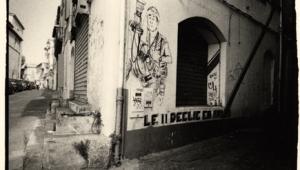
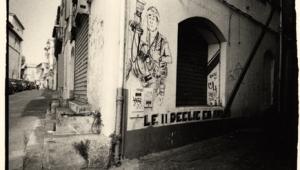
I had determined the correct contrast and exposure for this
print, but I still wasn't satisfied with the work
print. I took two black cropping "L"s and moved
them around on the print to see if a change of shape would
help. I think it works much better as a panorama. The crop
(below) emphasizes the sweep of the approach and makes the
lake and boat stand out much better. |
|
The log can also be useful
if you want to duplicate your final print--although, I must confess,
I use the information in the log to produce a new work print, and very
often make a number of new adjustments before I make my new final print:

I rarely want to make exactly the same print again and again.
The other way to keep a record of your printing is to make notes directly

on (dry) work prints with a write-on-anything pen. This serves two purposes.
It reminds you of how to make the final print, and it also identifies
a work print months or even years after you have made it. Another trick
for identifying work prints is to cut off a corner.
All of this applies only if you stick to a single kind of paper--whatever
you find you like best. I use Ilford (and mostly Warmtone RC at that),
but I know other printers who swear by Agfa, Forte, Oriental, or Bergger.
Whichever you choose, you can learn exactly what it can do: you know the
dry-down factor, you know how it reacts to your enlarger's filtration.
The same applies to developers: changing developer can alter the tone
and contrast of your paper, and even the paper speed, quite apart from
development time. If you constantly chop and change papers and developers,
you will find it very difficult to ever become a consistently good printer.
|
|
To sum up, then, how does wasting
all this paper stop you wasting paper? Simple: you begin to understand
what you are doing. By making one change at a time, drying the print,
and checking it under the right kind of light, you soon begin to internalize
what needs to be done. Instead of two or three work prints, you find you
need only one. Think of it as a (very cheap) course in fine printing:
one that costs no more than a few sheets of paper.
|