There must be something to
black and white photography. It's been around for years. It's
had its heyday, its demise, and now a comeback that's making history.
And why not? It's graphic, grand, and gorgeous!
With the advent of color photography many people slipped into a mode
of "getting by." It's been sort of easy to create
nice color photographs without a true understanding of lighting and
how it affects the image. One could get by with even flat lighting--very
little differentiation between highlight and shadow areas--because
the properties of color, themselves, create a pleasing three-dimensional
appearance.
|
| |
Photos
© 2002, Monte Zucker, All Rights Reserved
|
|
 |
But when a photograph is limited to black and white and tones of gray,
one has to really know the ropes before he can tie someone up in the excitement
of the photograph. In reality, however, there can be more tones of gray
between black and white than many photographers achieve in their color
photographs. A photographer who understands this and knows how to create
a complete range of tones between the two extremes of black and white
will undoubtedly often come up with a winner.
I thought my black and white days were over when color photography came
into existence. I finally freed myself from the darkroom. Today, I'm
more excited than ever because I'm creating some very strong black
and white images digitally. And they're better than I was ever able
to do myself in the lab.
I begin with color files created with my Canon D60. Yes, everything I
do starts out in color. Later, when I'm studying what I've
got, I look for potential in images that have a great range in tonal values.
Although I usually am creating portraits, I don't limit myself to
just that. I also sometimes find good black and white subjects in images
where the color seems to be almost distracting. In certain instances color
sometimes can draw the viewer's attention away from the subject
itself.
Pen & Ink
In this photograph of a snow-covered tree in Connecticut, for instance,
I felt that the original picture in color lacked the potential drama
that I had in mind when I saw the tree. The camera saw the tree and
everything else around it. There was just too much to look at. Playing
around on my computer in Photoshop, I began experimenting and just about
flipped my lid when I went to Image/Adjust/Threshold. Everything but
the bare outlines vanished. It was even more than I had expected. Everything
became either black or white--no shades of gray. It worked! I had
created an equivalent to a pen and ink drawing.
|
When Color Just Gets In
The Way...
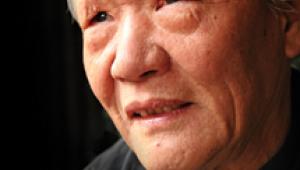
In another similar/totally dissimilar case I recently created this portrait
in the corner of a covered porch. It was very late in the day. My subject
was positioned in direct sunlight that was diffused by a Westcott translucent
panel. I could see the potential in this simple portrait, but the overly
warm tone of the setting sun was actually taking away from the man's
photograph. When I changed the portrait to black and white it popped!
The black and white rendition of this portrait has the complete tonal
range that I saw when I created the photograph. Maybe, even more than
what I saw from the start, but we won't go into that. With the
distracting color gone you look at the man...period! The incredible
tonal range of the background was all natural light on the corner post
holding up the porch above us.
The change was made in Photoshop by going to Channels. When I do that
I bounce back and forth between the red, green, and blue channels. The
red is very soft, good for a woman's portrait. The green channel
is much more dramatic. It creates a full range of tones in a medium
scale. The blue channel is the most dramatic of the three, almost too
dynamic for most portraits. Any of these three channels can be adjusted
in Levels to your taste.
After selecting one of the channels which I feel best represents what
I want to see in my photograph I know that I need to get rid of the
color embedded in the image. To accomplish this I go to Image/Mode/Grayscale,
dropping out the color that way. I then change the mode back to RGB
and finish the image as a black and white even though it is a color
file.
The final toning down was done by creating a duplicate layer of the
finished black and white version. I then went into Curves, pulling down
the right edge of the line to about halfway down. This created a darker
layer over the entire picture. I completed the photograph by erasing
the darker image 100 percent on the face and 20 percent on the throat
area and center of the body.
|
My Most Powerful Image...Ever!
Perhaps, one of the most dramatic black and white images I have made
during the past year was this picture of the focal point of the Holocaust
Memorial in Miami Beach, Florida.
I can't begin to tell you of the powerful feelings that are stirred
when you walk through the memorial garden there. This picture does,
however, give you those same feelings without my even having to utter
a single word. The power of speech through photography, in my opinion,
shows greater here than in any other photograph that I have created
in my lifetime.
The image began with a pretty picture of the hand against a blue sky
with sporadic white clouds drifting through. I thought that perhaps
the horrible message in the bronze against the peaceful sky would be
an interesting contrast. Instead, it was nothing. It didn't give
you the feelings that you have when you are there looking up at it.
Having just been to a Photoshop class with instructor Eddie Tapp, I
learned how to select the sky with Select/Color Range. With just two
clicks of the mouse I was able to select the entire sky on a duplicate
layer and delete the sky from that layer. A sky that I photographed
toward sunset in the Caribbean a few days later appeared to have something
exciting going for it. I took that sky and adjusted it through Levels,
turning a peaceful sunset into a disturbing, stormy sky. Then, all I
had to do was to take the Move tool and drag the bronze onto the new
background. When the resulting image popped up on my computer screen
I knew it was right!
What I hadn't thought about until a few moments later was the
fact that the new photograph might be even more effective in black and
white. A look at the blue channel again confirmed my opinion. The black
and white image brought tears to my eyes--the same as when I was
actually there. As far as I know, no one associated with the memorial
has seen this image. I'm hoping that through Shutterbug someone
will bring it to the attention of those who created the memorial and
that they may wish to use this image.
|
Creating Separation
Between Black And Black
Ever try photographing black on black, and showing a distinct separation?
Sound impossible? Not according to these next two images. In the first
picture I did something special with the foreground interest. In the
second I worked on the background.
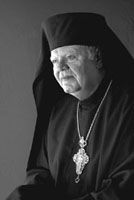
During a recent class I photographed this priest by daylight, you
guessed it, under the cover of a porch outside one of the entrances
to his church. I knew that the way to get detail in a dark fabric
like this was to use a cross light. One of the photographers in class
held a Westcott silver/black reflector outside in direct sunshine.
The brilliant reflection highlighted the right side of his face dramatically
and skimmed over his robe to show each and every fold of the fabric.
Another of the same reflectors (also known as Monte's Illuminator)
was positioned where I would normally place a main light. It was turned
toward the outside to pick up the light. Then, I carefully inched
the back edge of the reflector toward his face, until it beautifully
wrapped the light around onto the left side of his face. The background
for this portrait is a Westcott fold-out black and white panel that
has saved me many times when I was looking for just the right background.
I loved the picture, but wasn't thrilled with what the color
was doing to it. I had a mixture of color temperatures from the bright
sunshine outside and the cool tones of the ambient light in the shade.
Black and white, of course, was the answer. The blue channel again.
I used the same black panel behind this groom model in class. The
separation here was created by overexposing the background with a
light behind the model. I found that by crossing a light over the
background from below I could create many shades of gray just by putting
more light on the background than on the subject.
An extra light coming in toward the groom from a 90Þ angle crossed
over his tuxedo, too, bringing out all the detail in his black suit.
You don't have to imagine it. It's here before your eyes.
Black on black and just look at the detail throughout the portrait!
|
How About More Of A
Romantic Look?
A portrait of this engaged couple on the beach just before sunset
gave me an opportunity to create a different black and white approach.
There was almost no color here. Light clothing against a light sky.
All the color was from the warm glow of the setting sun.
What would it be like if we could eliminate the color and concentrate
just on the couple themselves? I found out when I chose the red channel
for this portrait. The subtleness of this high-key portrait was enhanced
even more when it was transformed into its black and white rendition.
The red channel gave me the softness that I wanted. The black and
white helped to emphasize their faces, standing them out from the
background by the only contrast in the photograph, their hair. Any
more harsh detail that I could have picked up using one of the other
two channels would have been inappropriate.
So, where does this leave
us as photographers using color as our main medium? As far as I'm
concerned it leaves us another avenue open for speaking our own statements
in this language we love called photography.
Remember my philosophy? I don't want to photograph the world
as it is. I would rather photograph the world as I would like it to
be. Black and white photography is one of the ways in which I can
accomplish this goal.
By the way, if you like what you're seeing and reading here,
be sure to stop by the web site that I have put together with Gary
Bernstein. It's www.zuga.net.
Browse through it all. Take a stroll into each and every area you
see in the table of contents on the left side of our homepage. There's
a lot of information there for you offered at no charge. There's
also live video instruction available there. It's a happening
place!
|