


- REVIEWS
Camera Reviews 
More Reviews Mobile Reviews Photography Reviews - GALLERIES
- VIDEOS
- BUYER'S GUIDES

Organizing and Sorting Your Images Using a Rating System: Stars and Rejects

Organizing and Sorting Your Images Using a Rating System: Stars and Rejects
by George Schaub
Once you've shot your pictures and begun the process of downloading, naming, storing and backing up, there are many junctures at which you can make critical decisions about what to keep, and what to toss away. Yes, it's difficult to throw away any image, but given that digital tends to encourage overshooting it's important to make some decisions about similars, bracketed shots and especially those that are beyond the reach of Photoshop. Some of these discards are obvious, and when you open your images right after downloading in your browser you know what's got to go. But others are borderline, and experience shows that some images that might have been thrown away later turn out to be your favorite.
One way to begin to triage your images is to use a star rating system, available on many programs including Photoshop CS2 and Elements and Apple's Aperture. This allows you to respond almost viscerally to an image by assigning it a star or stars as you go through your folder. It may sound like giving kids in kindergarten points for good behavior, but it does seem to work well enough for the top names in image editing and organizing software to have adopted it even to their higher-end programs.
To give you a sense of how this might work, and how you could adapt it to your workflow, I'll work with Apple's Aperture and their star rating system.
Aperture offers a myriad of editing and sorting routes. There is the simple matter of viewing your images one-by-one large on the screen, the ability to make comparative judgments by viewing similar images side by side, and the Rating system. Ratings are based on a scorecard that ranges from null to 5 stars, with null being a virtual reject and 5 being the cream of the crop. A Rating setup can be done in very rapid fashion. As you work with Ratings it is as if you don't realize how quickly you are moving through images until you are done and then, voila, you have all the images nicely sorted for whatever might come next.
The Rating system also has a saving grace, in that even though you rate an image a null or a 1 or 2 star you are not automatically deleting it. This means that you can re-discover that diamond in the rough weeks or even years later. You can, however, eliminate the low scoring images from the Aperture Browser view, which helps you make decisions about those that merit your immediate attention and consideration. Of course, there are within any shoot numerous images that should be eliminated. Being able to hold onto even the "losers" while not having them get in the way of your work has its advantages. Impulsively eliminating numerous images at the time of download or initial edit can risk losing out on some good shots, or the potential of shots that, with some manipulation, can be salvaged, or even vastly improved. Digital imaging software does make it possible to create finals out of images that, in the film world, might be marginal at best.

These shots have just been downloaded from a memory card and represent a group
of random images from a winter hike in New Mexico. The task is to narrow them
down using the rating system.
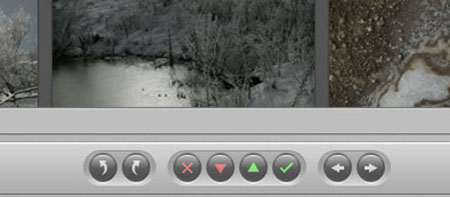
The Aperture control bar makes quick work of rating images. The toggle arrows
on the far left are for rotating clockwise and counterclockwise. The directional
arrows on the far right are for moving left or right through the images. The
"x" is for "reject", or no stars. The "check mark"
is for the best images, or 5 stars. The green up and red down arrow keys are
for raising and lowering a rating. For example, if you want to assign an image
a 3 rating you can just click the green up arrow three times. You can also just
select the image and press the number "3" on the keyboard.
The first stage in editing is when you Import. This is where you select images
for downloading into Aperture's Projects and eliminate the obvious duds
prior to Import. This same procedure can be followed in Adobe Photoshop and
Elements as well. You simply uncheck images you do not wish to import from the
card.
Ratings could be the next stage in your work, where you begin to create a hierarchy of quality. It can help you place images in categories that can be used to both defer the final "delete decision" to another day and to identify those images that are clear winners.

This group of images shows a variety of ratings, from "x" to 4 stars.
The ratings overall will show up in the Browser or the View mode. It will also
show up in the Aperture List mode, sort of a Details file organization.
Ratings work with a simple star system, from 0 (reject) to 5 stars (best.) Once you rate an image the rating appears as an overlay on the base of the image. You can do group ratings or rate images one at a time.

If you want to clear the Browser of low-rated images in Aperture use the Query
HUD, located in the upper left of the workspace, to assign a qualification for
images that will be displayed. In this case it's set for all images (all
including and above "X") but you can also set it for 2, 3, 4 and
above, or just 5-star rated images. In Photoshop use the View menu.

The qualification for display here has been set to 2 stars or above, which certainly
helps clear the clutter of the Browser screen. The rejects and 1-star images
have not been eliminated from the Project, just from the Browser screen. To
see them again you just change the qualification in the Query HUD.

Here a four-star image is being compared with a 3 star choice. The select image
appears on the left with a yellow border around it. You can quickly move images
in and out of the comparative space to find the best of a group, and raise and
lower the ratings of each image as you go.

Once you narrow it down to your final favorites you can create an Aperture Smart
Album as a sub-set of the Project. (You can also just Query the three and four-star
images from the entire Project.) These 4-star images now reside as an Album
within the New Mexico Winter Project. In Photoshop the View menu helps set like-rated
images together, although there is no comparative workflow per se.
Rating systems can help you make instinctive but critical choices about images. At first it might seem artificial, but as you work with it you'll get a feel for what a fast editing tool it can be. It allows you to sort through large numbers of images quickly and choose the best, along with the "wannabes." It can also be used to defer complete deletion of the image so you can return to the lower rated images later. It can also be used to sort the best of the best and help you go right to images that need some work but will reap great rewards.
| ||
|
||










 FEATURED VIDEO


Get the Latest Photo Tips, News & Reviews from Shutterbug!






| Camera Reviews Other Reviews | |
Mobile Reviews Photography Reviews Columns | |
News | |
Features | |
How-To | |
Resources |
 © 2026 Shutterbug
AVTech Media Americas Inc., USA
All rights reserved