


- REVIEWS
Camera Reviews 
More Reviews Mobile Reviews Photography Reviews - GALLERIES
- VIDEOS
- BUYER'S GUIDES

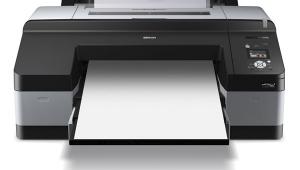
The Epson Stylus Pro 7880 Inkjet Printer; A Pro 24” Model With New “Vivid” Inks
The Epson UltraChrome K3-series printers are a well-known and popular choice for many digital photographers who are looking for quality prints with a good archival life. So when Epson asked if I'd like to take a look at their newest line-up, I was very interested in seeing what they had done.
The UltraChrome K3 ink set is pigment based, with a total of nine inks: photo black, matte black, light black, light light black, cyan, magenta, yellow, light cyan, and light magenta. With the exception of the Stylus Pro 3800, only photo black or matte black can be installed at any one time. Changing between the two inks requires flushing the ink lines and wastes a considerable amount of ink (as much as $75 worth on a 24" printer). Because the 3800 has all nine inks on-board, I had high hopes that the new line would follow suit. The good news is that Epson is clearly moving in that direction. The bad news is that it's only in the newest 64" model, the Stylus Pro 11880. If your needs and budget are more modest, you'll still be swapping blacks on the 17" 4880 ($1995), 24" 7880 ($2995), and 44" 9880 ($4995).
 |
|
|
So, what changed then? Outwardly, nothing looks different on the new printers. Epson sent a 24" Stylus Pro 7880 for review (#1), but these comments apply to the 4880 and 9880 as well. There is still the same layout with four ink cartridges on each side of the printer, and the control panel has the same button layout as before. Roll feed is done in the same manner as before with a simple vacuum-feed system to hold the paper flat during printing. The only obvious changes are the addition of an Ethernet port as standard equipment, replacing the FireWire port in the previous models, and in the inks. Epson has replaced magenta and light magenta with "vivid" counterparts. These new vivid magenta and vivid light magenta inks extend the color gamut in the blue and purple ranges (#2).
 |
|
|
Although the new ink is the visible change, and does make an obvious difference in prints, there are more changes under the hood that have improved print quality as well. Epson has replaced the print heads with new technology first seen in the Stylus Pro 3800, which greatly reduces the risk of nozzle clogging, and improves the screening algorithm for better print quality with more detail and color.
Setting Up The 7880
Like any pro-series printer, these babies are big. Don't plan on unpacking and setting it up all by your lonesome. Even the 4880, which can sit on a table, is best handled by two people, but once you get into the larger sizes, you absolutely need two or more to get the printer assembled and onto the included stand (the 7880 weighs in at about 110 lbs). It's a straightforward process, thanks to excellent documentation.
Once you have the stand assembled, you're ready to put the printer on the stand and begin charging the ink lines. The LCD control panel walks you through each step of the process, making it nearly foolproof.
The printer ships with photo black ink only. If you plan to do much fine art printing, I suggest you buy a matte black cartridge at the same time as the printer, and install that during the initial setup. Remember that each time you switch between matte and photo black you need to flush the ink line, consuming expensive ink in the process.
After setup, you install the software. Epson includes drivers, a network configuration program, and utilities to update firmware and manage paper, and to perform maintenance like nozzle cleaning. These are all accessed through the LFP Remote Panel (#3).
 |
|
|
If you're on a Mac running Leopard (10.5), you'll need to go to the Epson website (www.epson.com/leopard) to download updated drivers. The default drivers have very limited options--you can't select paper types, color management settings, or other critical options until you update your drivers, so make this your first stop.
Using The 7880
Printing to the 7880 is very much like any other Epson printer you might have used. If you're printing from Photoshop, you should let Photoshop manage color (#4), and select the appropriate paper profile there.
 |
|
|
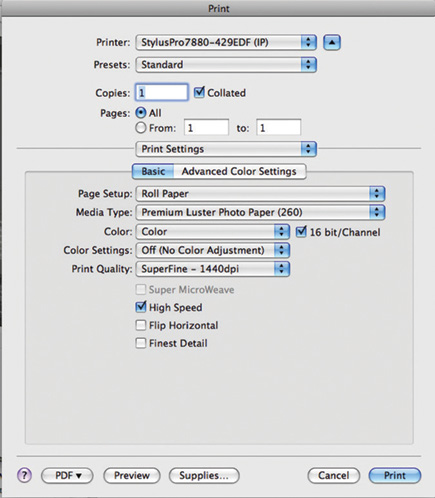
In the print driver, be sure to select "No Color Adjustment" to avoid unexpected results, and note that if you're on a Mac there is a new option, 16-bit color, that promises to improve output by sending more color information to the printer, resulting in more accurate color and smoother tonal transitions. Windows users will need to wait until Vista supports 16-bit printing to take advantage of this feature (#5).
 |
|
|
| |||||||||
|

| ||||||||









 FEATURED VIDEO


Get the Latest Photo Tips, News & Reviews from Shutterbug!






| Camera Reviews Other Reviews | |
Mobile Reviews Photography Reviews Columns | |
News | |
Features | |
How-To | |
Resources |
 © 2026 Shutterbug
AVTech Media Americas Inc., USA
All rights reserved