|
One of the glories of digital
cameras is that you have as many options as you could desire in terms
of exposure, white balance, file format and compression, sharpness, contrast,
color saturation, bracketing, flash modes, and ISO settings, etc., all
in each frame. This allows you to bring all your photo knowledge to bear
with each and every shot you make without changing film or camera bodies.
In theory this is great, but too many digital cameras give you these options
with one hitch--you have to wade through a host of menus and submenus
and the choices are not always clear. Having had time to work with the
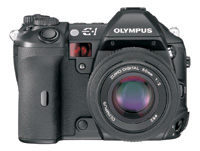
new Olympus E-1 digital SLR I can say that this is one camera where someone
actually seems to have thought about how photographers work (or would
like to work) and have designed a camera that allows them to make just
about every decision required while actually making pictures.
|
| |
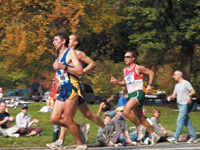
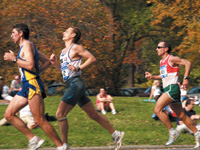
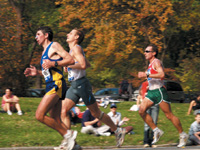
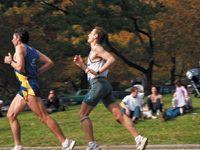
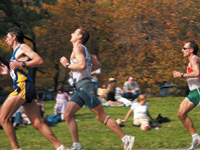
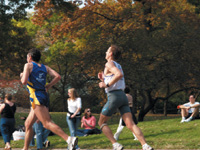
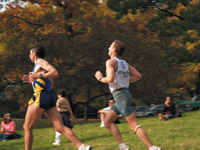
(Left
to right): Set on continuous mode, the E-1 can handle
up to 12 frames in its buffer. This sequence, made at
the NYC Marathon, follows a set of runners as they near
the one-mile marker. I moved the camera as the runners
went by to follow a single group. The E-1 performed flawlessly
in Program mode set up as a Shift to 1/250 sec. In SHQ
mode, there's very little compression and images
open with a 314 ppi resolution without re-sizing. I could
have gone to 12 frames in the sequence, but these front
runners were gone by the time I hit seven.
Photos © 2003, George Schaub, All Rights Reserved
|
|
|
|
|
|
|
|
|
| |
I
photographed this in raw mode in the default sRGB setting,
then when processing in the Viewer software switched it
to Adobe RGB. This resulted in a wider gamut of colors that
to me were somehow truer than the sRGB space, but that's
a matter of taste. Try various images in the camera on both
color spaces and see which best matches the subject and
scene at hand.
|
|
Drive Modes
If you like to "motor" through shots, the E-1 will deliver
3 frames per second for up to 12 exposures. In fact, the camera indicates
just how much the buffer will hold right on the LED finder and in the
viewfinder and count you down as you go. Of course when you finish the
sequence the images have to write to the card before you can make any
more shots. As with all digital SLRs we've tested, if you need to
burn off 36 quick ones then stick to a film SLR and motor drive. But I
did test the drive mode at the recent NYC Marathon, perhaps the best sporting
event I've been to in years. I set the quality (file format) to
SHQ (highest quality JPEG) and followed runners as they moved past. The
camera stayed dead on for up to six or seven frames--the most I tried--and
didn't skip a beat. It also kept focus even when there was space
between the runners, as long as I followed them and kept them more or
less dead center.
|
| |
The
ability to switch ISO easily between the standard 100 and
800 comes in handy. This photo was made using ISO 400 under
only candlelight and a small room light on auto white balance.
I could have corrected it further but liked the warm glow
of the color in the scene.
|
|
Handling And Setup
There are, of course, other matters I will consider about the E-1, but
this "workability" is foremost in my mind. Basically, you
find the button that addresses the function on the camera body and then
turn the command dial and/or sub dial (on top or on the back of the body,
respectively) and you get to toggle through the options of that function.
To add to the good news, most of those options are then displayed in the
viewfinder. And you can save up to four memory settings with as many parameters
as you desire. More esoteric or perhaps less changed functions are found
in the usual manner, through the LCD menu options, but they can also be
saved as part of a memory set. In short, Olympus has taken a look at the
advantages of digital and designed a system where you can actually control
and change the options without taking a five-minute break from the action.
This really became clear to me after working with the camera in a variety
of shooting situations.
|
| |
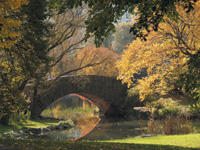
New
York's Central Park is beautiful in mid-autumn. The
exposure setup of the E-1 allowed me to catch the light
and shadow in its most glowing aspect by setting the camera
on ESP, biasing exposure toward the highlight (using exposure
lock) and making a set of bracketed exposures. There are
many ways to read and expose scenes such as this, and the
quick review on the E-1 showed me the most fruitful of the
set.
|
|
There is, however, what you
might call a learning curve to take advantage of this design. This would
include knowing, first, what each button does, and, second, finding it
in less than ideal conditions. But like loading a metal Nikkor reel in
the darkroom (how's that for an archaic reference) all this can
be accomplished with some time set aside just to get familiar with this
formidable machine.
These buttons are not bunched together; indeed, they seem to be spread
rather far and wide around the body. This keeps button confusion and mistaken
settings to a minimum. And the exposure mode dial is indented and requires
unlocking to change, unlike a digital SLR I worked with recently that
seemed to want to change modes on a whim with every movement of my hand.
The mode dial, by the way, is unencumbered with what some call Scene or
Picture modes, and just has the familiar P, S, A, and M, a good sign that
this camera is for those serious enough about their work to make their
image effect decisions without those pictographic crutches.
So, let's play find the button and take a quick review of what the
button-in/dial spin setup offers. Some of these actions require some dexterity
and I rely on you to practice to find the best thumb/index finger combo
to apply. There's ISO (from Auto to 100-800 in one EV step plus
1600 and 3200 with ISO Boost); exposure compensation (+/- 5 EV in 1, 1/2,
or 1/3 steps); white balance (auto, preset, and "registered");
file formats (raw, TIFF, and three JPEG modes); flash modes; auto-bracketing;
metering mode; drive mode; and AF frame selection. Those are the buttons
with options. There's also a one-touch white balance "registration"
(which makes custom white balancing a breeze), an AEL (AutoExposure Lock),
a playback button, an erase and protect button as well as an Info button
to display shooting information. Then, there's the Menu button.
|
| |
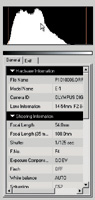
Part
of the Olympus software is an incredible range of descriptions
covering every possible image attribute, including settings
you made when making exposures.
|
|
The Digital Menu Side
This Pandora's box opens the other side of the Olympus E-1, and
it turns out to be a fully programmable minicomputer that poses as a camera.
Here you can affect both the way the camera functions (such as options
for EV bracketing parameters between 1/3, 1/2, and 1 step) and the influence
of the image processor, such as color saturation, contrast, sharpness,
and color space (sRGB or Adobe RGB). There are also some other intriguing
options, which we'll list here and go into more detail on later.
There's raw + JPEG (giving you two for the price of one), a Noise
Filter, Shading Compensation, Anti-Shock, Pixel Mapping, ISO Boost, and
Cleaning Mode. There are also the usual suspects that you probably are
familiar with if you've gotten near a digital camera in the last
year, dealing with playback options, customized operations (what dial
does what and when), and how long you want the camera to wait before it
"sleeps" while you check out a subject before making the picture.
Focusing Control
Before we get to that unique list we should cover focusing, a prime consideration
for this pro-oriented camera. Rather than give you a focusing grid that
covers the entire finder or moving focusing points that you can swing
around and through with a dial, the camera is decidedly center-weighted,
with three focusing points arranged horizontally. You can use what I consider
the fastest way to focus--a center target and focus lock. You activate
AF with slight pressure on the shutter release and then, when rewarded
with a focus confirmation signal in the finder, you complete the exposure
by full pressure on the release. If you like to fiddle with focus you
can shift the target to the left or right, and do the same operation,
but it has always seemed to me that doing the center target/lock and shift
frame move is faster anyway. There are also the usual single and continuous,
and manual AF modes. In each instance the AF system is as responsive as
they get and images were tack-sharp from frame to frame.
|
| |
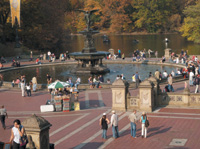
This
Sunday morning scene at New York City's Bethesda Fountain
shows the broad range of values and sharp image capturing
capabilities of the E-1. The shot was made in SHQ mode on
Program, ESP exposure metering pattern.
|
|
Exposure Modes
Exposure modes are limited to the essentials and do away with Picture
modes. My favorite is Program Shift, which allows you to use Program (in
three metering modes) and then simply shift to any combo of aperture and
shutter speed that suits your need--much easier than using Aperture-
or Shutter-Priority. In my book just keep it on Program and do the Shift
thing. The only time I'd switch to Shutter-Priority is for manual
slow sync flash and even then Program Shift could be used. There's
also a necessary depth of field preview control, although you cannot shift
exposure values when this is activated.
This also prevents working "out of metering" range when shooting
in AV or TV and is a great way to prevent overexposure when "wishing"
you could use a certain aperture or shutter speed.
Borrowing from the days when we bracketed to get exposure nuance with
slide film, the E-1 offers bracketing as well, in both exposure and white
balance. The bracketing increments can be set for exposure. In white balance
bracketing you get a warmer and cooler variation of the shot as well as
the "normal." You can also offset the "normal"
in both exposure and white balance and the camera will set the indicated
increment. So, if you set a tungsten white balance you get slight variations
of same, and not just from auto white balance.
|
| |
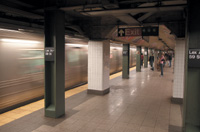
Leaning
against a supporting beam, I set the E-1 to ISO 800, set
Shutter-Priority to 1/30 sec and made a shot as the subway
flew into the station.
|
|
The Raw Deal
The E-1 offers you enough file format options to keep you amused and spells
out the compression ratios so that you know what you're getting
into when you choose one over the other. Full-sized TIFF yields a 14.4MB
file from this 5-megapixel camera, while Olympus' proprietary raw
takes up 10.2MB of space. The format extension is ORF, and you must use
their software, or third-party raw converter software to open and view
it. The software for this came packed with the camera, plus there's
another one called Olympus Studio, which is a trial version you have to
pay for after a 30-day period (about $150). Other digital SLR companies
may have set the precedent on this, charging extra for custom raw manipulators,
but this one mainly adds batch processing and the ability to control the
camera from the computer, something I would not ordinarily do and did
not test.
|
|
| |
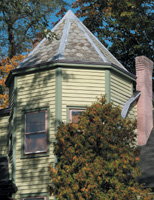
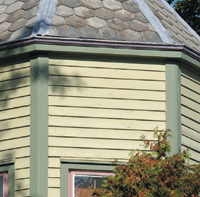
This
"painted lady" Victorian was photographed in
raw format (ORF) and converted to TIFF in the Olympus Viewer
software. As you can see from the detail, the Olympus 14-54mm
lens is tack-sharp, catching all the details and line edges
in the siding.
|
|
The (included and "free")
Viewer software does just fine and allows you to change parameters such
as contrast (which I used quite often), color space (going from sRGB to
Adobe RGB is quite instructive), white balance, and exposure compensation.
It's quite comprehensive, and also quite slow. I do love shooting
in raw format, as I can sculpt each image, if you will, without doing
much when I photograph, but this version, at least, requires patience.
Each raw edit takes longer than it should to do the task, even a fairly
simple one like EV compensation. My main complaint with this software,
however, was with file management, as the software does not offer any
easy Save As and renaming files is awkward to say the least. I did talk
with the good folks at Olympus about this and they are aware of the problem
and I am sure that this will be addressed very soon. But my version of
raw editing was clunky and slow. Other aspects of the Viewer, however,
were very good and allowed me to Browse, see attributes, etc., like any
good editor should.
The JPEG shooting options include the familiar Olympus SHQ, HQ, and SQ
options. SHQ is a very nice full pixel 1:2.7 compression, and records
at 3.8MB, opening to a full 14.4MB. HQ is the same but is the 1:8 compression.
SQ offers two compression ratios, 1:2.7 and 1:8 at lower pixel counts,
four in all down to VGA (640x480). You can also get a raw + JPEG record
and choose the JPEG format and compression you want for the piggyback
file. Olympus, I feel, has done very well in making the options easy to
understand and choose. You just press the recording mode button atop the
camera and spin one of the dials to set the format.
Sensor Sensitivity
The basic ISO set ranges from 100-800 in 1 EV increments, with some other
options. If you want to get even more sensitivity you go into the menu
and choose something called "ISO Boost," an interesting term
that lets you "push" the sensor another two stops, from 1600
to 3200. This is done by applying additional gain across the sensor, and
like pushing film, you get more speed with increased contrast and noise.
Interestingly, if you have set the ISO to Auto the camera will automatically
increase the ISO if it senses that the flash does not provide enough coverage
at that speed. I tried higher ISO settings in low light at a party and
in the bowels of the NYC subway system and it delivered very pleasing
results.
|
| |
The
Olympus Viewer software in Raw Edit mode allows you to perform
all sorts of image processing tricks and tasks. It is a
very comprehensive program that allows you to shape the
image in any way you could desire, including choosing various
color spaces, exposure compensation, saturation, noise filtration,
etc. We had a very early version and unfortunately it was
slow and a bit clunky in application, a situation the Olympus
folks have been made aware of and that we trust will be
fixed soon.
|
|
White Balance Options
White balance has all the usual options, as well as presets that range
from 3000 through 7500 in various increments. A nice touch is the camera's
"one-touch" white balance setting. Here, you point the camera
where you want white balance set and take the picture. It's a good
feature, better than those cameras that have a two-step setup using the
shutter release. Another very good feature is that you can "register"
the white balance in one of four sets, great for quick adjustments when
moving through different light sources as you work. You can also bracket
white balance and even compensate according to your first set. All in
all, it seems that Olympus has paid close attention to this key feature
and has provided us with just about every option we might need.
The white balance system is a hybrid type, getting information from the
CCD and from a sensor on the front outside of the camera. The external
sensor is in a spot that's unlikely to be covered by your hand or
fingers during shooting, but there's no accounting for individual
shooting techniques, so know where it is and do not cover it during shooting.
By the way, Olympus does recommend using the 6000 setting for flash, which
does help warm it up. Speaking of flash, I do miss not having a small
fill flash on the camera. This is a pro-oriented camera, and I guess Olympus
thought pros would only want to use a powerful auxiliary flash, but I
do like a small fill for intimate shots and miss it here. I did get to
use a tiny add-on flash supplied by Olympus, but it had all the problems
I associate with a fixed head unit--weak output, direct flash glare,
etc.--albeit without redeye due to it being raised well off the body.
If you shoot flash get a fully functioning one with bounce, swivel, etc.
|
| |
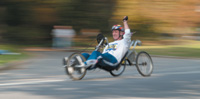
When
you work with an SLR you want a responsive camera that will
make it easy to perform any image effects you desire. Here,
during the NYC Marathon, I set the shutter speed at 1/15
sec in Shutter-Priority exposure mode and panned this enthusiastic
participant as he made his way toward the finishing line.
|
|
Interesting Options
When photographing at long shutter speeds and/or high ISO settings, or
even when there's dominant areas of similar tone, noise can set
in. This is common to every digital camera, some worse than others. In
general, the images made with this camera are not bothered by noise at
all, but when instincts tell you to use it there's an excellent
Noise Filter function built-in. You can set noise reduction from the menu,
although you cannot do so when shooting in any of the raw modes or when
shooting sequential images. Of course, when writing the image the noise-reduced
ones will take longer and you can't shoot while they process. You
can apply noise reduction in the raw edit function of the Viewer software
when shooting raw format.
Another interesting option is what Olympus calls Shading Compensation.
Used mostly with wide angle lenses, this automatically compensates for
the light falloff at the edges of the frame. This is noticeable in some
cameras and lenses we have worked with and undetectable in others. Think
of a center filter, used with some panoramic cameras, in reverse and you
get the picture. The function here actually increases brightness at the
edges of the frame, which some will find reassuring and others will find
unnecessary. If you're working with extreme wides (we worked with
only the 14-54mm) try it out, or use it if you are bothered by falloff.
|
 |
| |
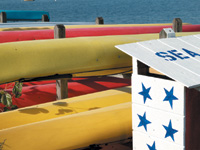
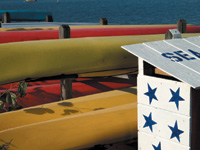
Exposure
control is definitely a strong point of the E-1. In general,
images came up on the computer after downloading with a
full, rich histogram, and only minor tweaks seem needed,
given you get it right in the camera. Here (top) the ESP
metering pattern delivered a tonally rich image with textured
highlights. I switched to spot and metered off the white
wall and gave it a +2/3 EV exposure compensation (bottom),
an exposure practice learned from years of working with
slide film. This gave more texture to the white and deepened
colors in the canoes and kayaks.
|
|
Playback offers the usual
options, with a very good information panel that can be scrolled through
many levels of data. You can look at the picture unadorned with data;
with time, date, and file number; with highlights (overexposed areas blink);
with a histogram; and with a fairly full profile of the settings used.
You can also zoom in for critical judgments and get a multi-shot version,
useless for judgments but great for finding a series or quickly locating
one image in a set. The monitor, by the way, does not articulate, something
we found to be a bonus in other digital cameras.
There are two other items worthy of special note: Olympus' take
on vibration reduction and their pixel mapping and dust reduction features.
Anti-Shock isn't an image stabilization setup as found in VR and
IS lenses from other makers. Olympus takes another approach, that of diminishing
the affect of mirror "pop," and allows you to delay the time
between when the mirror pops up and the shutter is activated. You can
choose from between 1 to 30 seconds. The viewfinder, of course, blacks
out during this period.
If you want to clean up your CCD after noticing odd specks in your images
there are two possible routes. One is "pixel mapping," which
Olympus suggests you do about once a year. This function detects "dead
pixels" (the dark stars of the digital worlds) and adjusts for them,
at the same time helping to clear dust from the CCD. If the dust remains
you can use "cleaning mode." The company does suggest you
have the camera cleaned by an authorized service center, but if you're
brave you can try it yourself. Here, you remove the lens, choose Cleaning
Mode from the menu, press the shutter release to open the shutter curtain,
and use a mechanical blower (emphasis added) to remove dust. Do not put
the blower behind the lens mount; if the power should cut out on you the
shutter curtain could be broken.
Four-Thirds System
You might have heard lots of pre-release discussion about the Olympus
Four-Thirds system and how it will benefit us with smaller lenses and
a more efficient digital SLR system. I left this to last because the camera
and its images tell the tale. There are a few things that are evident
here. One is that most digital SLRs are built into 35mm body frames and
that there are focal length conversion factors because of the difference
between the circle of coverage from lenses built for 35mm and the coverage
of the sensor inside a digital SLR. Those factors average about 1.5, thus
a 50mm lens delivers an angle of view equivalent to a 75mm. Olympus tells
us that the E-1 was built from "the ground up" and is designed
exclusively for digital photography. But there's a conversion factor
here as well. For example, the 14-54mm lens we had for our test yields
an equivalent 28-108mm angle of view in 35mm terms.
|
|
But numbers such as this,
confusing as they are, do not tell the whole story. Their lenses, say
Olympus, are built just for their camera body, thus do not have what they
claim are inherent faults in "adapted" lenses for 35mm. First
off, says Olympus, they are highly corrected, with three aspherical elements
and ED glass, and virtually eliminate light falloff at the edges and,
more importantly, deliver light to the sensor at less of an acute angle
than wide angle lenses adapted from 35mm. The CCD, it turns out, likes
parallel delivery, and when the angle is acute it tends to be less efficient.
Not being an optical engineer I cannot attest to or negate this claim.
Being a photographer, however, I can say that I do not see a great difference
and have yet to be bothered by it.
The crucial matter, it seems to me, is that any lens must be judged on
performance regardless of claims, and that the Olympus lens I worked with
was tack-sharp and worked in perfect union with this system. The "system"
aspect of these lenses might also be found in the accompanying software.
The lenses all contain a CPU that transfers data specific to the lens
along with the image. Once in the software the image can be easily corrected
for pincushioning, barrel distortion, shading, and any other potential
distortions. Pretty neat.
In truth, the lens I worked with is not substantially smaller or larger
than others in this focal length range and, if anything, the E-1 body
is on a par with or even somewhat larger than some other more amateur-oriented
digital SLR bodies available today. The fact that you must add a flash,
even for a small amount of fill in, adds to the size and weight. Right
now there are four lenses in the system, with more to come--our wide
angle zoom, a 50-200mm, a 50mm macro, and a 300mm f/2.8. The lower range
zooms are f/2.8-3.5.
In The Field
The E-1 looks and feels like a pro SLR. The body build inspires confidence
that the camera can handle the rigors of the trade, and all the functions
operated flawlessly. Focus is snappy and very sharp, and instant preview
and information feedback on images is fast and efficient. As mentioned
earlier, navigating all the options comes easily after a short period,
and even the menus, sometimes obscure in other cameras, are easily worked
through to pick the myriad of options.
I photographed outdoors in the late fall, indoors without flash during
various celebrations, at the NYC Marathon, and in and around the city
in various weather conditions. I felt right at home with the camera and
know that I could come to feel very safe and secure in the knowledge that
this camera could deliver what I want when I wanted it. The accompanying
illustrations and captions will tell most of this tale.
In summary, the E-1 is one of the finest digital SLRs to come down the
pike. It shows all the work and research that went into making this pro-oriented
camera. Battery life was a pleasant surprise, as was the ability of the
sensor and image processor to dig deep into shadows, lend texture to highlights,
and be very responsive using various metering modes, overrides, and exposure
options. I would gladly take this camera along to any location or use
it in any studio situation. Viewing was clear and bright, and every image
it delivered met or exceeded my expectations. While it comes in at the
higher end of recent digital SLRs (about $2200 MSRP, body only), it's
built for pro handling and has all the options one could require, or desire.
The main weakness right now, as mentioned, is in the slow processing (on
my system, at least, which handles other raw file formats much faster
and easier) of raw files in the ORF format and in the file saving setup.
Other than that the raw editor gives you options that will have you crafting
your Olympus raw files into great TIFF and JPEG images for printing, sharing,
and archiving for future use.
Olympus promises us a full system of lenses and other accessories for
the E-1. It is also rumored that they will have a competitive, amateur-oriented
digital SLR coming soon. The Four-Thirds system coalition partners, if
you will, have yet to deliver on the promise of interchangeable lenses.
As it stands today, the E-1 shows great promise and I salute Olympus for
bringing us a finely crafted digital SLR that delivers great quality and,
with some practice, great field functionality. There are times when working
with a camera that you know it's going to be a worthy companion
to your art and craft. The E-1 awaits more lenses and accessories to make
it a full system pro digital SLR, and some work needs to be done on the
software, but in terms of image quality and usability it ranks right up
there with the best.
Technical Specifications
Camera Type: Digital SLR with interchangeable lenses
Sensor: 5-megapixel CCD
Monitor: 1.8" TFT LCD, 134k pixels
Shutter: 1/4000 sec to 60 seconds, Bulb
Autofocus: TTL, three-point
Exposure: TTL, ESP (evaluative), CWA, Spot
Exposure Modes: Program (with shift), Aperture- and Shutter-Priority,
Manual
ISO Range: 100-800 (1600 and 3200 with ISO Boost)
White Balance: Hybrid, with CCD and external sensor;
auto, preset, one-touch
Media: CompactFlash card, compatible with FAT 32
Recording Formats: Raw (ORF), TIFF, JPEG
Drive: Single, continuous (12 frame buffer)
Flash: Sync at 1/180 sec, TTL, Auto, Manual, hot shoe,
and external connector
Out: FireWire, USB
Power: BLM-1 lithium ion, AC adapter
Weight: 1.6 lbs
Size: 5.6x4.1x3.2"
Price: Body only, $2200 MSRP
For more information on the Olympus E-1, visit the company's website
at www.olympusamerica.com.
|