


- REVIEWS
Camera Reviews 
More Reviews Mobile Reviews Photography Reviews - GALLERIES
- VIDEOS
- BUYER'S GUIDES

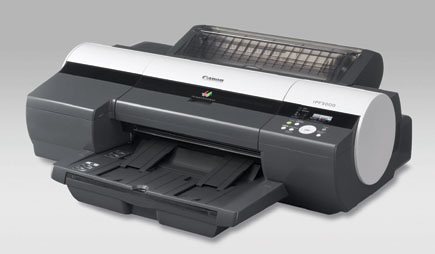
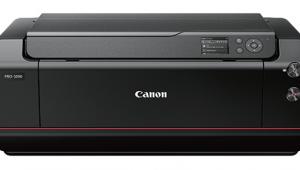
Canon’s imagePROGRAF iPF5000 17” Printer; A New Wide Format Pigment Ink Printer
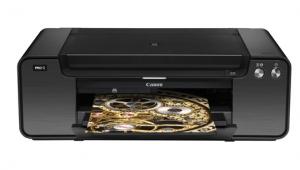
About a year ago Canon announced new pigment ink professional wide format printers for the US market. Initially, the smallest of these Canon printers available in Japan, the 17" wide, was not slated for the US market. Not long after, Canon announced the PIXMA Pro9500 printer, a new 13" pigment ink printer. I responded immediately to this announcement, requesting a unit for test and evaluation as soon as available. Months went by and I again contacted Canon about the PIXMA Pro9500 and found out its release had been moved back to 2007. Canon suggested I might like to test and review the imagePROGRAF iPF5000 17" wide format inkjet instead, which used the same inks and similar technology. My curiosity got the best of me, and I wanted to see how Canon has dealt with pigment ink printing.
 |
|
|
At first glance the Canon imagePROGRAF iPF5000 printer appears to share the basic configuration of other large format printers, with controlled paper feed and a print head that shuttles across the print media as it travels through the printer. Upon closer inspection I saw that the Canon iPF5000 is quite distinguished from other inkjet printers. Although piezo print head technology has not been associated with Canon, apparently they did significant research on the matter, patenting their approach to that technology in the 1970s, prior to their concentration on their BubbleJet technology for dye ink printing.
The iPF5000, along with its larger brethren, utilizes Canon Lucia pigment inks. These are ground fine and encapsulated with a polymer compound, an approach that is said to enhance durability and image quality. The Canon Lucia inkset is comprised of 12 distinct colors, with two densities of cyan and magenta, black and matte black plus two levels of gray, in addition to yellow, red, green, and blue. This number of different inks reduces the amount of color mixing needed to achieve many specific colors, and is said to produce cleaner, purer reproduced print image values. And, with both black and matte black loaded in the printer, switching is achieved for printing on fiber- or resin-coated media automatically when each particular media type is selected in the printer driver. In addition, monochrome black and white prints can be made with black, gray, and photo gray and just a minimum of color inks applied. This achieves just the desired gray tinting, controlled by the printer's driver monochrome settings dialog.
 |
|
|
The two print heads are user installed, making replacement costs moderate, if ever required. I am told there are 30,720 nozzles, with each head handling six colors using 2560 nozzles for each color, laying down 4 picoliter ink droplets. The Canon print system has a self-diagnostic capability. This senses a nonfunctioning nozzle and automatically transfers printing to other nozzles. In addition, a self-diagnostic routine also runs a cleaning cycle automatically when needed.
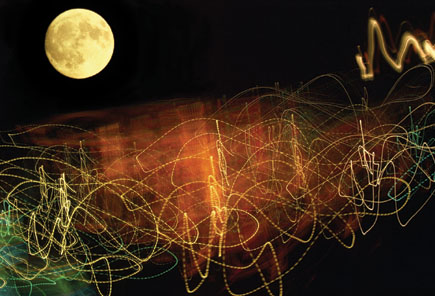
A large variety of media can be used with the Canon iPF5000, including film, plastics, and papers of many types. There is a wide selection specifically under the Canon label, including a full range of Hahnemühle papers for fine art reproduction and photography. The printer can accommodate both cut sheets and rolls with a dedicated printer-controlled roll adapter (an extra cost option). Paper can also be fed automatically from a cassette under the printer or manually, for single sheets.
 |
|
|
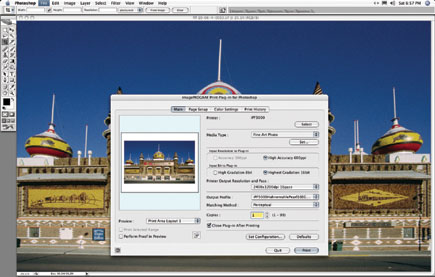
The software driver support for the Canon iPF5000 includes the usual operating system 8-bit driver for both Windows and Apple Mac computers that also includes a monochrome capability, supporting grayscale black and white printing with color tone control. In addition, Canon provides a plug-in which is essentially a 16-bit software RIP that runs in either Photoshop or Canon's Digital Photo Professional application, the latter is supplied with all Canon EOS D-SLR cameras. This is for printing HDR 16-bit or raw digital camera files that are directly processed (rasterized) and sent to the iPF5000. This approach reproduces a fuller gamut content of the file while providing smoother tonal gradations and superior color/tonal separations. The Canon iPF5000 comes with interface support for both USB 2.0 and network printing; a FireWire interface connection may be added as an extra cost option.
Using The Printer
The Canon iPF5000 printer arrived at my door just as I was testing a new genre of luster-finish fiber-based papers, PremierArt's Platinum, Crane's Silver Rag, and Hahnemühle's Pearl. In addition, a paper source new to me, Ink Press Paper (www.inkpresspaper.com) made samples of two of their fine art papers, Picture Rag (cool) and Picture Rag (warm) available for testing. All this new media combined with a new printer provided a rich and intriguing set of photo printing possibilities, so my enthusiasm could not have been greater.
 |
|
|
I was impatient to get the printer set up and the drivers installed, which went smoothly and without a hitch, mostly because I forced myself to follow the documented instructions to the letter. I often just charge ahead, assuming I know what I am doing, and then find out the hard way that I might have to go back to square one. I was glad to have everything running correctly and confirmed by an initial test print, because there was much more "fiddly" stuff to do before I could get serious about test printing. Because I had media that was not made by Canon I had to profile each paper, which is a bit tedious and even boring when you've done it many, many times before. But it was really not that long before I could make some test prints with the profiles I'd made.
| |||||||||
|

| ||||||||
- Log in or register to post comments


















 FEATURED VIDEO



Get the Latest Photo Tips, News & Reviews from Shutterbug!






| Camera Reviews Other Reviews | |
Mobile Reviews Photography Reviews Columns | |
News | |
Features | |
How-To | |
Resources |
 © 2024 Shutterbug
AVTech Media Americas Inc., USA
All rights reserved