


- REVIEWS
Camera Reviews 
More Reviews Mobile Reviews Photography Reviews - GALLERIES
- VIDEOS
- BUYER'S GUIDES
The Epson R-D1 Journey Begins
A New Digital Version Of A Classic Rangefinder Camera, And More...
Photos © 2004, David B. Brooks, All Rights Reserved
Early in 2004 Epson announced a new digital camera body based on a classic 35mm rangefinder model with a Leica lens mount. This back-to-the-future concept caused a stir among members of the photo press, and I wrote as much as was known then about it in a First Look in the July 2004 issue. My chief concern then was whether the camera would be taken seriously. Would an Epson digital rangefinder become like some Porsche sports car models considered "impure" because the engine was not in the rear with an opposed piston design?
 |
|
|
From what I heard through the grapevine, the R-D1 was greeted with a lot of
interest and enthusiasm. This was confirmed by several photographer friends
who, even though not rangefinder enthusiasts, took a great interest in the camera
and were captivated by it. And so was I, particularly because it took me back
to my early years in photography and the first 35mm cameras I owned. But I,
too, am not now a rangefinder enthusiast, and have no lenses of my own to use
with the camera.
But soon after learning about the Epson R-D1, chance would have that I enjoyed
a meeting with a long-time friend and associate from Tokyo, Tosh Komamura. He
was on his way to the Photo Marketing Association convention and, in his capacity
as manager of Rollei product development, had with him a couple of new Rollei
lenses (a Carl Zeiss 40mm f/2.8 Sonnar HFT and an 80mm f/2.8 Planar HFT) for
the Rollei 35 RF camera (Leica mount). Ah! What serendipity indeed. So, of course
as soon as I had confirmation when the Epson R-D1 would be available for test
and evaluation, I sent an e-mail to Tokyo, and these two new Rollei lenses arrived
just a day before the Epson R-D1 was on my doorstep.
On the same day Epson made the formal announcement that the R-D1 digital rangefinder
would be available in the US market, they also announced their new P-2000 Multimedia
Storage Viewer, a portable battery-driven hard drive with the ability to read
digital camera memory cards and download the photo files. Of course pocket hard
drives suitable for use for digital photographers in the field to download and
store camera files were not that new, but this Epson model P-2000 has a mammoth
3.8", super high-quality LCD screen like nothing we have seen before.
So what better opportunity to also test and review this new Epson P-2000 in
the field in conjunction with the R-D1?
The Journey Begins
Once I'd sat down with the documentation and oriented myself as to how
the digital functions worked, I was out with the camera taking pictures. Working
with the R-D1, even though almost entirely manual, was a bit like getting on
a bicycle. If you learned to ride as a child you never forget. I was right at
home focusing manually and cocking the shutter before each shot, even setting
aperture and shutter speed manually on the basis of the viewfinder read-out,
one of the few things that is "digital." I immediately felt a comfort
level with the camera, even though its squared off, sharp edged, classic appearance
suggests otherwise. So much for the ergonomic molded curves of contemporary
cameras.
In my shooting tests I looked for subjects and lighting conditions that would
reveal technical prowess on the part of the R-D1 and the Rollei lenses. I made
shots in soft indirect light of subtle subjects, and just the opposite, capturing
contrasty scenes illuminated by backlight, and some more moderate situations
in between. On each of my outings with this new Epson camera I got more done
than I anticipated, so it was a good thing I had the Epson P-2000 Multimedia
Storage Viewer to download the Secure Digital card as it filled up. Apparently
because of room restrictions Epson had to use the diminutive Secure Digital
memory card, which unfortunately does not offer the storage capacity of the
more popular and larger CompactFlash cards, so shooting in raw format filled
the one Secure Digital card I had rather quickly.
As I continued working, I recalled how much I like a split-image rangefinder
because it is so easy to pick a point in the subject and get precise focus quickly.
On the other hand, a rangefinder's viewfinder, like the R-D1's 28,
35, and 50mm frame selection, makes using shorter and longer lenses difficult
by requiring an auxiliary shoe-mount viewfinder, or an expensive multi-focal
length viewfinder that covers more focal lengths than the camera. It is unfortunate
this digital rangefinder does not support through-the-lens viewing via the camera
sensor and LCD screen. There must have been a good reason Epson did not include
such a capability with the R-D1. I just hope some future model will not be so
limited. Leica, Zeiss, Voigtländer, and even Nikon and Canon from their
early days all made auxiliary viewfinders for just about every one of the well
over 200 lenses there are with a Leica M (or L mount with adapter) that can
be used with the Epson R-D1. Of course, you have to keep in mind that if you
have a 100mm lens you want to use with the R-D1 you'll need an accessory
viewfinder for a 150mm lens! But Epson made that easy to remember, with a nice
circular chart on the back cover of the LCD display showing all of the popular
35mm focal lengths matched with the equivalent effective focal length for the
R-D1--thoughtful!
Another practical consideration I found advantageous is that both the R-D1 body
and particularly rangefinder 35mm lenses are significantly less bulky compared
to what we have become used to with SLR cameras. This is particularly true with
SLR wide angles, which are especially bulky because of the retrofocus optical
design. And, it is really no great advantage with a rangefinder to have a very
large maximum aperture, so f/2.8 or even a bit smaller is quite sufficient because
focusing is never impaired even in low light with a rangefinder. The bottom
line of all this, for an increasingly lazy, old photographer, is you don't
have to schlep a big heavy bag to go shooting and still be well equipped. And
the addition of the Epson P-2000 Multimedia Storage Viewer represents no more
bulk or weight than four rolls of film.
 |
|
|
Although the Epson P-2000 Multimedia Storage Viewer provided a really excellent check of what I was getting beyond what the camera's LCD display provided, the proof of the pudding became fully revealed after opening the images in Photoshop. The Epson R-D1 is of course accompanied by support software for converting raw image saves to open them in Photoshop or save them in a standard file format like TIFF. For the Apple Mac this Epson utility is a Photoshop plug-in that is a rough approximation of the Photoshop Camera Raw utility. It provides a full range of its own adjustment tools, but rather than use them to color correct and edit the raw files I took with the R-D1, I used the option to just convert them using the Adobe RGB color space option and output in 16 bit per RGB channel mode. Then, with the raw image file open in Photoshop in 48-bit Mode I was able to assess the content quality of the image in a familiar environment.
I am most comfortable using a similar workflow with a number of different digital cameras, and referencing that experience I found that the Epson R-D1 images were exceptional. First they looked rather punchy. Then, after opening several, I found the R-D1 exposure meter was quite accurate, and it placed the exposure gamut slightly more to the dark side of the scale, which is a good safety strategy that helps avoid the clipping of highlight detail with high brightness range subjects.
What was even more impressive was that after I had adjusted the image's internal contrast and brightness to a more ideal printing level, the detail contrast, particularly in darker tones, was unusually good. They defined adjacent tonal values with great subtlety very clearly and sharply. Part of this, I am sure, was thanks to Epson's configuration of the sensor's sensitivity, but I have to also assume the contrast quality of the Rollei lenses I was using deserved much credit. But isn't that a part of the reason why the classic rangefinder cameras have such a devoted following?
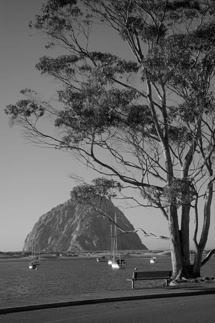
Toward the end of my shooting and digital darkroom sessions with the Epson R-D1, and particularly because it is a "classic," I had to try the camera's option to record images in black and white, along with the option to do so as if you are using one of four popular black and white filters like a K2 yellow, or G orange. The raw files that resulted were a somewhat new and challenging experience for me in my digital darkroom. But I adapted quickly and soon found I was able to produce finished files quite comparable to what I obtain scanning black and white film, even though the process is quite distinct.
For instance, if I wanted the result to be a 12x18" by 300dpi image for printing, I got to that point most effectively by increasing the image size in Photoshop before correcting and adjusting the image brightness and contrast, and then applying sharpening as the final adjustment before reducing the file to an 8-bit gray scale. Once this strategy was refined with a little practice, I was very positively impressed with the print quality of results. They were as rewarding if not more so than the color images I captured with the Epson R-D1.
| |||||||||
|

| ||||||||


 FEATURED VIDEO


Get the Latest Photo Tips, News & Reviews from Shutterbug!






| Camera Reviews Other Reviews | |
Mobile Reviews Photography Reviews Columns | |
News | |
Features | |
How-To | |
Resources |
 © 2026 Shutterbug
AVTech Media Americas Inc., USA
All rights reserved