


- REVIEWS
Camera Reviews 
More Reviews Mobile Reviews Photography Reviews - GALLERIES
- VIDEOS
- BUYER'S GUIDES
Adobe’s Photoshop CS3 Beta; Adobe Opens Photoshop Beta Testing To CS2 Users
Adobe's rationale for releasing a beta version of their next Photoshop CS3 to the public, at least those who are CS2 licensed users, is that they wanted to give support to Apple users with new Intel processor Macs. This would allow those users to have Photoshop running "native" instead of in emulation mode sooner than later. While this does lend support to Adobe's large Apple Mac graphic base audience it also sounds a bit altruistic, so you can probably assume there are more reasons to this beta approach than first meets the eye. That said, there is now public access to the next Adobe CS3 upgrade, or at the least a work in progress.
 |
|
|
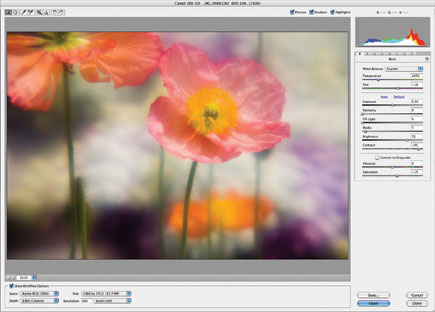
Of course, graphic industry bloggers were already chattering pro and con from day one, and after reading just a few of their posts I was thoroughly convinced to just work with CS3 to form my own impression. That's easy to do if you have high-speed Internet by going to the download URL at: http://labs.adobe.com/technologies/ photoshopcs3/, and have a cup of coffee while several hundred megabytes of installer are transferred. Also, look down further on the Adobe download page and you'll find a place to enter your CS2 serial number to generate a new serial number for your CS3 download. Even with all that you'll still have to activate CS3 once installed.
 |
|
|
New Features
When my download was installed, activated, and running Photoshop CS3 on my newest
Mac mini (Intel), using it quickly confirmed the advantages of CS3 being programmed
to run native on Intel Macs; it was almost half again as fast as CS2. Windows
users should not despair, as speed tests have confirmed a significant speed
boost there as well, and that says a lot for a beta application that usually
gets tweaked for speed just before final release. Contrary to what the web chattering
class naysayers have blurted out prematurely, there really are many new and
useful features in CS3 that will benefit photographers, although of course the
gee-whiz features were, as usual, reserved for those pros doing creative graphics
for production. So, to provide a basis of experience to write this First Look,
I went to work processing raw files, scanning slides, editing, correcting color,
cleaning and retouching, and even creating a composite of three scans to make
a single image.
 |
|
|
The new features I used were easily discovered as CS3 beta has a drop-down list of Workspace options from the main menu bar, including "What's New in CS3," that marks the new menu items with a bright blue highlight. This new Workspace selection feature also has many other options for identifying different tasks, like retouching. By highlighting just the pertinent menu selections it's easier to find the tools and processes needed for that particular task. One of the new highlighted tools and processes are new Smart Filters that are nondestructive, and work a bit like adjustment layers. They preserve the original pixels in your file so you can go back at any time to the original image.
 |
|
|
| |||||||||
|

| ||||||||


 FEATURED VIDEO


Get the Latest Photo Tips, News & Reviews from Shutterbug!






| Camera Reviews Other Reviews | |
Mobile Reviews Photography Reviews Columns | |
News | |
Features | |
How-To | |
Resources |
 © 2026 Shutterbug
AVTech Media Americas Inc., USA
All rights reserved