


- REVIEWS
Camera Reviews 
More Reviews Mobile Reviews Photography Reviews - GALLERIES
- VIDEOS
- BUYER'S GUIDES

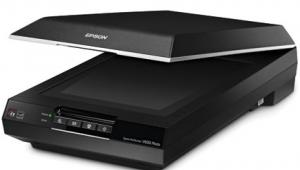
Epson’s Perfection V750-M Pro Scanner; Pro Performance From A Flat-Bed
The new Epson V700 Photo/V750-M Pro Perfection scanners remind me of the very first Epson professional scanner I got to know over 10 years ago. The resemblance, however, is largely superficial. Even though the new V700 and V750 have a shape similar to the Expression of over a decade ago, these new Perfection scanners reflect an entirely different era of scanning performance. While this report will concentrate on the V750 model, you should know that there are two new models from Epson, the V750 and V700. They share the same primary specifications, but the V750 goes a step beyond with a fluid film mounting capability, something new to consumer scanners. It also includes the most advanced LaserSoft SilverFast Ai 6 scanning software as well as MonacoEZcolor.
 |
These new scanners represent a design break from recent Perfection scanners. Epson has foregone styling for a utilitarian shape and configuration with a box-like, straight-sided exterior. They have a slightly concave-sided TPU lid housing the film scanning illuminator that provides more efficient physical handling when making scans.
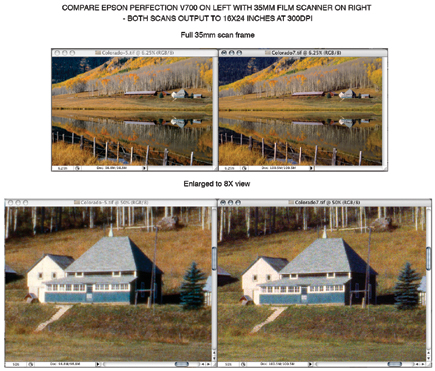
But it's what's inside that counts. The units support film scanning across most of the scan area, allowing scans of film sizes as large as 8x10", and also as many as 12 35mm slides in mounts, and even more 35mm negatives in strips. Excepting larger than 4x5 sheet film sizes, film scanning is accommodated by a dual lens design that supports a spectacular 6400dpi optical resolution. A full range of clean, noise-free information is read and recorded at the scanners' 48-bit color depth and 4.0 dynamic range, producing much better shadow information in positive transparency scans, and virtually eliminating highlight blocking in scans of silver-based black and white negatives. The dual lens design, which provides the higher 6400dpi optical resolution, does so with a larger diameter lens and higher f/stop for a better modulation transfer function, backed up by a high-pass filter and a coated CCD lens with a more efficient mirror in the scan-head assembly.
 |
|
|
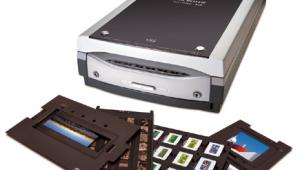
Physically, film scanning is supported with new film holder designs with pins that assure precise alignment to the scan area, as well as tab adjustments to raise the film holder focus plane to accommodate bowed and droopy film. The new film holders include one for 35mm slide, 35mm filmstrips, 4x5 sheet film, and a 120 medium format holder that holds two strips of film. The latter is of course a compromise, with its shortcoming being poor support for 120 film cut in individual frames. Epson, I think, would be well advised to offer optional 120 holders for each of the standard medium format frame sizes from 6x4.5 through 6x9cm. Even if relatively expensive I am sure many photographers with a library of 120 film would purchase extra cost holders for these specific frame sizes.
 |
|
|
Fluid Mounts
The V750-M Pro has a rather unusual capability--a special holder to accommodate a fluid mounting technique that is well established in pro drum scanning. The fluid mount holder is a frame around a piece of optical glass about the same overall size as the other film holders. It has a handle at each side and a loading base with a white grid against black, which marks the scan area and provides grid lines to align film placement. Besides providing a more effective holder to support film cut in individual frames, fluid mounting also assures completely flat support for the film that remains in place during scans. Some of the thinner 120 films in particular are known to "pop," changing focus plane position during a scan, a problem familiar to anyone who has done enlarging in a wet darkroom with glassless film carriers.
 |
|
|
The fluid used in this mounting technique used to be a special kind of mineral oil, which was rather messy to clean up afterward. For the V750, Epson recommends a newer scanning fluid made by Kami, as well as the other consumables like Mylar sheeting, wipes, Kami tape, etc., that are distributed by Aztek (13765-F Alton Parkway, Irvine, CA 92618; (800) 472-7455, (949)770-8787; www.aztek.com). The mounting fluid and consumable supplies are not included with the scanner, nor are they available from Epson, but Aztek does offer a starter kit that can be purchased directly if you call in an order or go to their website. Although I had some experience with a drum scanner many years ago, loading a flat surface with film to scan using mounting fluid was really a new experience.
 |
|
|
Testing The V750-M Pro Scanner
With such a comprehensive range of capabilities, testing and evaluating this new Epson Perfection V750-M Pro was going to be a big job. To have a basis for comparison necessitated scanning a lot of photo images I had scanned before with other units. In fact, I even dug out a stack of CD-Rs from 1996 and '97 with stored TIFF files from the first two Expression models I tested, as well as those of more recent models, including the Perfection 4990. I must beg your indulgence if you have seen some of these images before, but it was essential to making an accurate assessment of the performance.
| |||||||||
|

| ||||||||








 FEATURED VIDEO


Get the Latest Photo Tips, News & Reviews from Shutterbug!






| Camera Reviews Other Reviews | |
Mobile Reviews Photography Reviews Columns | |
News | |
Features | |
How-To | |
Resources |
 © 2026 Shutterbug
AVTech Media Americas Inc., USA
All rights reserved