


- REVIEWS
Camera Reviews 
More Reviews Mobile Reviews Photography Reviews - GALLERIES
- VIDEOS
- BUYER'S GUIDES

Nikon’s D90; The Legendary N90 Returns In Digital Form
It’s déjà vu all over again. As quaint as it now sounds, the Nikon N90s was the first autofocus 35mm SLR that I owned and I have many fond memories of using and capturing film images with that camera. I wrote a review of the N90s for Shutterbug’s long-lost sister publication Photo Pro in 1994, and now 14 years later I’ve come full circle writing about that wonderful camera’s digital offspring. My, how the times they have changed.
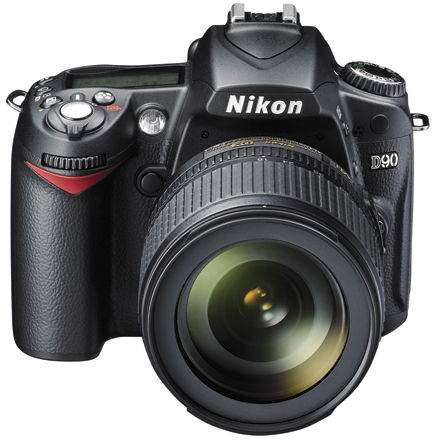 |
The D90, while perhaps not considered a “professional” camera like its more expensive sibling the D3, is still a camera that a lot of pros will use, so it’s not surprising that it’s bristling with pro features as well as the ability to capture 24 fps (frame per second) HD movie clips complete with sound. Video image quality was impressive, especially considering it was produced with a still camera, and I had fun recording several clips, at least one of which will be available for viewing on Shutterbug’s website in the Instant Links section. Even when using one of the new SanDisk Extreme III 32GB memory cards, expect to capture about 80 minutes of video on the card. The short 12-second AVI (Audio Video Interleave) clip of Mary driving her sports car that’s posted on the Shutterbug site is 9.2MB. But take note: the D90 is not the long awaited Vstill camera. That may or may not be the Red (www.red.com) Scarlet, but the D90 is still a multifaceted D-SLR that pros and enthusiasts alike will embrace.
 |
|
|
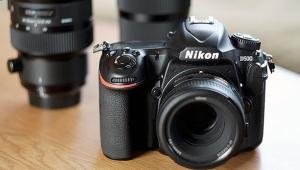
Plopped down right in Nikon’s product line between the popular D80 and D300 D-SLRs, the D90 has a 12.3-megapixel sensor that uses a DX-format (15.8x23.6mm) sensor and produces a 1.5x multiplication factor. That’s combined with Nikon’s new, easy-to-use Live View mode that displays scenes on a 920,000-dot high-resolution 3” LCD. The 11-point autofocus system utilizes Nikon’s Scene Recognition System and Face Detection System to help make the best shot under a variety of environments and should make newbies feel at home while helping the rest of us capture better images faster. The aluminum alloy and plastic body seems rugged enough for all but the most abusive pro use and a durable shutter mechanism has been tested to 100,000 cycles.
 |
|
|
In real-world use, the D90’s 11-point AF is fast and accurate and uses a newer version of Nikon’s Multi-CAM 1000 AF Module. Nikon suggests that you use Single-Point AF for static subjects, Dynamic-Area AF for moving subjects, Auto-Area AF for spontaneous shooting, and 3D-Tracking AF when changing the composition after focusing on a subject, but the truth is that all modes worked amazingly well. The camera has a power-up time of 0.15 ms and shutter response measuring just 65 ms, eliminating any fear of losing pictures due to the dreaded shutter lag phenomenon. Casual sports shooters will appreciate the D90’s ability to shoot bursts of JPEG files at 4.5 fps and images are processed and previewed in 120 ms, which is less time than it takes the average chimper to move their eye from the viewfinder to the LCD screen. You can stop action with the camera’s maximum shutter speed of 1/4000 sec or create time exposures as long as 30 seconds.
For shooting under a variety of lighting conditions, the D90 has a sensitivity range of ISO 200-3200 that’s expandable to 6400. Images shot at ISO 3200 do have noise that while clearly visible is not annoyingly so, and is also extremely fine. I shot some video clips of my model train layout in action at ISO 3200 using only the tiny lights from the trains and structures and the results were just as good. The camera employs an Image Sensor Cleaning function that seems to use the classic “shake your booty” system to remove dust particles from the sensor’s optical low-pass filter, and I never once had to spot any images in Adobe’s Photoshop from the hundreds, maybe thousands, of images I made with the camera.
 |
|
|
The D90 is the least expensive D-SLR that includes Nikon’s Scene Recognition System and adds Face Detection technology, which is all the rage today with the kids. The Scene Recognition System interprets the color and brightness information of each individual shot and applies changes to AF, autoexposure, and white balance. This worked amazingly well for me in difficult and mixed lighting conditions. Whether working outdoors or making candid snapshots or in the studio, the Face Detection System produces flattering portraits with surprising definition and accuracy. In Playback mode, when you press the zoom button, any portraits captured with Face Detection are immediately magnified to ensure proper focus on the subject. The subjects’ faces are displayed on the LCD within brackets for reference and subject tracking.
Nikon’s EXPEED digital image processing engine produces smooth tones with rich colors and its 3D Color Matrix Metering II ensures accurate exposures, even under challenging lighting conditions. Data from the system’s sensor is automatically cross-referenced against an internal database of over 30,000 actual photographs and is used to calculate correct exposure values. This was most obvious when I was shooting images at a car show alongside Mary and we compared images made with her camera and the D90 and saw how well the Nikon handles images that included splotchy light containing both sunny and shady sections. The D90 clearly produced better-looking files. Variable Center-Weighted metering and Spot metering centered on the active focus area are available, too, as are exposure compensation and autoexposure bracketing to fine-tune exposure even more.
 |
|
|
In Camera Processing
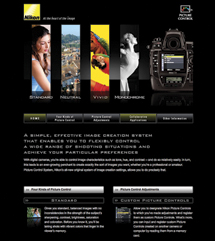
Nikon offers their version of Canon’s Picture Styles which they call Picture Controls, and the D90 offers Standard, Neutral, Vivid, Monochrome, Portrait, and Landscape modes. Picture Controls can also be user-tweaked in camera and saved within the D90; the User’s Guide states that optional Picture Controls are available for download from Nikon websites. The D90’s Retouch menu offers Monochrome and Sepia modes that can be applied later and saved as a separate file, allowing you to create an exact monochrome duplicate of your untouched color original. Former film shooters may prefer to shoot in monochrome so they get the direct black and white feedback.
Other in camera processing includes image trimming and a wide assortment of digital filters, including a star filter, which can also be applied to images after capture. Other in camera options include Distortion Control to adjust lens aberration, Straighten to correct linear inclination of an image for straight horizons and landscapes, and Fisheye Effect to produce optical effects similar to a fisheye lens. Image Overlay sounds like it might be a way of adding captions to images but is, in effect, an in camera HDR (High Dynamic Range) emulation that overlays two raw (.NEF) files to produce better results than either image file was inherently capable of rendering. More on raw capture in a bit.
 |
|
|
Why process in camera? First of all, why not? More importantly, editing images in camera means you can take that SD card to your nearest photo kiosk immediately after shooting and mail prints or, better yet, hand prints to any relative you might be visiting, or vice versa.
 |
|
|
In The Field
In my medium-sized paws, the D90’s ergonomics are quite good, but unlike the larger yet sleeker N90s, the camera is festooned with lots of buttons and controls that seem so beloved by Nikon’s digital engineers. My wife Mary found the camera’s ergonomics to be excellent and she often borrowed it from me when we were out shooting. She frequently expressed how much she liked how the camera felt in her hands. I’m not sure if the late Alphonse Chapanis, father of modern human factors engineering, would agree with the placement of all the controls, but that seems endemic in today’s D-SLRs. We are expected to adapt to the camera, not the other way around. On screen menus are easy to read and relatively complex, only because of the D90’s intense in camera processing capabilities. In the world of increasingly crowded D-SLR menus, I place this one right between the kitchen sink method used by Olympus and the more streamlined menus from Canon.
| |||||||||
|

| ||||||||












 FEATURED VIDEO


Get the Latest Photo Tips, News & Reviews from Shutterbug!






| Camera Reviews Other Reviews | |
Mobile Reviews Photography Reviews Columns | |
News | |
Features | |
How-To | |
Resources |
 © 2026 Shutterbug
AVTech Media Americas Inc., USA
All rights reserved