| |
Paterson
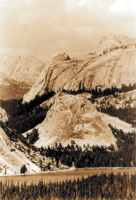
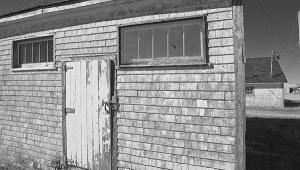
Acugrade Warmtone in Maco Lith developer gives a yellow-brown
image tone.
Photos © 2003, Frances E. Schultz, All Rights Reserved
|
|
It's always fun to
try out a new photographic printing paper, especially when it turns
out to be as versatile as the new Paterson Acugrade Warmtone. It is
a medium weight, Variable Contrast (VC), Resin-Coated (RC) paper with
a semimatte, pearl finish. The base tone is a light creamy-white, which
does not look particularly warm until you compare it with a cool-tone
or neutral-tone paper. "Pearl" is a very apt description
of the surface texture. It has a very nice tactile quality, which although
different from fiber based, compares very well with it.
Change Tone Via Developer
The warmth of the actual image tone varies with the developer used.
I tried Paterson Acugrade, Paterson Acuprint, and Tetenal Variospeed
W (a warm-tone developer). Acugrade gave the warmest tone, followed
by the Tetenal warm-tone developer, and the coolest was with Acuprint.
It may seem odd that Acugrade was warmer than Tetenal warm tone, but
very often, a manufacturer's own developer will give you the best
results with their paper, especially warm tones. This is in any case
a subjective judgment, and the tones look slightly different in different
light. Both Acugrade and Variospeed W gave excellent tonality: I was
less impressed by Acuprint.
Standard red or yellow-green safelighting is specified. I used the Nova
5 Star which is a yellow LED and it was safe. If you have any doubts
test the paper with your own safelighting.
|
| |
Toning
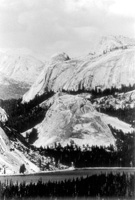
a lith print can be surprising. Gold tone turns the image
tone to a cold blue.
|
|
Paper Speed
Acugrade Warmtone is around two stops slower than many neutral-tone papers,
so be prepared to use either extended exposures or a larger aperture to
get the best results. If you are used to other warm-tone papers, though,
the exposure may not be that different.
Contrast Variations
The contrast range is from Grade 0 to Grade 4, and this is available with
any VC head, VC filter, or color head. Remember, though, that not all
filtration is the same. For example, a print exposed using my Grade 2
Ilford MG IV filter has about the same contrast as a print exposed at
Grade 21/2 on my Meopta Meograde head. This doesn't matter: it is
always a question of getting the contrast you like. Exactly what the contrast
is called (2, 21/2, or even 3) is not important. The important thing is
that if you don't have enough contrast, give more, and if you've
got too much, give less.
|
| |
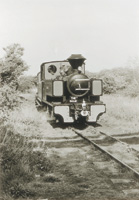
Paterson
Acugrade Warmtone paper, developed in Paterson Acuprint.
|
|
Dry-Down Effect
Don't forget, though, to allow for dry down. This is a phenomenon
recognized by all experienced printers: the way that a wet print has more
contrast, and less density, than the same print when it has dried. Most
warm-tone papers have more dry down than neutral-tone papers, and with
Acugrade Warmtone it is ferocious. If your wet test strips look right,
cut the exposure by around 15-20 percent for the final print. You're
also likely to need to increase the contrast by around a half grade in
order to match the dry print to the wet test strip.
For example, if your wet test strip looks good at 15 seconds and Grade
2, you will probably get a good dry print at 12 seconds and Grade 21/2.
This is not a fault: it is just the way that warm-tone papers are.
Toning Tips
Like most modern warm-tone papers, it is not as warm as the old cadmium-doped
papers of yore, such as the original Forte Polywarmtone, but as soon as
you set it next to a neutral-tone or cool-tone paper, you can see the
warmth. But again like most modern warm-tone papers, it takes toners extremely
well, and this is the way to get seriously warm tones. I tested it with
Paterson's own Acutone toners, both selenium and sepia. The selenium
gave a rich purple aubergine (eggplant) color, and the sepia (with a healthy
dollop of toner additive) gave me a rich but somewhat gingery sepia-brown.
|
| |
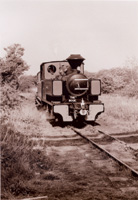
Acutone Selenium on Acugrade Warmtone gives a rich purple
image tone.
|
|
Gold toner on its own tends
to cool a warm image tone. Gold on sepia gives a reddish color. As this
test was of the paper and not the toners, I stopped at just selenium,
gold, and sepia. You can ring the changes in all sorts of ways, including
partial, split, and sequential toning, so you need to experiment. When
you try out a new paper, keep your scrap prints or washed test strips
so you can play around with the various combinations.
Next I tried handcoloring, and found this paper to be ideal with most
handcoloring media. It doesn't have quite enough "tooth"
for use with colored pencils, but everything else worked just fine, including
SpotPens and Marshalls' Oils.
The "Lith"
Technique
Even more exciting is the way that this paper takes to "lith"
printing. Lith printing relies on both incomplete and "infectious"
development. Infectious development means that once the darkest areas
begin to develop they will go faster and faster: it is a self-stoking
or "infectious" process.
|
| |
Acutone
Sepia can be adjusted by the addition of a toner additive.
I used the additive to give a warm, rather gingery brown.
|
|
There are several kinds of
lith developers on the market. They are generally two-part, and to get
the best results, you use them very diluted, at about half strength. If
at all possible, follow the manufacturer's instructions for the
developer you choose (not all give adequate instructions).
It helps if you make up the fresh developer with a mixture of water and
old, exhausted developer: this seasons it, and brings on the lith effects
better and faster, because the most dramatic effects are achieved just
before the developer is exhausted. Otherwise, season the developer by
developing a couple of sheets of completely fogged, scrap paper.
Use the largest volume of developer you conveniently can: the "window"
of partial exhaustion is bigger with a large volume than with a small
one.
Exposure generally needs to be about three or four times as high as for
a normal print, and development times are very long. Nothing happens for
ages (10, 15, even 20 minutes); when development starts, it is very slow
at first; and then everything starts to happen very quickly, across the
space of a minute or less, and you have to "snatch" or pull
the print as soon as (or just before) you think it is ready.
Develop until it looks like the blacks are almost right, then pull the
print very quickly and put it in the stop bath. The infectious development
continues until the paper is totally immersed in the short stop, which
is why you need to work quickly. Judging just when to pull the print takes
experience.
If the darkest areas block up and there is not enough highlight detail
(the print is too contrasty), you need to increase exposure and decrease
development. If the mid tones block up as soon as the dark areas begin
to develop, decrease the exposure and increase the development.
If you want to know more about lith printing, the most comprehensive source
is The Photographer's Master Lith Printing Course, by Dr. Tim Rudman,
Argentum, 1998, distributed by Amphoto. Or for a brief how-to, Darkroom
Basics by Roger Hicks and Frances Schultz, Collins & Brown, 2000,
is available from Silver Pixel.
Evaluation
Although I am not generally a fan of semimatte papers, I was truly impressed
with this one: it has a sort of glow and a sparkle. I also love the convenience
of a RC paper which I can use for both handcoloring and lith printing.
I expect to use quite a lot of this paper, and I can enthusiastically
recommend it.
For more information about Acugrade Warmtone paper, contact Paterson Photographic
Inc. (USA), 4860-A Industrial Access Rd., Douglasville GA 30134; (770)
947-9796; fax: (770) 949-5917; www.patersonphotographic.com.
|