| |
The
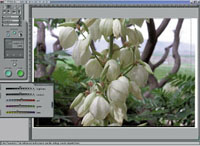
new Nikon Super CoolScan 2000 software is a clean, accessible,
easy design. It is flawed by the fact the controls on
the left of the screen are very small displayed by a monitor
set at 1024 or higher pixel resolution width.
Photos © 1999, David B. Brooks, All Rights Reserved
|
|
Nikon has been at the forefront
of 35mm film scanning from the beginning, and has enjoyed a top position
in the field most recently with the CoolScan LS-1000. Just a short time
ago Nikon announced a new CoolScan that would be better and easier to
use, but the one feature which caught everyone's attention was
its ability to recognize and cleanup film flaws like dirt and scratches.
This feature, Digital ICE, is a development of a company in Austin,
Texas called Applied Science Fiction, and involves hardware and software
functions new to scanning. More about Digital ICE later, while I describe
the rest of the features which distinguish the Nikon CoolScan 2000.
Although I liked the previous LS-1000 model because it produced very
good quality scans, mechanically it was lacking a really smooth working
film strip carrier. Now the new Super CoolScan 2000 is completely redesigned
and all types of 35mm slides, strips of negatives as well as APS are
handled faultlessly, and with ease. The physical package is also designed
conveniently so the scanner may be placed on edge to take up minimal
desk space or on its side. The software is also entirely new. One feature
that has been added is the ability to make a multipass scan, which is
intended to assure better detail in highlights and shadows with less
noise. The software driver interface is entirely redesigned with a modern
look intended to make access to the control features easier. It looks
good and the interface is surely friendlier. However, because the Nikon
CoolScan dialog window does not scale, features like the curve adjustment
control, when used with a computer's monitor set at a high-resolution,
are so small it is very hard to use and control them.
Although Nikon has included a fully automatic color management facility
within the new driver for the Super CoolScan 2000, intended to assure
WYSIWYG color from input through output, their adherence to the new
sRGB colorspace standard is questionable. The sRGB colorspace standard
was intended to assure greater consistency in color, particularly relative
to the ubiquitous use of the World Wide Web, and is a color gamut limited
to an average of what the typical computer monitor can display. Unfortunately
that is a rather restricted and limited color gamut, which is much less
than what current photo-realistic printers can reproduce, much less
what a scanner can read from an Ektachrome or similar color film image.
Considering the LS-2000 will undoubtedly be used in conjunction largely
with Photoshop 5, it should at least provide the optional colorspace
selections that are supported by Adobe in Photoshop 5.
|
| |
To
be able to scan a 35mm slide or color negative and clean
all of the dirt specks, scratches, and film defects from
the image as part of the scan to free the user from manual
"spotting," is a feature worth the price of
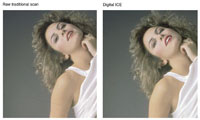
the scanner alone. This comparison of a dirty, raw image
compared to a scan made with Digital ICE plus less than
10 minutes cosmetic retouching, would have required at least
two hours of manual spotting in the past.
|
|
Digital ICE. As
any experienced 35mm camera user has surely discovered, the format's
greatest weakness is that its small image frame size collects dust readily
and is easily damaged by handling. Even freshly developed film is hard
to keep clean to avoid spotting enlarged prints made from it, much less
a frame from one's files that has been stored and handled and reprinted
a few times. In other words, the spotting and retouching 35mm has traditionally
demanded costs individual photographer's considerable time, as well
as photo labs, and other reproduction services adding up to a great deal
of extra money eventually paid for in the cost of services to you and
I.
Digital ICE is an addition to a scanner that makes a concurrent scan identifying
all of the physical defects like scratches, dust, fingerprints, etc.,
and records this information in a fourth layer in addition to the three
RGB color information layers. This fourth layer of information is then
used to eliminate the identified flaws that would otherwise show up in
the RBG layers, replacing the flaw information with adjacent image information.
Digital ICE does in just seconds what an individual photographer using
Photoshop's Stamp tool would work at for minutes or even hours at
cleaning up a dirty image manually.
Working With The Nikon Super CoolScan 2000. Installing
and setting up the Super CoolScan 2000 was easy and was accomplished quickly.
It was only minutes and I had my first scan previewed, ready to adjust,
and scan into Photoshop. Obviously, the images I chose to scan were slides
that were abused by handling and had embedded dirt and scratches not easily
removed physically. One in particular was a 35mm transparency photographed
directly on duplicating film (ultra-fine grain) of a model against a seamless
background, a difficult cleanup job. So I turned on the ImageClean option
for this and many of the scans I made as my trial of the scanner.
Although Digital ICE slows down the scanning process somewhat, the fast
speed of the Super CoolScan makes it almost unnoticeable compared to previous
scanning experiences. The results are also a more than adequate justification.
Digital ICE works. It's appreciated by me to no end, and I assume
it will also be by just about anyone who has "spotted" scans
in Photoshop. I was also most interested in the Nikon multipass feature
because scanning slide images with large, dark areas frequently results
in recorded noise in those areas. The multipass helps, but I found scanning
Kodachromes with subjects against a black background, multipass still
could not eliminate the noise entirely in all cases.
As I noted earlier, the physical design of the film handling whether mounted
slides or strips of film has been improved immensely. If nothing else,
this makes the scanning process a more enjoyable and efficient one. However,
because I work with a computer with a monitor resolution set at 1280 wide,
the Nikon driver dialog tool features are really too small to be manipulated
effectively. I found myself just setting the white and black points in
the Nikon dialog and scanning at default settings, otherwise doing the
rest of my color correction in Photoshop. This is a perfectly satisfactory
way to work and little or no data loss is the consequence, so why not.
It makes it also unnecessary to learn a new set of tools to do color correction.
But why all scanner software developers have to design a unique interface
puzzles me when they should know most users will be scanning into Photoshop,
and Photoshop's color correction tool dialog designs are really
a de facto industry standard. Speaking of scanning into Photoshop, I usually
run Photoshop 5 with the RGB color setup using the SMPTE-240M colorspace
because it most closely emulates the gamut of a raw scan of Ekta-chrome
film. But, it doesn't work with the Super CoolScan 2000 very well,
producing a significant difference in the appearance of the preview and
the final scan result in Photo-shop's workspace. The only resolution
is to switch Photoshop's color preference to sRGB to match the scanner's
colorspace default, which unfortunately results in some image information
clipping.
|
|
Conclusion And Recommendation.
Although my description of and my experience working with LS-2000 has
involved more critical comments than usual from me, it is because Nikon
sets high expectations. However, this report is surely not the last word.
During the short time I had an evaluation unit Nikon released a new upgraded
4.1 version of the software with the announcement that they considered
the product a work in progress, which would continue to reflect refinements
and improvements. Considering its under $2000 price, high-resolution,
36-bit, 3.6 dynamic range specifications plus the exclusive for now Digital
ICE and multipass scanning, Nikon continues to offer the best in 35mm
scanning.
As the new Super CoolScan 2000 fully replaces the LS-1000, you can also
expect add-on software like a new version of LaserSoft's SilverFast
will be available. Before sending this report to my publisher, I received
a call from Karl Zahorsky, the president of LaserSoft, informing me the
new SilverFast for the Nikon Super CoolScan 2000 is finished and will
include all of the Nikon features like multipass and Digital ICE. In addition,
the new SilverFast is easier to use and more powerful, offering refined
automation and truly professional manual color correction tools designed
for the Super CoolScan 2000. Also, the current problems for photographers
I related relative to the sRGB colorspace standard are not limited to
Nikon's scanner software. The issues raised by sRGB are being recognized
by many in the industry and indications of more positive implementations
without limitations on photographic image quality are already surfacing.
The bottom line is the Nikon Super CoolScan 2000 offers many new and highly
valuable features, as well as a level of performance that's a definite
advantage over anything before it for the cost involved--reason enough
to choose this new scanner. That it will surely get better with age as
nikon continues to evolve the software is well assured, or by the time
you read this purchasers will be able to add the new SilverFast software
to the package. For more information contact Nikon Inc., 1300 Walt Whitman
Rd., Melville, NY 11747, (800) 526-4566 or visit their web site at www.nikonusa.com.
To inquire about Lasersoft SilverFast write LaserSoft International Inc.,
6529 Gulfside Rd., Longboat Key, FL 34228, (941) 383-7496, fax: (941)
387-7574 or visit their web site at www.lasersoft.de/.
Technical Specifications
Scanner Type: 35mm
and APS film using a fixed target single pass scan
Resolution: 2700dpi from a 2592 pixel monochrome linear
CCD array
Scanning Area Maximum: 24.3x36.5mm
Illumination Type: Condensed and diffused light
Light Source: RGB, LED array
Color Separation: RGB line sequential
Autofocus: Contrast detection by CCD
Manual Focus: By software controlled servo
Scan Time: Approximately 20 sec normal mode at 2700dpi
plus data transfer time to computer
Density Range: 3.6
Scan Color Depth: 36-bit, 12 bits per RGB channel
Interface: SCSI--2 with D-sub 50 pin connector
Transfer Rate: 4MB per sec maximum
Dimensions: 3.4x5.6x10.8"
|