|
|
|
The software for the DiMAGE
Scan Multi PRO is powerful and comprehensive, closely paralleling
the color correction tools in Photoshop. Although some image
adjustment automation is available, images that vary from
typical, like high and low key lighting, portraits with
colored backgrounds, and unusually colored subjects usually
require manual adjustment to obtain ideal scans.
|
|
Most photographers want to
use the best tools available and hope they can afford the best. When it
comes to film scanners, Minolta's latest DiMAGE Scan Multi PRO sets the
standard for a reasonably affordable scanner. This new Minolta scanner
offers trend-setting specifications as well as the ability to scan both
35mm and 120 film formats up to 6x9cm (21/4x31/4"). Of course, numbers
alone tell only a small part of the story. The proof is in the pudding,
so to speak. The rest of this report is an account of my experience with
this scanner and why that experience and the resulting images produced
convinced me this new Minolta DiMAGE Scan Multi PRO sets the bar for serious
film scanning.
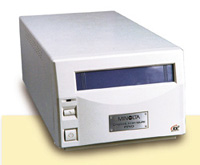
The physical attributes of
the DiMAGE Scan Multi PRO are a bit deceiving as it is no larger, if not
somewhat smaller, than some 35mm-only film scanners. But as soon as you
pick the scanner up its weight lets you know there is some considerable
substance in its all-metal construction. This is carried through to the
film holders, which are large relative to the scanner's compactness, and
quite rigid with very well-designed easy access and secure film support,
including an ingenious adjustable 120 glassless holder. Once the scanner
is turned on and you begin using it the substance of the scanner is confirmed
by its smooth, Swiss watch-like precision operation--it makes all of the
right sounds, both reassuring and subdued. The software is obviously intended
to complement a scanner intended for professional and serious use. The
controls are straightforward and logical, supporting quite complete control
over every aspect of the scanner's operation. This includes precise framing
and full continuous output specification, as well as providing adjustment
to all attributes of image quality necessary to optimize output. Although
automated scan image color correction is available (and Minolta has made
every effort to provide easy scanning solutions), the Minolta software
demands precise inputs, which come only with knowledge and practice like
that acquired by an experienced and skilled user of Photoshop.
|
|
|
|
Although
Applied Science Fiction's Digital ICE does not function
with black and white silver-based film, the Minolta
Multi PRO's high resolution and color depth offer
great advantages, particularly scanning 35mm black
and white film. I was able to obtain scans producing
files which would print a 15x22" image with unusual
sharpness and tonal brilliance I would find difficult
or impossible to match in a wet darkroom print made
with the best enlarger.
Photos
© 2001, David B. Brooks, All Rights Reserved
|
|
In addition to precedent-setting
performance specifications, powerful software, and substantial physical
quality, Minolta includes the full suite of the latest versions
of Applied Science Fiction's Digital ICE3 automatic image dirt and
scratch cleaning, Digital ROC (Reconstruction Of Color), and Digital
GEM (Grain Equalization and Management). These utilities both enhance
the potential quality of scanned image output and reduce the amount
of manual, post-scan effort required to produce clean images with
optimum color attributes.
The DiMAGE Scan Multi
PRO At Work
Upon receiving the Minolta DiMAGE Scan Multi PRO I must admit that
I felt a bit like a monkey let loose in a fruit market. But years
of testing, evaluating, and reporting got the better of me and I
applied some discipline to my selection of images. These included
some images recently scanned for comparison sake, as well as some
particular film images that had previously proven difficult. And,
to test the Minolta's range of capabilities, I also selected all
categories and sizes, as well as different film brands to scan.
In addition I dug deep in my files, close to the "bottom" for a
few very old, faded images that would test Digital ROC.
|
|
|
|
Almost 30 years
ago I traveled all around the country making
landscape photographs for a book. At that time
for medium format color I preferred Agfachrome
CT-18 film. Scanning those images today with
the Minolta reproduced them with even more brilliance
of color and scenic detail than I saw in the
film results at the time the images were made.
|
|
The Multi PRO
is a very efficient scanner. It allowed me to scan images
for their test value as well as play like the aforementioned
monkey at a fruit stand. This became particularly evident
when about halfway through my work I connected the DiMAGE
to a new Apple Mac G4 Quicksilver I was also testing for a
report. Minolta clearly suggests that ideal Multi PRO performance
demands the support of a powerful computer. And although my
previous model G4 is no slouch, the Quicksilver with 768MB
of RAM gave my work a noticeable boost in scan speed. It taught
me to appreciate how well the newest "cubed" iteration of
Digital ICE works. It produced almost perfectly clean images
with even the grain sharpness intact. It also showed me how
frustrating it is to scan and then manually clean Kodachrome
and silver-based black and white film image scans, which Digital
ICE does not clean. On the other hand, I found little personal
satisfaction in how Digital GEM functions to reduce graininess.
I did not like the results when GEM is applied to very grainy
35mm film images, which, to me, lost some of their "character."
Its main value, I would think, is when it's applied to relatively
fine-grained images, particularly product illustrations that
are enhanced by a super-slick appearance of no grain texture.
|
|
|
|
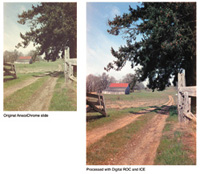
Applied
Science Fiction's Digital ROC utility
included through the Minolta scanning
software interface supports restoring
the color in images faded by age. An almost
50-year-old AnscoChrome slide close to
color oblivion was revived quite realistically.
|
|
Evaluation
And Recommendation
My month-long use of the Minolta DiMAGE Scan Multi PRO
produced a copious body of evidence as to what it can
do. In fact, the amount of scans I was able to do is
a significant merit in the scanner's favor. It is not
just the scanner's speed, but the efficiency of the
entire process, including loading film images, obtaining
a thumbnail, a pre-scan, making the color correction
adjustments, and then clicking on the final scan button.
The Multi PRO supports efficiency throughout the entire
process. Someone less experienced with scanning may
find that the less than intuitive software control interface
may slow things down initially. The one thing I can
possibly fault Minolta for is some weakness in the interface
design of the software--the tools needed are all there
but the access to them could be more graphic and logically
intuitive from a photographer's perspective.
|
|
|
|
The combination of bold subject
colors and Vericolor HC commercial
color negative film is a challenge
for scanning software to interpret.
The Minolta software for the Multi
PRO provides the tools to adjust
the image values resulting in a
brilliant, accurate reproduction
of the subject.
|
|
A high
quantity of work produced is a plus for any tool,
but the value is in the quality of the scans made.
In this regard I am glad I chose to re-scan many
film images of various kinds, as without exception
I achieved a better final result in the image
file than previously produced. With some I was
even surprised to see subtleties of color previous
scans had missed entirely. And, with film images
which had previously yielded less than satisfying
results I was able to achieve much greater satisfaction.
When scanning black and white silver-based film,
however, I found I obtained the best results by
outputting a raw, uninverted positive 16-bit gray
scale image without any adjustment made with the
Minolta software, and then optimizing and inverting
it in Photoshop in several stages. The reason
for this is that a scanner with a dynamic range
of 4.8 only fills about a 1/3 of that gamut when
it scans a typical black and white negative, and
expanding that short range of data up to fill
the space of the output gamut in a single step
frequently results in less than smooth tone gradations
in highlights and shadows. Doing the same thing
in progressive, discrete stages in Photoshop helps
keep those gradations smooth and provides more
control over the characteristic curve of the image.
My conclusion, based on over a month's daily experience
with the scanner, is it is great. It is quite
efficient, even though it demands a powerful computer,
and outputs excellent image quality scans. I recommend
it to any experienced digital darkroom photographer
who wants as much refined quality from film images
as possible whether they be slides, transparencies,
color negatives, or black and white. And, the
price is about what you'd pay for a top dedicated
35mm scanner and a very good flat-bed with superior
film scanning capabilities. For more information
call Minolta's PHOTOFAX at (800) 528-4767, or
visit www.minoltausa.com.
|
|
|
|
One of the many "difficult"
film images I scanned to test
the DiMAGE Scan Multi PRO
is this subtle twilight scene
captured on Agfa ISO 1000
color negative film. Besides
reproducing the image with
a high level of image qualities
accurately rendering the range
of tonalities, the scanner
and software brought out hints
of color in the scene I was
never before able to reproduce.
|
|
Optical
Resolution:
35mm film: 4800x4800dpi; 120/220 film: 3200x4800dpi
Maximum Input Resolution: 35mm film:
4800x4800dpi; 120/220 film: (by interpolation)
4800x4800dpi
Sensor: Three-line color CCD
Number Of Pixels: 7260 pixels per
line
Scan Sizes: 35mm film: 25.02x37.08mm
Medium format 120/220 film:
6x4.5: 56.58x42.67mm
6x6: 56.58x56.58mm
6x7: 56.58x70.10mm
6x8: 56.58x77.15mm
6x9: 56.58x83.82mm
Multi formats*: 35mm film (24x65mm
panorama format), 16mm film, Minox film,
TEM film, and microfilm in aperture cards,
can be scanned within the following sizes:
Multi-format 35mm: 25.02x83.82mm, Multi-format
6x9: 56.58x83.82mm, *with the optional Multi-format
Set
A/D Conversion: 16 bit
Output Data: 8 bit, 16 bit (per
color channel)
Multi-Sample Scanning: 2x, 4x, 8x,
16x, off
Continuous Scan: 35mm Film Holder:
six frames (maximum); Slide Mount Holder:
four frames (maximum)
|
|
Dynamic Range: 4.8
Focus: Autofocus (Point AF available)
and manual focus
Interface: Ultra SCSI (D-sub half-pitch
50p x2) and IEEE1394 (6p x2)
Dimensions: 6.6x5x14.8" (168x128x377mm)
Weight: 8.82 lbs
List Price: $2995
|
|
|
|
|
|