When I first became active
in computer-based digital photographic image processing in 1989, scanning
technology was already well established. However, a truly professional
color scanner at that time which had sufficient resolution to support
magazine quality reproduction and would accommodate all film formats
cost as much as a new car and a down payment on a house combined. And
a computer capable of running such a scanner cost as much again or more.
Today, both personal computers and photo scanners have evolved in capabilities
and refinement. The most dramatic progress has been the lowering of
the cost of both, making professional-level scans and computer support
affordable to most photographers. The best example I know of and have
tested thoroughly is the Microtek ArtixScan 1800f.
|
| |
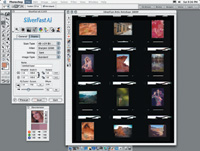
The
ArtixScan 1800f scanner comes with an extensive software
bundle with a choice of two drivers including the popular
LaserSoft SilverFast Ai 6.0. Besides providing the best
quality choices in scan adjustments the 1800f's capabilities
include the efficiency of batch scanning. This allows selecting
each of the film images in a template carrier; framing,
sizing, and adjusting each individually; and then clicking
on the scan button.
|
|
Flat-Bed And Film
The unit is configured in similar fashion to all flat-bed scanners and
can handle all kinds of documents, art, and photo prints. It also has
a separate film drawer below the sensor array which supports direct film
scanning without glass interference using the entire scan width of the
CCD sensor array. Template trays hold 12 35mm slides, four 120 film images,
and two 4x5s. There's also a glass drawer which will support odd-size
film up to 8x10" in size. The ArtixScan 1800f provides two fast
and convenient interfaces including FireWire and USB 2.0.
This quite compact desktop scanner has hardware performance that is truly
professional, with 48-bit input and output color depth, a 4.8 maximum
optical density, and hardware resolution of 3600x1800dpi. It is backed
up with Microtek's own ScanWizard Pro software driver and ICC Scanner
Profiler including Kodak Q-60 print and 4x5 film targets, as well as LaserSoft's
SilverFast Ai 6.0 scanner driver software, and LizardTech's Genuine
Fractals for lossless file compression and print size enlargement.
|
| |
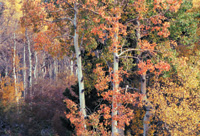
I've
scanned this 35mm Fuji Reala negative numerous times in
the past always frustrated by not being able to get a clean
accurate reproduction of the rich and varied hues in the
scene. With the ArtixScan 1800f I was able to remove all
of the color cast and cleanly capture the white trunks of
the Aspens contrasted by the rich variation of colors in
the fall leaves.
Photos © 2003, David B. Brooks, All Rights Reserved
|
|
Using The Microtek
ArtixScan 1800f
Obviously to test and evaluate a scanner that is capable of handling all
sizes and kinds of photographic images, I had my work cut out for me.
So I selected some print and film images in each format including black
and white negatives, color negatives, and positive transparencies including
a broad selection of different subjects in each size and category. Now
that's a lot of images, but I soon found I hadn't bitten off
more than I could chew. Even setting scan resolution at the optical limit
of 3600dpi for 35mm and a print image size of 12x18" at 300dpi for
the larger film sizes, the easy to load and use film drawer and its inserts,
plus the rapid scan and data transfer, made scanning and saving a very
efficient task.
This to me is one hallmark of a professional scanner--being able
to scan two dozen 35mm film frames in a short morning session. If I had
taken advantage of the scanner and software and used batch scanning, I
could have also reduced considerably the amount of time needed to get
the job done.
|
| |
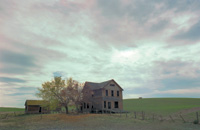
Traveling on back roads early one spring in eastern Oregon
I came across a ghostly abandoned farmhouse illuminated
by a clouded sky colored in pastel tints of contrasting
color. My 6x9cm Horseman field camera was loaded with a
color negative film I was testing, so I took a chance and
recorded as many exposures as possible before the light
changed. Prior to using the ArtixScan 1800f I was never
able to reproduce both the tints of colors in the sky and
the shades of hues in the foreground.
|
|
The 1800f took a bit longer
than usual to install because the bundle of software includes two drivers
and the ICC profiler software, as well as Genuine Fractals, if you choose
to put it on your system. Once the software was all installed and the
scanner was ready, my first task was to use the Microtek ICC profiler
to calibrate the scanner and set up options in the drivers to activate
color management.
I should say here that although the native Microtek ScanWizard Pro is
a particularly effective scanning interface and set of tools compared
to any other scanner manufacturer's drivers, for photographic scanning
I chose to use LaserSoft's SilverFast Ai 6.0 for most of my testing.
To me it produces the most precisely adjusted color and image qualities
and very productive workflow capabilities. In addition, SilverFast 6.0's
SRD dust and scratch removal utility substantially reduces the amount
of post-scan cleanup and retouching, considering some of my film images
have had a hard and active life.
|
| |
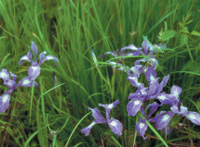
In
the spring in the mountain foothills of Oregon wild iris
are sometimes frequent in the grassy meadows. This photo
captured with a Pentax 67 on color negative film proved
almost impossible to scan and obtain the natural colors.
In the past when the excess blue was removed, either the
green of the grass or the lavender of the iris would be
seriously skewed. The combination of the ArtixScan 1800f
and SilverFast with NegaFix supported an adjustment which
finally did justice to both the grass and the iris.
|
|
Productive Scanning
After a couple of weeks of doing little else but working the Microtek
ArtixScan 1800f as hard as I could, I had enough scans to fill a substantial
stack of CDs. That amount of work would not have been nearly as satisfying
as an experience, nor as rewarding in the quality of the images, were
it not for the great marriage of hardware and software this professional
Microtek scanner provides. Many of the images I chose to scan from my
library I have scanned before, some with several different scanners, and
in every case, even with the most challenging, problem images, I was able
to improve on the previous scans, frequently with dramatically superior
results.
For example, when I was living in the Northwest I occasionally photographed
a model in environments like the rain forest. Because there was often
little light due to overcast skies and under a canopy of tall trees, I
used high-speed films like AgfaColor XRS 1000. These negatives have been
a nightmare to color correct to obtain fidelity in both the model's
skin tones and the many natural colors of the forest. But with the 1800f
I was able to obtain clean, sharp detail in shadows and highlights, and
remove all of the distorting color casts with SilverFast over a surprising
range of negative densities that were recorded on the film. Now for the
first time I have large digital prints of some personally prized photographs
that are completely satisfying. Those scans were not an exception. Many
if not most of the other scans I made exhibited results strikingly improved
and entirely satisfactory from images which had been problems to scan
that had yielded compromised results before, like early Fuji Reala 35mm
color negatives taken in the fall of Aspen groves in the Colorado Rockies,
in addition to numerous other film images of all sizes and types including
a number of daylight studio portraits on chrome film.
|
| |
Color
transparency daylight films are designed to respond to just
one color temperature of light, but scenes we photograph
can be illuminated very differently. A landscape in fog
or at very high altitudes can yield a blue color cast. Using
the ArtixScan 1800f I found that I could remove the excess
blue easily.
|
|
Evaluation And Recommendation
To me, the proof of the pudding is in the best print that can be made
from a scan file. So, all of the numerous finished scans were printed
on a minimum of letter-size photo paper, with a good portion also printed
on 13x19" fine-art matte paper. The print image size of the 3600dpi
35mm film scans was 11x16" at 300dpi while the larger film format
image scans were set at 12x18" at 300dpi. All of the test prints
exhibited as good or better image quality than I have experienced to this
date, with of course some advantage given to the larger film sizes. In
fact, compared to the 2700/2800dpi generation of dedicated 35mm film scanners,
I find the Microtek ArtixScan 1800f actually produces scans of a 35mm
film that make better prints of most subjects, and with smoother tonalities
and often less apparent grain.
In addition, with the color depth of 48 bits and a 4.8 dynamic range,
I was able to obtain more useable information in scans from some 35mm
slides, particularly Kodachrome and similar high contrast, short exposure
latitude slide films. With larger film sizes and more image information
available to capture, the results are correspondingly advantageous. For
example, I scanned a 6x4.5cm shot done with a Mamiya and a 400mm lens
of a distant forest. I had always assumed it was a little soft due to
slight camera movement. However, after scanning the image with the 1800f
I found my assumption was wrong, and I was able to obtain a scan file
that reproduced a 13x19" print with quite fine detail.
|
|
I hardly need mention 4x5 film
scans, other than to say I acquired a new appreciation of some very fine
optics I was favored with using over the years like a 300mm Rodenstock
f/9 APO Ronar. Besides scans with exquisitely fine definition of detail,
I was also able to adjust tonality to get an ideal range of tones in the
resultant prints.
In all, I found the ArtixScan 1800f easy and efficient to use. It has
very substantial, well-designed film carriers combined with very effective
software. The short scan times, and even more rapid transfer of the image
data to the computer, means getting a lot of very good scan work done
with a minimum expenditure of time. So both in terms of the quality and
quantity of output it meets the essential criteria for professional applications,
as well as being an appreciable boon to any serious photo enthusiast.
|
| |
One
of the earliest sessions photographing my now long-time
friend and favorite model, Bonwitt St. Claire, was in my
daylight studio. I just happened to load a Mamiya 645 with
Agfachrome CT-18 for the shoot, and in the intervening years
it has yellowed dramatically from age. I had tried scanning
the images from this session with very limited success until
working with the ArtixScan 1800f.
|
|
With a retail price under $1500,
the Microtek ArtixScan 1800f provides a truly effective all-in-one scanner
for photographers who shoot some or most of all of the film formats used
today, including panoramic cameras and even an 8x10 view camera. That
all this functionality and quality costs no more than some dedicated 35mm
scanner models makes the 1800f a whole lot of functionality for the money.
Technical Specifications
Hardware Resolution: 3600x1800dpi
Max. Interpolated Resolution: 14,400x14,400dpi
Scan Area: 8x14" reflective, 8x10" film/transparencies
Color Depth: 48-bit input; 24 and 48-bit output
Dynamic Range: 4.8 maximum optical density
Interface: FireWire and the new Hi-Speed USB (2.0)
Computer Support: Windows, Macintosh
Dimensions: 24x15.25x6.25"
Weight: 28.19 lbs
Software Package: Microtek ScanWizard Pro (PC/Mac); LaserSoft
SilverFast Ai 6.0 with dust and scratch removal; Microtek ICC Scanner
Profiler (MSP) (PC/Mac) *1; LizardTech Genuine Fractals Print Pro (PC/Mac);
Adobe Acrobat Reader (PC/Mac)
*1 Consists of a 4x5" Kodak Q-60 reflective color target, a 4x5"
Kodak Q-60 transparency color target, and a calibration software for maintaining
consistent color quality in any work environment.
|
| |
In
the immediate past I have found scanning black and white
film can be a difficult challenge and even wrote a recent
article detailing a manual work-around to achieve the best
results. So, when I tried using the ArtixScan 1800f and
SilverFast NegaFix with some of my favorite 4x5 black and
white negatives I was surprised to obtain all of the image
quality which had previously eluded me. This led me to scanning
a very large number of 4x5 negatives from my library, and
the results were consistent with my first favorable impressions.
I discovered detail sharpness and tonal detail I never knew
were recorded in some of the images. These scan results
make me wish I had a wide format ink jet printer so I could
make some really big prints!
|
|
For more information visit
the Microtek website at www.microtekusa.com.
|