


- REVIEWS
Camera Reviews 
More Reviews Mobile Reviews Photography Reviews - GALLERIES
- VIDEOS
- BUYER'S GUIDES

Microtek’s ScanMaker i800 Pro Design; A Fully Loaded Legal-Size Flat-Bed Film & Print Scanner
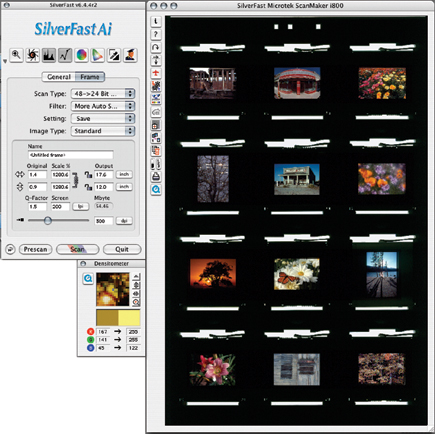
When the new Microtek ScanMaker i800 model was released I held back until the i800 Pro Design model was ready for review. The reason for waiting for the Pro Design model was that after reviewing numerous scanners over the years I have come to the realization that the software driver is as important, if not more so, than the hardware. Like an automobile, scanner specs resemble an auto engine's specs--it's what the makers use to sell you the car. But it is the entire chassis of a car that gets you from departure to destination, particularly if the road is full of twists and turns. Scanning photos is a windy mountain road with differences in each image due to film, processing, exposure, the subject, and the conditions under which the photo was made. While hardware is important, the software should be responsive and support your work. In this case, it's the LaserSoft SilverFast Ai 6 software included in the Pro Design model that is an essential part of the package.
 |
|
|
Microtek ScanMaker i800 Features
The i800 Pro Design is based on a well-tested platform, one that's now been developed to a new level of performance. This includes 4800x9600 optical resolution in a legal-size scanner with an 8.5x14" scan area. The TMA lid encloses a moving film scanning light source covering an 8x12" scan area that accommodates all film formats, from 35mm to 8x10 film. Four EZ-Lock film holders are provided, including a spring-loaded tension grip to maintain film in a flat plane for overall focus and even scan results. In addition to LaserSoft's SilverFast Ai 6 driver software, the i800 Pro Design also includes a generous bundle of software--ASF-Kodak's Digital ICE dirt and scratch repair, Adobe's Photoshop Elements 3.0, two versions of Microtek's ScanWizard and Microtek's Scan, an OCR, and Ulead's Photo Explorer, all for Mac and PC, plus a couple of other Windows-only applications.
 |
|
|
Scanning With The i800 Pro Design
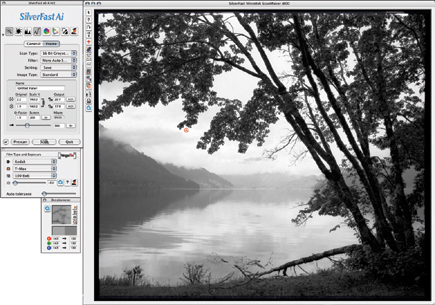
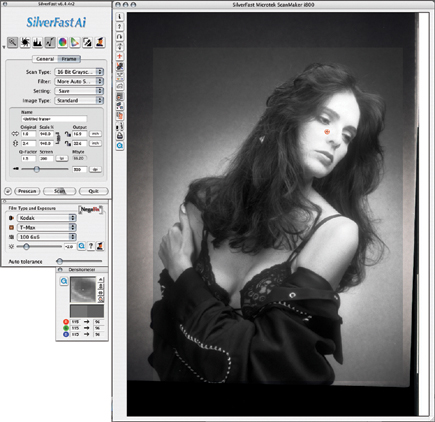
I could have spent weeks and weeks testing if I covered every format in color transparency, negative, and black and white film, so I concentrated most of my work with challenging images, including contrasty Kodachromes and another large selection of different medium and large format black and white silver-based negatives.
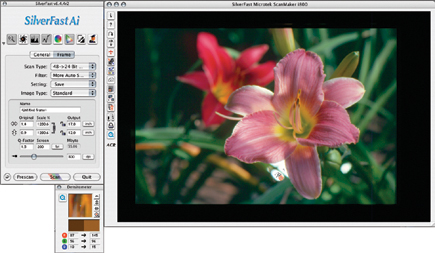
From the start and throughout I found the Microtek film holders substantial, effective, and easy to use. The workflow using the i800 is generally efficient and the scan times relative to the size of the files produced were as fast as could be expected. The only concern I had was the warm-up and initialization procedures at the beginning of each session, which seemed much too long. Other than this minor annoyance the Microtek produced results consistent with what I adjusted in the preview window. In part this is due to the fact the Pro Design comes with both reflective and film IT-8 color references as part of the LaserSoft bundle, which allowed custom calibration and profiling.
 |
|
|
 |
|
|
In each of the essentials of good scan results, from optimizing the image gamut and removing any inherent color cast, to adjusting the tonal curve to bring out detail at all levels of density in the image, to correcting individual colors in hue, saturation, and brightness, the results were excellent. I scanned in 48-bit mode and did some final tweaking using a mild application of Photoshop's Smart Sharpen as well as some dirt cleanup on Kodachromes using SilverFast's SRD dirt and scratch removal. I was then quite eager to print the resulting scan files. I found that each 35mm color film frame scanned to 12x18" at 300dpi made as acceptable a print as I could expect from the original film image, with more than a few producing better proof prints than I anticipated.
 |
|
|
 |
|
|








 FEATURED VIDEO


Get the Latest Photo Tips, News & Reviews from Shutterbug!






| Camera Reviews Other Reviews | |
Mobile Reviews Photography Reviews Columns | |
News | |
Features | |
How-To | |
Resources |
 © 2026 Shutterbug
AVTech Media Americas Inc., USA
All rights reserved