| |
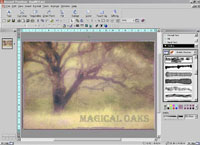
Microsoft's new PhotoDraw 2000 application
workspace is designed to be easy and comfortable for Windows
Office application users. There's a bar of primary
function buttons across the top of the screen under the
menu bar, which pop up right-hand side column tool definitions
with easy to select graphic options as well as color choices
and effect controls.
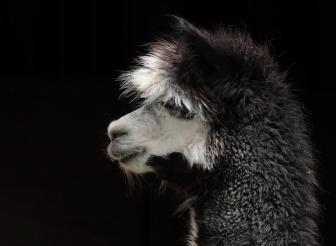
Photos © 1999, David B. Brooks, All Rights Reserved
|
|
The early rumors were pitting
microsoft's new, yet to be announced application against Photoshop.
How wrong the pundits were. Microsoft's new PhotoDraw 2000 is
a quite different approach to a graphics and photo application because
Microsoft took their own particular perspective on the market to determine
what was needed for their customers. Considering that their business
suite, Microsoft Office, has something like 90 percent of the market,
it was their target audience of choice for PhotoDraw. That it significantly
involves digital photographic functions was also influenced by current
trends, like the fact about 80 percent of digital camera sales are to
businesses and institutions. In light of these facts of obvious importance
to Microsoft, just what have they designed to make PhotoDraw a must
have application?
Superficially you could assume Microsoft is just another application
in the recent category established by Adobe, Live Picture, and Corel
that includes the likes of PhotoDeluxe Business Edition, LivePix SOHO,
and PrintOffice, but Microsoft's approach was anything but "me
too." Besides the obvious, providing very tight integration with
all of the applications in Office 2000, which PhotoDraw will be a part
in the Office 2000 Premium package, PhotoDraw is also the original work
of some of the best minds in computer graphics development. Although
some fault Bill Gates for the huge wealth he has amassed, he does some
things with it that are very beneficial. Taking a page from FDR, Gates
has created a "brain trust" of scientists, two of which
I have had the pleasure of interviewing in the past, who have developed
a completely new and more effective core solution for creating graphics
on a computer. In the case of PhotoDraw, the most significant result
is a highly effective integration of vector (draw) capabilities with
faster (paint/photo) bitmap imaging, and there is more as I get into
describing how PhotoDraw performs.
Microsoft PhotoDraw Features. The purpose of Microsoft's
Photo-Draw 2000 is to provide the means to create any kind of publications
needed--primarily for businesses large and small, including a full page
ad, a fold-out brochure, flyers, and business cards. To accomplish this
all of the elements, including design elements, importing and modifying
clip art, headlines and text with all kinds of effects like curving
a line of type around an object, shading and 3D effects, bringing in
photographs from digital cameras, scanners, and CD libraries, adjusting
and modifying photos, applying special effects, as well as edging or
selecting a subject out of its background, are all handled in the same
workspace with largely the same tools.
PhotoDraw also provides a very complete set of pre-designed graphics
of all kinds from ads to banners, as well as elements for web pages
like 3D buttons and a cornucopia of resources contained in the three
CDs, which are the application package. These resources are supported
with online help, tutorials, Wizards, and expert guidance, so professional
looking publications can be created by a nonprofessional. This all sounds
relatively common until you also consider PhotoDraw is equally adept
as a set of tools and as a work environment for creating from scratch.
This for anyone with computer experience, even just with word processing
using Microsoft Word, is easy to accomplish compared to learning the
tools of professional applications like Freehand and PageMaker. It also
avoids a perennial problem of the past requiring different kinds of
graphics like type effects, design elements, and paint or photographs
to be created in separate applications and then be put together in a
desktop publishing application like Page-Maker or Quark. PhotoDraw does
it all in one workspace using a common set of tools.
Working With MS PhotoDraw 2000. Besides finding out what PhotoDraw
can do in general and how it works, considering Micro-soft's focus
for the application is Microsoft Office users mostly in business work
environments, just how useful and appropriate is PhotoDraw for a photographer.
in addition to just exploring the features, tools, and capabilities,
I set for myself the task of beginning the creation of a poster or lead
web page design for a series of photographs about a specific subject.
I soon found that although Photo-Draw has a quite full set of photographic
image adjustment tools, that by the way are surprisingly conventional,
they are no match for a professional image editor like Photoshop. In
fact, it is a good idea to not expect to do major color correction of
raw images in PhotoDraw as it does not have the ability to equalize
an image like Photoshop's Levels with a histogram to optimize
an image's use of the entire colorspace, nor does PhotoDraw have
any sharpening filters. However, it does have all of the Hue and Saturation,
Brightness and Contrast adjustments needed to tweak an image, and even
a tool to eliminate redeye, as well as a facility to cleanup dust, dirt,
and scratches. If you're scanning into PhotoDraw, you should do
a complete job of color correction plus add any sharpening if those
facilities are available in your scanner's driver. The saving
grace for PhotoDraw, however, is that it supports Adobe Plug-Ins, so
if you want to be able to do more in the way of photo color correction
and adjustment, including sharpening, within PhotoDraw, you can use
a plug-in like Test Strip 2.0 or Intellihance 4.0.
I don't consider myself a professional at all when it comes to
using graphic design applications like Illustrator or Freehand, so I
was pleasantly awarded with a very good experience thanks to the really
intuitive tools designed into PhotoDraw. Putting in a special text effect
headline over a photo background was a cakewalk, as was applying a border
effect to the entire image. This intuitiveness designed into the tools
available is consistent throughout the application. Applying a special
effects filter to a photographic image is really point and click guided
by illustrated control buttons and thumbnail samples, making the selection
of an effect to try purely visual. The tools, although they involve
an amazingly large selection of options, are also simple because the
same effects tool for applying an edge effect to an image is also used
to apply similar effects to text.
The bottom line is that I found it quite easy to start with a plain
photo, find a special effects filter to alter its appearance the way
I imagined, then soften the edges, and add a painterly edge effect.
I then added some type by visually selecting a font from PhotoDraw's
graphic font preview, then colored the font by applying a degree of
transparency and adding a complementary color outline. This entire project
resulted in a graphic with very complex, softly muted subtle coloration.
So how would Photo-Draw handle outputting this to my Epson Stylus Photo
700 printer to make an 8.5x11 glossy? Surpri-singly well. PhotoDraw
provided a WYSIWYG print result with all of the subtleties and muted
effects I had created on-screen--replicated faithfully in a print. This
was surprising because I assume the PhotoDraw workspace is sRGB colorspace,
but Microsoft has apparently implemented this without the usual garish
effect of clipping colors that I've experienced with some of the
new applications that use sRGB colorspace.
Conclusion And Recommendation. Although Microsoft Photo-Draw
2000 is designed to fit into the Office 2000 suite of business applications,
it does contain the pre-designed graphics to make publishing easy as
well as a powerful facility for creating unique individual photographically
based publications. In consideration of my just scratching the surface
of photoDraw's capabilities, that experience assures me I could
use it as effectively as any application to create almost any publication
I might need, based on my catalog of photo images, from a printed flyer
to a web page. It was an unusually easy experience for me to dive into
PhotoDraw and work with it with confident results immediately, suggesting
anyone with familiarity with Windows business applications like a word
processor, particularly Microsoft Word, will have an equally easy and
fruitful reward for their efforts.
At a stand-alone price set by microsoft of $149, PhotoDraw is on par
with other applications offering similar capabilities. That is a reasonable
cost as an addition and extension to an image editor for any individual
photographer/computer user. I would also assume it would prove invaluable
to anyone with their own full-time or part-time photo business, as well
as serious hobbyists desiring to create their own photo- graphically
oriented publications. For anyone with experience using Microsoft Office
applications, PhotoDraw is definitely an advantageous choice. For more
information about Microsoft PhotoDraw 2000, visit their web site at
www.microsoft.com.