| |
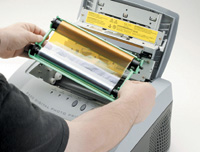
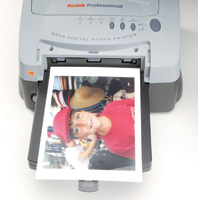
Here's
the process for printing: after the printer spools up from
your computer, the paper is drawn through. The first pass
lays down the yellow ink.
|
|
Pro Quality Prints
In an effort to get some really nice looking pro quality prints that I
could bang out quicker I've laid out the big bucks for other types
of printers over the years. I've owned a Fuji Pictrography photo
printer and several Kodak dye sublimation printers. While the Fuji is
an absolutely killer machine I found the Kodaks to have a better per-print
cost and an easier workflow. Of course, the issue was always the up-front
cost of the machine and the size and weight--they're big boys!
The beauty of the dye sub is that it has a real photo lab quality, and
of course the back of the print says "Kodak" on it, which
clients like!
As event imaging using digital cameras has expanded in the past few years,
a few manufacturers have gotten into the game with fast, portable, inexpensive
dye sub printers. While most are aimed at small print sizes, they've
been incredibly popular. Well, Kodak recently hit the market with a printer
that seemed almost too good to be true. The specs are a studio or location
photographer's dream: continuous tone 314dpi color prints, a true
8x10" finished print size, amazing 75 second print times, a stunning
27 lbs for true portability, drivers for Windows XP and Mac OS X, parallel
and USB interface, and a US street price of only $999! Hey Kodak, send
me one of these!
|
| |
Ssecond
pass lays down magenta ink.
|
|
The 8500 Arrives
Once the printer arrived in my studio I was puzzled--unlike my big
beast Kodak 8650 dye sub printer, the 8500 has a plastic bulge in the
back and a plastic hood in the front. Once you fire off a print you can
actually watch the paper jog back and forth using those plastic areas,
applying each color separately, and then the final XtraLife UV coating
in either gloss or matte. It's fascinating to watch and reminds
me exactly of the Olympus P-400 printer. While the P-400 opened the door
for this type of machine, its slightly smaller than 8x10" print
sizes and nearly $3 each cost of consumables made it a bit less desirable.
Of course this Kodak printer really does operate like the Olympus, and
Kodak admits that it has partnered with other companies for some of its
products, and there is that exciting 4:3 Olydak product with Olympus...
Hmmm.
|
| |
Third pass lays down the final color, cyan. Now you have
a full color image.
|
|
The Dye Sub Difference
Whoever did the engineering on the box, it seems pure Kodak in operation.
The special Kodak paper loads easily into the front paper tray, which
is see-through so you always know your paper level. Dye sub printers don't
use ink cartridges--they use heat to apply color from thin sheets
of ribbon material. This material comes in rolls that look like some bizarre
third-world flag--solid bars of magenta, cyan, and yellow mate to
a clear patch. (The clear patch contains the UV coating, which Kodak calls
XtraLife.) The installation routine couldn't be simpler. The ribbon
roll is snapped into a plastic carrier, which is then inserted into the
printer. That's it. Power up and go.
Print Driver Ease
The print driver, used both in Mac OS X and Windows XP, is pure simplicity.
While there is an excellent calibration utility and a full complement
of color and brightness controls, feel free to simply click "print"
and watch the printer do its thing. In fact, my first print with the 8500
with no color controls or calibration whatsoever produced one of the best
prints I've seen in a while. Kodak really, really knows how to dial
in color for portraits, and if flesh tones have been a problem for you
in the past, then you need one of these. I defy you to produce a bad print
on this printer. I tried it on four different computers, all with different
color profiles applied in Adobe Photoshop. Every machine produced excellent
color quality and a warm, natural color sense. Using this printer will
spoil you very fast--effortless color is now a reality.
|
| |
The
final pass lays down the UV coating, in either gloss or
matte, according to your ribbon type.
|
|
Print Speed
Print speeds are also a revelation. While the quoted time for a print
is 75 seconds, that does not include the spool times, which can vary according
to the complexity of the file and the processor power and RAM of the host
computer. I routinely found that the machine would deliver the first finished
print in about 2 minutes flat, and then produce about four prints every
5 minutes after. That is supremely fast if you're used to ink jet
printers, and is a bit faster than my very expensive 8650 dye sub.
The print feel and finish is also an eye-opener. While the 8500 does not
produce the glossiest dye sub prints that I have seen, they have a beautiful
even shine that rivals any lab "C" print. The matte finish
prints (which are accomplished by changing the ribbon--the paper
is universal) also have a very nice even feel, and really look like they
were produced in a pro lab processor. When I went to reorder materials
I found that 100 sheets of paper along with enough ribbon to produce 100
prints was $180. That's a fixed print cost of $1.80, which compares
very favorably to super high quality ink jet glossy paper at roughly $1
a sheet plus those pricey cartridges in ink jets.
Traveling Companion
While I had the printer for review I landed an assignment that required
me to travel, and the client needed on-site 8x10" prints. That's
kind of a unique situation for me but in the past I would just pack an
ink jet printer, cartridges, and paper. It always worked fine but making
the client wait nearly an hour for seven photo quality prints made me
look bad and created the kind of tension on the shoot that I just didn't
need.
I packed up the 8500 in a large Leitz projector bag I had around the studio
and set off for the shoot. I brought a 2GHz P4 laptop running Windows
XP with 1GB of RAM. I shot my stuff with a Canon EOS-1Ds camera and we
reviewed our images on screen using Photoshop. When we had narrowed down
our image selection the client asked for 10 prints of one image for his
use that day in a corporate meeting. No problem. Or so I thought--I
had forgotten to pack the Kodak software disk and could not print. Yikes!
Luckily for me the wireless card in my computer was picking up an 80211.b
wireless router somewhere, and in seconds I was on Kodak's well-designed
web site downloading the latest driver. Not only is the driver available
online, but there's also the full complement of materials including
the calibration utility and manuals. It's this level of support
that pros have come to expect from Kodak, and it's nice to see that
even a price-conscious product like this receives the same level of support.
Once the driver was installed I simply clicked print and set up "10"
as the quantity. Rather than the customary 1 hour and 20 minutes of ink
jet printing I was handing off genuine dye sub prints with the Kodak logo
on them in about 13 minutes.
Some Nits To Pick
The 8500 is a wonderful machine, but it's not perfect. While the
color, saturation, and especially the finished surface of the prints is
stunning, there can occasionally be a slight "digitalness"
to the printed images. On very high key areas of contrasting colors--especially
Caucasian skin against blue sky--you notice a slight stairstep pattern
that seems about in-line with the machine's 314dpi. On practically
everything else the prints are smooth and continuous tone. I also find
it odd that Kodak does not offer this machine, even as an upgrade, with
a network port. In my studio the ability to print from any computer in
the shop is a critical aspect of any new printer's specifications,
and the USB or parallel only interfaces limit this printer to a single
computer installation.
Evaluation
The Kodak 8500 is a wonderful printer. It produces warm, realistic color
effortlessly, in record time for an unheard of purchase price. The ability
to instantly change from a high-gloss UV coating to a nice satin-matte
finish on the fly is wonderful, and the very reasonable cost of consumables
make this a machine that is within the reach of any serious digital photographer.
I used it daily for a couple of months and charged clients for the prints
I made with this printer. A few years ago this level of speed, color quality,
and sophistication would have cost many thousands of dollars. The Kodak
Professional 8500 Digital Photo Printer provides a real pro rival to photo
ink jet printers, and should become a fixture in many serious photographers'
digital darkrooms.
For more information about the Kodak Professional 8500 Digital Photo Printer,
visit Kodak's website, www.kodak.com.
|