


- REVIEWS
Camera Reviews 
More Reviews Mobile Reviews Photography Reviews - GALLERIES
- VIDEOS
- BUYER'S GUIDES
The Dog Ate My Homework… But Somehow I Recovered It
"A common mistake that people make when trying to design something completely
foolproof is to underestimate the ingenuity of complete fools."
--Douglas Adams
Like a lot of photographers, I take some things for granted. When inserting a CompactFlash card into a camera and capturing lots of images, I assume that I'll be able to transfer those files onto my computer. That's the way it's supposed to work, anyway.
 |
|
|
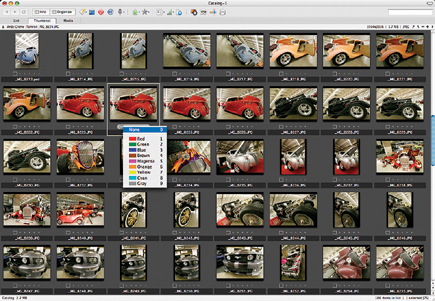
Crème de la Chrome showcases some of the classiest hot rods, sports, and muscle cars in the Rocky Mountain West. Armed with a Canon EOS 5D and EOS 20D, fitted with wide angle zooms, I was excited to photograph it for the first time. The fun faded after the shoot when I inserted a 4GB Lexar Professional (www.lexar.com) CompactFlash card in my reader and it refused to copy the image files to my hard drive. If I put the card back into the EOS 5D, I could see the pictures, making the process more than a bit frustrating.
I first reached for DataRescue's (www.datarescue.com) PhotoRescue software, which recovers images from CompactFlash cards that were reformatted, but it couldn't hack it. Next I tried Prosoft's (www.prosofteng.com) Picture Rescue but it wouldn't work on this card either. Image Rescue software is included on every Lexar Professional CompactFlash card and can recover lost or deleted JPEG, TIFF, and raw files from erased, reformatted, or corrupted memory cards but after recovering a few files it stalled.
 |
|
|
Since Lexar Professional cards have a lifetime warranty, I contacted Customer
Support, FedEx'ed my card off to Fremont, California, and waited with
my fingers crossed. A week later (rescue time varies depending on their workload)
I had a stack of CDs with 500 recovered images and a replacement 4GB CompactFlash
card. (See "Care And Feeding Of Memory Cards" for some tips on how
to prevent this from happening to you.)
Author's Note: To any wise guys out there: This is not the same
Lexar memory card I repeatedly washed and dried in my Maytags ("Shutterbug,"
September 2003 issue). That card continues to function perfectly, thank you.
 |
|
|
Plug-In Of The Month
SilverOxide (www.silveroxide.com)
is well-known for their black and white Photoshop compatible plug-ins and recently
announced their first color product called Color Landscape Filter. It builds
on their monochrome Landscape filter (Shutterbug, April 2005 issue) and includes
a BANG (Blue Algorithm Neutral Gray) setting. The BANG setting reacts to the
blue content of each pixel and acts like a polarizer, deepening the sky and
water and giving greater depth to trees. If you need a less dramatic contrast,
red and orange color filter settings are available.
SilverOxide's Bill Dusterwald told me that "you can get a similar
effect by fooling around with Curves but this is faster, less intimidating."
The Color Landscape Filter plug-in includes a Histogram function that lets you
see if you're clipping highlights and works with 8- and 16-bit images,
including 16-bit layers supported by Adobe's Photoshop CS and CS2. I tested
a beta copy of the Windows version, but a Mac OS version should be available
by the time you read this.
 |
|
|
| |||||||||
|

| ||||||||


 FEATURED VIDEO


Get the Latest Photo Tips, News & Reviews from Shutterbug!






| Camera Reviews Other Reviews | |
Mobile Reviews Photography Reviews Columns | |
News | |
Features | |
How-To | |
Resources |
 © 2026 Shutterbug
AVTech Media Americas Inc., USA
All rights reserved