|
First, let me fill you in a
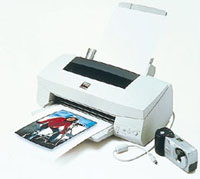
bit about the Epson Photo PC 700 and its companion Stylus Photo 700 printer.
The camera is a megapixel model with a maximum 1280x960 pixel resolution,
which is enough to make really fine 5x7" full-color prints. It is
also compact enough to fit in my pants pocket and is fully a point-and-shoot
automatic, but with the essential options like controllable built-in flash.
It also supports CompactFlash storage cards, in addition to its own 4MB
internal memory. The Epson Stylus Photo 700 printer is a full letter size,
six color, photo-realistic ink jet with a maximum 1440dpi resolution.
In addition to this model Epson that's an industry leader in photo
quality printing, the Photo PC 700 can print directly to five more different
Epson printer models.
To continue, an Epson Photo PC 700 digital camera with its support of
Com-pactFlash memory cards does not even require you also have a printer--just
get some extra memory, like the 16MB card I purchased from Samy's
for $80. Besides giving the camera a lot more storage of 20MB in all (there
are even larger CompactFlash cards to store up to 36 full resolution highest
quality images and many more lower and smaller images), those images can
then be transferred at many photo stores and minilabs to a computer and
printed. An increasing number of minilabs and camera stores now have digital
processing and print services with many of those having a reader for CompactFlash
memory cards. These memory cards also have other uses. For instance, they
can be used to store a series of images making up a slide show, which
with the camera connected to a TV, it becomes the driver/controller used
to run such a slide show. How about that, the next time you visit grandma's
you can just plug the camera into her TV and present a slide show of the
latest pictures of the kid's or even last summer's vacation.
Finally, one distinct advantage of the Epson Photo PC 700 is that you
can look at thumbnails of the pictures you've taken with the LCD
panel on the back of the camera. Then if there are stupid pictures you
really don't want, just delete them--you'll have room for
even more pictures. what do you do when your Compact-Flash memory is full
and you want to keep the original picture files? The very same minilabs
and camera stores with digital services usually also have the ability
to record your image files on a CD or a CDR, which can be added to until
it is full--over 600MB, which is enough room for over 500 full size top-quality
images. If you just want to have a copy of one image file to mail to someone
with a computer of course, it can be put on a 1.4MB floppy disk.
|
| |
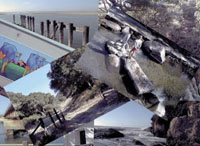
This scan of a collection of trimmed 4x6
Epson Photo Paper prints displays just a bit of the camera
and printer's combined capabilities.
Photos © 1998, David B. Brooks, All Rights Reserved
|
|
Using The Epson Photo
PC 700 And Stylus Photo 700 Printer. After over 40 years of professional
photography I'm really not much of a snapshooter, but it was easy
just stuffing the Photo PC 700 in my pocket and making a few snaps here
and there. After I got back home, I took the connector cord, plugged the
camera into the printer, and made 4x6 Photo Paper prints of the images.
Right off I was pleasantly surprised at the quite good quality of these
prints. They are of substantial paper weight, with a nice glossy surface,
and the paper is precut with micro perforated borders so they can be removed
to make a borderless picture. A close friend and long-time photo enthusiast,
who uses minilab services frequently, even said they were better than
the prints he's used to getting. Besides the standard snapshot size
of 4x6, there are three more picture size options including A4, A6, and
printing a 5x7" image on a letter-size sheet of paper. Besides using
Epson's Photo Paper, you can also print successfully on less expensive
paper, like Epson's Photo Quality Ink jet paper, and obtain very
nice image quality. The camera also supports printing more than one image
on a single sheet of paper. It is a quite flexible control, operated from
layers of menus displayed on the LCD screen on the back of the camera,
easily navigated and controlled with four buttons next to the screen.
I found this abbreviated form of digital photography entirely worthwhile
providing results at least as good as the best snapshot prints you'd
get from typical minilabs. The only accessory I'd recommend beyond
the packages I was provided by Epson would be an accessory power supply
to adapt the camera to household power rather than using its four internal
rechargeable batteries. The reason I found was that printing most of the
36 pictures I was able to take and store in the camera and on the CompactFlash
memory card, used up an entire battery charge. A transformer adapter from
Epson to provide external power for printing would reduce the frequency
of battery charging significantly.
Conclusion And Recommendation. Although this little trial
and demonstration project may seem to be stretching a point, the experience
was honestly as satisfying as making snapshots conventionally with film.
In addition, it did not require a trip to a store to purchase film nor
a trip to a minilab at least twice to get film developed and pick up the
finished processing. To pay a price approaching $1000 for this may seem
a bit high. But, for anyone who takes a lot of snaps, of the kids, on
trips, at family gatherings, etc., the initial cost is soon equalized
when the price of film and processing that was saved is taken into account.
Sure the Epson photo paper costs a bit and so does the occasional ink
cartridge, but in the long run, not even considering the wear and tear
of dropping off film and picking up processed pictures, as well as going
out to buy film, digital will break even in total cost with just a reasonable
amount of use.
Then of course, seeing as you have a computer printer already, why not
get the computer? Considering the Epson Photo PC 700 and the Epson Stylus
Photo 700 printer come with software bundles already, all you need is
the hardware to use it and have even more fun. How about producing your
own unique photo holiday cards this year? For more information call (800)
463-7766 or visit their web site at www.epson.com.
Technical Specifications
Epson Photo PC 700
Camera
Sensor: CCD size _.7" with 1.25 million pixels
Resolution: 1280x960 pixels and 640x480 pixels optional
Modes: Superfine with low compression, fine with medium
compression, and standard (640x480) with high compression (compression:
JPEG)
Color: 24-bit RGB
LCD Monitor: 2" TFT active matrix LCD
LCD Functions: Instant playback and review, view--menu,
playback--menu, including 9x thumbnails
Internal Storage: 4MB or 7 superfine, 15 fine, or 50
standard pictures
Removable Storage: CompactFlash cards, in all sizes 4,
8, 16, 32MB
Lens: 5.5mm f/2.8 glass, five elements in four groups--equivalent
to 36mm, 35mm lens
Autofocus: 20" to infinity normal, 4-20"
macro mode
Shutter: _ to 1/500 sec
Exposure Control: Programmed autoexposure with +/- two-step
compensation adjustment
Built-in Flash: Range 8" to 8', with auto,
forced, and no flash modes
White Balance: Automatic TTL and manual fixed 5000K
Sensitivity: Equivalent to ISO 60/120
Estimated Street Price: Under $699
Epson Stylus Photo 700 Printer
Printing Method: Drop-on-demand micro piezo ink jet technology
Color Configuration: 32 monochrome and 32x5 color nozzle
print head
Photo Print Speed: 3x5", 90 sec--8x10" under
5 minutes
Resolution: 1440x720, 720x720, 360x360, and 18x180
Software Driver Compatibility: DOS, Windows, and Mac
OS
Interface: Bi-directional IEEE-1284 parallel Macintosh
8-pin DIN serial
Printing Paper Sizes: Letter (8.5x11"), legal,
A4, B5, executive, statement, and 4x6
Ink Cartridges: Separate black and five color
Dimensions: 16.9x9.2x6.4"
Weight: 11.5 lbs
Estimated Street Price: Under $279
|