Konica Minolta DiMAGE Xg
Quick Look
· 3.2 Million effective pixels
· $299
· 1.6" LCD Monitor
· 12x Zoom
Further Inforamtion
KONICA MINOLTA DiMAGE Xg
http://www.minoltausa.com
When most people purchase
digital point-and-shoot cameras, it's because they want to capture
family memories, weddings, holidays, and other special moments. As Jerry
Seinfeld once said, "not that there's anything wrong with
it" but, you may be missing what someone else once called, "The
Joy of Photography."
Some of the most fun I had while testing Konica Minolta's new
(www.konicaminolta.com)
DiMAGE Xg was making close-up photographs of flowers. You see, this
clever little camera will focus as close as 5.9" (or 0.15 meters
if you're reading this in the rest of the word) from the front
of the camera. While hardly what experts might call "Macro"
photography, the little Xg lets you get even closer than that with a
little fudging about where you focus and what end of camera's
zoom lens range you're using.
|
| |
Photos
© 2004 Joe Farace, All Rights Reserved
|
|
The Good And Bad News
The bad news is that the DiMAGE Xt, my favorite little pocket digicam
is gone. The good news is that it's been replaced with the Konica
Minolta DiMAGE Xg. What's the difference? The cameras look similar
but the Xg manages to add a little more panache to what must already be
one of the most stylish digital point-and-shoot cameras available. I like
the Konica Minolta name on the front next to the sliding cover hiding
the proprietary lithium ion battery and Secure Digital card slot. You
can use a MultiMedia Card (MMC) and I often do, especially since the $299
camera is bundled with a minuscule 16MB SD card.
The DiMAGE Xg has a start-up time of approximately 0.8 seconds, which
is 1/2 second quicker than the Xt's already fast start-up time.
It also features automatic digital subject program modes, a larger 1.6"
LCD monitor, and continuous advance of 2 fps. It's PictBridge compatible,
so you can connect it to any digital printer--without a computer--enabling
direct printing on the spot. What's missing? You can't shoot
TIFF files with the DiMAGE Xg. The lack of the ability to shoot truly
high-quality files kinda breaks my heart, but explains the 16MB SD card.
|
| |
The
Xg's 37-111mm equivalent lens is very sharp even when
capturing JPEG files. And the larger screen helps when you're
lying on the garage floor making a close-up of the racing
wheel on my wife's Mazda Miata. Not only can you see
specks of disc brake pad dust, but also the edges of the
decals on the wheel are clearly defined.
|
|
Up Close And Personal
The DiMAGE Xg weighs only 4.2 ounces and is just 0.79" thick. Like
other DiMAGE Xs it uses folded optics to eliminate a protruding zoom lens
and keeps the case designer-slim. The 3x optical zoom (37-111mm equivalent)
lens is adjusted internally, letting you get extremely close to your subject,
while the mostly useless 4x digital zoom extends the zoom range to 12x
for those times, like the kid's hockey games, when you can't
get close enough and don't care if the photographs aren't
as crisp as they might otherwise be.
Steady And Ready
When making the flower photographs, a tripod can be a big help. With such
a diminutive camera you don't need some big clunky, expensive European-made
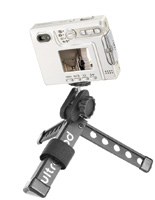
tripod; instead use a compact well engineered pod like Pedco's Ultrapod
(www.pedco.com). The
UltraPod I used for the flower shots that accompany this story weighs
two ounces and is made of Fiberglas reinforced nylon and aluminum. It
costs less than $15 and folds up small enough so there's no excuse
for not having it with you.
|
| |
Pedco's
Ultrapod is made of Fiberglas reinforced nylon and aluminum.
It costs less than $15 and folds up small enough so there's
no excuse for not having one with you at all times.
|
|
Another important accessory
for macro work is a cable release because it minimizes camera shake which
is more exaggerated the closer any camera gets to the subject. Like most
moderately and some higher priced point-and-shoot cameras, the DiMAGE
Xg does not even have a place to plug in an electronic release. That's
one of the reasons a tabletop tripod braced against your body as a chest
pod works so well, allowing you to minimize camera movement.
No matter how you support the Xg remember two things: squeeze the shutter
to minimize camera shake and keep your fingers out of the shot. With the
lens up in the upper left-hand corner (from camera position) it's
easy to let the tip of your index finger hang over the front and become
part of a not-so-interesting composition. Brace the camera between the
index finger of your left hand then do something similar with your right
hand, letting the index finger rest on the shutter release. After you
make the photograph, use the zoom controls to take a closer look at the
image on the preview screen to make sure it's sharp. If not, try
again. Don't you just love digital photography?
|
| |
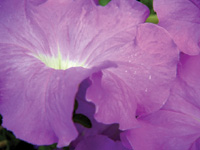
This
close-up image was made using natural light coming from
the kitchen window with the DiMAGE Xg mounted on an Ultrapod
I.
|
|
Modes, Movies, And
Noise
With its Automatic Digital Subject Program Selection function, the DiMAGE
Xg assesses the situation, determines the most suitable photo mode, and
automatically controls color reproduction, contrast, and sharpness. If
you want more control, try the Xg's Program Selection modes. Portrait
mode produces softer skin color reproduction but hair and eyelashes remain
sharp. Got kids in sports? Sports Action mode selects faster shutter speeds
ensuring that a moving subject stays in focus. This is one feature where
the Xg shines over the Xt.
In Landscape mode the entire frame, from foreground to background, stays
in sharp focus, while Sunset is designed to accurately reproduce the subtle
hues of sunrise and sunset. Then there's Night View for nighttime
scenes such as city lights, and Night Portrait for photographing people
against a nighttime backdrop. Where's the Macro mode? There isn't
any. I use the basic automatic mode for most of these shots, but if I
want a softer look I use the portrait setting even if the portrait is
of a flower, not a person.
|
| |
The
tiny built-in flash is useful outdoors for fill for flowers
or portraits (less useful indoors when light is low) but
indoors for flower photography can produce harsh ugly shadows.
Using Pedco's Ultrapod, I made two separate exposures of
this iris: one with flash, one without. Then I used Adobe
Photoshop CS to place each one on a separate layer and erase
parts of each layer while changing layer opacity settings
to produce a single image that combined the best aspects
of flash and natural light. I can hear the purists now...
|
|
I noticed how well the Xg controlled
noise compared to more expensive and even higher megapixel count cameras.
This is especially noticeable in low-light images, where the built-in
Dark-Noise Reduction combines to reduce graininess while maintaining needed
contrast to provide accurate reproduction of the scene.
Motion Clips
I'm not much of a fan of making video clips with digital still cameras,
but the DiMAGE Xg makes it so much fun I just might change my mind. In
Movie mode it can record longer movie clips, at resolutions of 160x120
or 320x240 pixels, onto the memory card for as long as its capacity allows.
(Not much with the standard card.) In addition to recording 15 fps, the
30 fps mode produces "real" video. There's even a Night
Movie function that lets you shoot video clips in dimly-lit locations.
The DiMAGE Xg has a Movie Editing function that lets you shoot and edit
in the camera. You can cut out unwanted parts of a clip, as well as extract
still images.
|
| |
The
DiMage Xg lets you choose from 50, 100, 200, 400 and Automatic.
In Automatic ISO modes, this available light image was made
at ISO 80.
|
|
The Konica Minolta DiMAGE Xg
is the perfect pocket digital camera. It's easy to carry, but be
sure to get the leather clip-on pouch. The Xg is also a great digicam
for parents or grandparents and I've recommended it to many as a
second (maybe third or fourth) camera for professional travel photographers
when they want to be incognito. The Konica Minolta DiMAGE Xg is simply
an amazing little camera; just make sure you never leave home without
it.
What's A Macro?
Defining Macro photography is not an easy task. Here are some definitions
I found on the Internet: Macro photography is magnified images of typically
a small object. My favorite was: "Taking close-up pictures of small
things is called macro photography. I have no idea why. Perhaps because
the small things in macro photography are generally larger than the things
you are taking pictures of when doing micro photography."
|
| |
I
try to set the ISO speed low as possible to make the finest
noise free image possible. This image was made at ISO 50
and maintains good detail in a high contrast subject.
|
|
But the one that makes the
most sense to me is Timothy Edberg's (http://www.edbergphoto.com/pages/Tip-macro-tools.html)
and goes like this: Macro photography is simply another name for close-up
photography. The closer you can focus on your subject the larger it will
appear in the frame, which is the point to macro photography--to
magnify small objects. Some purists insist that the term macro be reserved
for images that are at least life-sized in the film--an object one
inch long must record an image one inch long or longer in the film to
count as macro to these folks." Check out his website for some tips
on making up close and personal images.
Facts
· Number
Of Effective Pixels: 3.2 million
· ISO: Automatic (between ISO 50-160 equivalent), ISO 50, 100, 200,
400
· Lens Focal Length: 35mm equivalent of 37-111mm
· Minimum Focus Distance: 5.9" (0.15m) from front of camera
· Viewfinder: Optical real-image zoom viewfinder
· Monitor LCD: 1.6" (4.0cm) digital-interface TFT color monitor
with anti-reflection coating
· Shutter Speed Range: 4-1/1000 seconds
· Exposure Control: Programmed AE
· Exposure Compensation: ±2 EV in 1/3 increments
· Flash Range Wide: Approximately 0.5-10.5 ft. (0.15-3.2m)
· Telephoto: Approximately 0.5-8.2 ft (0.15-2.5m)
· Recording Media: SD (Secure Digital) Memory Cards, MultiMediaCards
|
| |
Outdoors,
the built-in flash does a great job of fill with the kind
of shadows produced indoors under low light are nowhere
to be seen.
|
|
Special Features
· Multi
Frame: capture 9 sequential images in a 3x3 grid in a single frame
· Image Pasting: Embeds an image within another image.
· Night Movie Audio Recording: Maximum 180 minutes but a 128MB memory
card is required.
· E-mail Copy Function: Creates a compressed 640x480 or 160x120
JPEG image for transmission.
· Crop Frame: Trims parts of captured still pictures and save the
image as a separate file.
· Dimensions: 3.37x2.64x0.79"
· Weight: Approximately 4.2 oz without battery or recording media
· Price: $299
Contact
Konica Minolta Photo Imaging
(201) 574-4000
www.minoltausa.com
|