| |
The
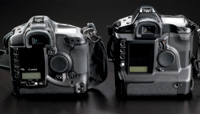
D2000 sits next to its replacement, the EOS-1D (left).
|
|
Without a doubt, 1998 was
an important year for the digital camera industry. For it was in '98
that the first really good, really usable, really portable digital SLR
camera hit the shelves. A joint venture between Japanese camera maker
Canon and American film giant Kodak, the camera hit the marketplace
like wildfire. In an interesting joint marketing experiment, Canon released
the camera as the D2000 with Canon badging, while Kodak rolled it out
as the DCS 520, badged a Kodak but with the Canon logo clearly visible.
The twins were based upon the defacto pro camera of the day, the Canon
EOS-1N, and offered a big (for '98) file, 1728x 1152 pixels--a
whopping 2.0 megapixels! For photographers using older DCS 420, DCS
410, and DCS 200 cameras, everything about the DCS 520 was revolutionary--especially
the big LCD on the back!
Yep, the D2000/DCS 520 was the first pro camera with an instant review
LCD, and it is the camera that invented "chimping"--the
act of constantly reviewing what you just shot, rather than looking
in front of you at what you're about to shoot. At a retail price
of around $15,000, it was considered a reasonable investment by most
daily newspapers, event imaging companies, and commercial photography
studios. Certainly the 2 megapixel was plenty for newspaper work, and
the big 6-megapixel sensor on the big brother DCS 560/D6000 would set
one back $30,000. Ouch!
|
| |
Canon
picked up Kodak's technology and carried on, making
the back panels and menu systems surprisingly similar on
the D2000 and EOS-1D.
|
|
Way Back In '99
My involvement with the DCS 520 started in early '99. I had just
spent about two hours playing with one at the Kodak booth at the big PMA
show, fighting off other interested parties while I marveled at the DCS
520's speed, incredibly bright LCD, and deep, deep menu and custom
functions. I was head over heels in love with this thing, and the 2-megapixel
file size seemed just enough for a lot of the catalog jobs that I was
shooting at the time. A few months later I managed to work a deal on a
"demo" DCS 520 from a Boston camera shop, and $11,000 lighter
I headed home with my new toy.
Over the course of about two years I banged out well over 100,000 shots
on the DCS 520, eventually replacing it with a series of newer and better
Canon digital SLRs. When I sold off the DCS 520 in early 2001, I got just
enough dough back to buy a spanking new Canon EOS D30 body. With a bigger
sensor, the ability to shoot JPEGs right in the camera and handle smaller
CompactFlash cards, the EOS D30 seemed like a much more mature product.
Missing My 520
My first few months with the EOS D30 made me miss the DCS 520 worse than
I thought. The DCS 520 had a great FireWire tethered mode, while the EOS
D30 supported only dog-slow USB. The DCS 520 used Kodak's excellent
PhotoDesk software, while the EOS D30 had Canon's amateur-oriented
Zoom Browser. Most importantly, the DCS 520 was a real EOS-1N body, with
a full 3 frames per second and that excellent, super accurate predictive
autofocus. The EOS D30 was good for what it was at the time, but really
couldn't match the DCS 520 for build quality, autofocus, and file
handling. Currently I shoot with EOS-1D and EOS-1Ds bodies, and certainly
they are a major advance over the older DCS 520 cameras.
So what happened to those tens of thousands of DCS 520 bodies that were
sold over the course of the late '90s? Even though I have the latest
and greatest Canon bodies, I thought I would look into a cheap DCS 520
body to keep around the house while the newer bodies stayed in the lockup
at my commercial studio. With DCS 520 prices now hovering at or in some
cases well below a grand, how could I resist?
Comparing "Old"
And New
Compared to the EOS-1D or even a newer Canon EOS 10D, the DCS 520 really
is a beast. It's bigger, heavier, much, much louder, and the LCD
seems horribly grainy by modern standards. That said, even an old beat
DCS 520 still autofocuses faster and more accurately than every D-SLR
out there, short of an EOS-1D or Nikon D1H. Given the price on a used
DCS 520, it's really comparable in purchase price to a good point-and-shoot
camera, and the operational difference is stunning. I don't know
if you've ever tried to shoot a sporting event or an active child
with a point-and-shoot digital camera, but it's nearly impossible
due to focus lock and shutter lag issues. That's not the case with
a used DCS 520--focus is quick and perfect and the camera happily
shoots along at 3.5 fps until its 12 frame buffer is filled.
|
| |
The
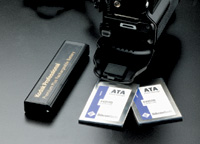
DCS 520 can handle two PCMCIA flash cards at once--in
my case a whopping 900MB of storage!
|
|
Is File Size That
Important?
Certainly the file size is a problem. I have a 5-megapixel point-and-shoot
that fits in my back pocket that simply blows this camera away for file
size. Can 2 megapixels compete in a modern world? Frankly, yes. I always
told friends back in the day that a single DCS 520 pixel was easily worth
two or three point-and-shoot pixels, and I think that has remained true.
Compare a DCS 520 image shot at ISO 200 with a 4-megapixel image shot
at ISO 200 from a really good $800 point-and-shoot camera, and in most
cases you'll find that they will make comparable 8x10 prints. ISO
200 shots with these cameras are fairly noiseless, something that definitely
cannot be said for point-and-shoot images from any manufacturer. The lack
of noise means that you can re-size the images quite handily. I re-size
every DCS 520 image into 2640x1760 files. That's a 4.6-megapixel
image, and compared pixel for pixel with my 5-megapixel consumer camera
files, I think the files hold up fairly well.
Anti-Aliasing Filter
One of the things that you'll need to get around with the DCS 520
is the whole Anti-Aliasing (AA) issue. Unlike newer cameras that employ
a softening filter on the sensor and then automatically re-sharpen in
firmware, the early Kodak cameras had a user-removable AA filter located
just in front of the mirror. By softening the image just a bit, you increased
the "circle of confusion" of very fine objects like individual
hairs and fine detail, avoiding the typical RGB candy-cane aliasing. Of
course, it was up to the user to sharpen after the fact, but this camera
was built for pros, right? Most experienced pros at the time simply took
the AA filter off, since the prevailing wisdom at the time was that it
softened the image way too much. I'm of the no-AA school also. One
of the big disappointments for amateurs buying used DCS 520s is the AA
filter. They get their big pro camera bargain home, bang off a dozen shots
that are really soft and lifeless, and put the camera back up on eBay.
Without the AA filter the DCS 520 images are tack-sharp, but of course
there are some instances of moiré and aliasing. A great tool for
removing aliasing from the era was Camera Bits' "Quantum Mechanic,"
which I used every day with my original DCS 520. Today I have found that
the Photoshop plug-in that Phase One includes with Capture One is a fantastic
moiré removal tool. It instantly removes any aliasing in my files
without harming fine detail.
Buying Tips
If you're looking to buy one of these digital bargains today, look
for the cleanest camera you can find. Since these cameras were custom
designed for working photojournalists, most of them are quite beat. Guys
who shoot hundreds of images every day do not baby their equipment.
In my quest for a good DCS 520 I looked at ex-Boston Globe and ex-Los
Angeles Times cameras--some with 80,000 to 100,000 actuations (that's
exposures in Kodak-speak). The Kodak menu allows the user to instantly
check on the total number of actuations on every body, and that number
is not resettable. Sure, my own DCS 520 was going strong in '01
with 111,000 actuations, but buying a high mileage DCS 520 is taking a
calculated risk.
The first thing you'll notice in your search is that D2000 and DCS
520 bodies seem to show different levels of wear. That's because
the DCS 520 was marketed directly to photojournalists while the Canon
version was marketed more to studio photographers. While many, many more
DCS 520s were made than D2000s, you'll find that D2000s are usually
fresher. That said, it's worth looking for a DCS 520 that's
clean enough. Why, you ask, if they're identical? Well there is
one very interesting wrinkle--both cameras save images to one of
the two internal PCMCIA flash card slots in proprietary Kodak TIFF format.
While the files are about 2MB each, they open in Photoshop as tiny little
preview files.
To open the full 2-megapixel image you'll need Kodak supplied software.
The Canon version only uses a Photoshop Twain plug-in called the Acquire
Module, while all Kodak cameras are supported by the latest version of
Kodak's PhotoDesk software. The ability to open and edit images
outside of Photoshop is an advantage, and really makes it worth your while
to look for a DCS 520 over a D2000. If you can live without the +/- four
stops of exposure compensation, excellent white balance control, and quick
rotation of images in the Kodak software, you can quickly and easily open
the Kodak TIFFs using the new "File Format Module," which
allows Photoshop to open the full resolution file.
Bringing It Home
In my case I found a very clean D2000 for well under $1000 with only 17,000
actuations on it. Since that's about a month of my typical shooting,
I knew that I should be able to get years of use out of this body. Once
I had my camera home I searched through my "technology closet."
Every photographer has one of these, and mine is stuffed with broken strobe
heads, dead camera bodies, and lots of old computer stuff.
Finding Media
I found my old drives for the DCS 520 and figured I'd see if they
still worked. To my surprise my old 320MB Calluna cards worked like a
charm. A single card takes up two PCMCIA slots, so it fills the D2000's
internal slots completely. Since I don't have a reader for a two
PCMCIA slot card, I simply plugged the camera into the same FireWire cable
that I used with the EOS-1Ds and bingo--the camera became a card
reader! Of course, you must use either PhotoDesk or the camera's
Acquire Module to access the images, so that might slow you down a bit.
I decided to find some more modern flash media so I looked online, where
I found nice flash cards--single-slot PCMCIA cards with big 448MB
capacity--at a ridiculously low $25 each. I figure that 900MB of
storage (about 450 shots) for $50 is a pretty good bargain, and with a
$9 USB PCMCIA reader I could now just dump files from the cards to my
hard drive.
For my money I got the super-clean body, all of the original manuals and
software, the AC adapter to run the camera from regular wall current,
and the Kodak fast charger with two new-style batteries. These cameras
are only a bargain if you can find a complete kit like this, because good
luck finding the stuff after you buy a naked body! When it comes to batteries
avoid the original batteries, which are simply marked "Kodak Professional."
These are older NiCd packs and really are useless. Look instead for either
"Premium Plus" batteries or "Gold" batteries,
since these are the Ni-MH high-capacity batteries.
Don't be swayed by a seller's included flash cards, since
these cameras can accept standard CompactFlash cards with an inexpensive
adapter. A great advantage of buying into the Kodak family of digital
cameras is the incredible support that Kodak offers for even older legacy
products. I found all the latest updated drivers on Kodak's website
for instant downloading, even the latest firmware for the camera and a
Windows XP FireWire driver. All for free!
The latest firmware is a must, since it allows you to set up to 10 custom
white balances in the Acquire Module, and then save them to the flash
card for use in the camera. This gives you a ton of custom white balances
"canned." Very sweet. The new firmware also finally allows
for good old-fashioned JPEG files to be produced in camera. In fact, I
often shoot a ton of stuff, then plug the camera into the AC adapter and
have the camera process the JPEGs. Now I can just dump the files into
my computer to view using any software.
My D2000 is a great camera. It looks totally pro, functions beautifully,
and produces very acceptable 8x10" prints on my Epson 2200P. While
there are plenty of newer cameras with much larger sensors, this camera
was designed for a rugged pro usage. I use mine as my primary weekend
camera, and I've filled a small gadget bag with a couple of batteries,
a couple of decent EOS lenses, and an older Canon flash, all for around
$1200.
Some Straight Talk
Let's get this straight: Finding a bargain on a used Kodak DCS 520
or a used Canon D2000 is not for everyone. This is older technology, and
everything about this camera other than the sterling EOS-1N body is a
bit dated. That said, there is no cheaper way to get a good pro camera
in your hands that accepts the full EOS lens line and can produce usable
digital images.
I know a handful of pros who shoot for small daily papers that still use
these cameras on a daily basis and swear by them, and plenty of event
photographers who still operate a fleet of these things. Practically all
of your favorite news and sports pictures from '98 though '01
were shot with these cameras. As a collector's item or curiosity
piece, the DCS 520 and D2000 cameras are fun and reasonably affordable
pieces. As working cameras, their performance still beats much of the
current amateur and prosumer offerings on the market today.
|