


- REVIEWS
Camera Reviews 
More Reviews Mobile Reviews Photography Reviews - GALLERIES
- VIDEOS
- BUYER'S GUIDES

Backing Up Is Good To Do: Carbonite Home: Online Backup
Photographers should back up their image files—it’s as simple as that—and there are numerous services that offer their services today. In this article I’ll be looking at one, Carbonite (www.carbonite.com), that works somewhat differently from others. Many people have told me that their $59 per year for the Home Plan, unlimited backup, is a steal, so I thought I’d check it out.
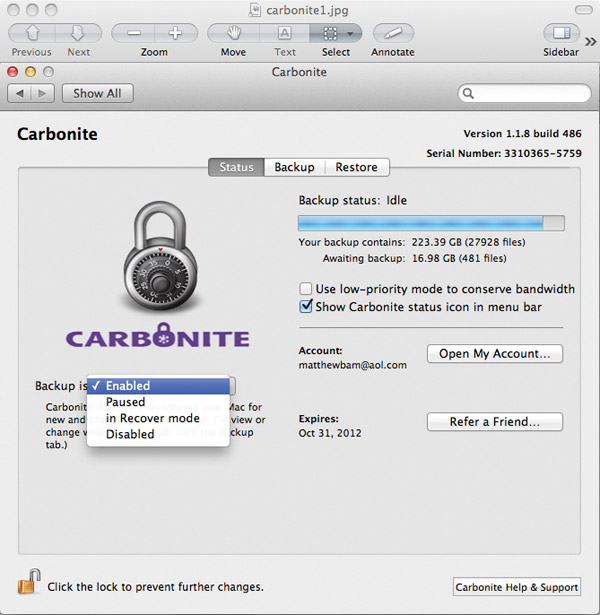
Carbonite’s appeal lies in the unlimited number of files it can store, but many other services have that offer as well (Backblaze at $5/month or $50/year; CrashPlan+ at $5/month or $60/year). The company permits you to choose what you want to back up (Backblaze doesn’t; CrashPlan+ does), and, perhaps most pertinent today, allows access to your image files via mobile devices (iPhone, iPad, Android, etc.). You can access your backed up files on these devices either through an app that you download or by accessing your files on their website from the browser installed on your device (Backblaze can’t do this; CrashPlan+ can). This is a one-way street, though, as you can’t upload images to Carbonite from any other computer or device for which you haven’t bought a subscription.
The primary drawback of Carbonite is that the Home Plan does not back up external hard drives, an option you’d probably like to have in the event you hear the deadly clicking sound coming from your external device (a telltale sign that it is about to break down) or some other malfunction where you lose all of your files. You might think that you can simply drag the data from the external drive to the computer temporarily to upload it, but when you delete it from the hard drive Carbonite will too, within 30 days. The other two versions of Carbonite do support backup for external hard drives—$99 per year HomePlus, and $149 per year HomePremier. This covers just one PC and, as of this writing, there is no external hard drive backup for Mac.

Backup vs. Storage
Carbonite Home is online backup—not online storage. Carbonite eventually does and will dump your files when you put the in the trash on your end, but not in the same way a platform like Time Machine does. It is meant to be a backup for the files on your computer—not a place to store files in order to free up space on your hard drive. Carbonite keeps files that you have placed in the trash or garbage (and emptied) for 30 days. Backblaze has a similar timetable for deleting files that have been placed in the trash and emptied.
Online storage services such as Google Drive (formerly Google Docs) and Amazon Cloud Drive differ from Carbonite and other similar backup services such as Mozy and Backblaze in that files are not automatically backed up, but uploaded manually and stored. Storage sites do not offer unlimited file uploads at set prices, so that you end up paying quite a bit more if you want to store several hundred gigabytes.

Upload & Download Speeds
Before you can calculate upload speeds, especially those that you are given online when you “test” your connection on websites like speedtest.net (to test speed at that website, click on My Results and click on Take a Speed Test), you have to realize that those speeds vary for a number of reasons, including how much bandwidth your computer is using (slows down if you are uploading files) and your ISP connection quality (if many people are online, your connection slows down). It’s kind of like the mileage ratings on cars.
When I registered for Carbonite, I wanted to back up over 200GB of images, and therein is the biggest challenge of using Carbonite—the upload speed of the transfer. It’s slow. It took me 10 weeks to upload 200GB of image files to the Carbonite servers. That’s right—10 weeks. But I have to say that my backup time was on the low end because I shut down my computer at night and that when Carbonite is on I’m usually working, running lots of programs, which signals Carbonite to slow down the upload process.
You can set a customized backup schedule for Carbonite, setting what days and times to begin and/or not run your backup. Carbonite backs up automatically in real time only when your computer is powered on and connected to the Internet. You can help things along by setting the backup to run while the computer is set to sleep with the monitor off.
According to the Carbonite website, typical home connections can back up 2GB to 4GB per day. Given that, my 200GB would still take about 50 days, a lot faster than my 10 weeks, but still slow. I would guess that the average user would want to start with the service as soon as they start working on their computer, which would allow the upload to proceed as they worked, not as a large project of accumulated files.

Accessing images is possible on any device because Carbonite files are in the cloud. It handles all kinds of image files, including those in Raw format. You can download these files by opening the Carbonite Preferences window on your desktop, clicking on the Restore tab, and navigating to the file you want to download. I tested how long it takes to download a 45MB file and found it took 3 minutes, not fast by any means.
Cloud Service Caveats
Cloud service availability (cloud outage downtime) is also a factor when making a decision about a cloud service provider. You’ve probably heard the stories about websites not being accessible or a failure to get to your files once you’re there. These occurrences are not common, but not rare either, and for most cloud service providers the outage time is no more than a few minutes a month. Recent bad weather conditions have shown that the cloud is vulnerable to storms and other general service outages.
In its NASDAQ filing, Carbonite acknowledges a wide range of risks that can occur to their system, resulting in the loss of your data. Data loss occurrences are most likely to be located in the data centers and can be caused by everything from terrorist attacks to human error to natural disasters to hackers/viruses infiltrating the system. If you think about the component parts of the computers and telecommunications systems that make up a cloud service like Carbonite, any part of it can fail at one time or another. Taking the risk of storing your portfolio online isn’t like gambling though. Your odds are good that your data will remain intact and accessible at any time. But I’d be negligent in failing to tell you that risks with any provider are there, and that the best bet is to make numerous copies and have a few backup options out there.
To be honest, I use Carbonite because it’s inexpensive and easy. I recommend it if you’re not in a rush to back up your portfolio and your goal is to back up a lot of data from one computer at a low price. To repeat, no backup or storage plan is perfect because the entire cloud is “darkened” with the risk of access availability. No matter how you store or back up your files, ensure they’ll be there when you need them by storing your images in another location, either online or “on the ground.”
Author Bio
Matthew Bamberg began his career in the arts as a graduate student at San Francisco State University in 1992. His work in the visual and media arts included video production and software applications. He completed his Masters in Creative Arts in 1997. After being a public school teacher for 14 years, Bamberg began writing for The Desert Sun, Riverside Press-Enterprise, and Palm Springs Life magazine. In 2005, Bamberg’s first book, Digital Art Photography for Dummies, was published. In 2011, he authored Beginning HDR Photography and Photography Applications for Cloud Computing (Course Technology, Thompson Publishing Group). Bamberg teaches at the University of California, Riverside and the University of Phoenix.
| ||
|
||
















 FEATURED VIDEO


Get the Latest Photo Tips, News & Reviews from Shutterbug!






| Camera Reviews Other Reviews | |
Mobile Reviews Photography Reviews Columns | |
News | |
Features | |
How-To | |
Resources |
 © 2026 Shutterbug
AVTech Media Americas Inc., USA
All rights reserved