| |
Photo recovery software comes with data file recovery
program, too.
|
|
We've lost a lot of
files in our day--mostly by forgetting to back them up--but
photo and movie files have always managed to hang around unscathed,
probably because we are rather slow with our equipment and constantly
charging it, checking the memory, and so on. So we wondered about how
often one would actually get to use ImageRecall (www.imagerecall.com),
which is a nifty little program to recover lost image files from flash
cards, memory sticks, or any other storage peripheral.
|
| |
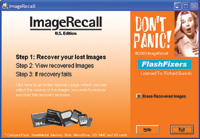
Opening screen sets you up for three steps to rescue files.
|
|
Don't Do This
That was until we read the suggestions in the Reviewer's Guide they
sent telling us what we could do to test the software. That is, just how
to create a file failure, and here's how:
1. Delete all the files on the card (or format the card)
in the camera.
2. Delete the files and/or format the card while it is
connected to a computer via a USB card reader.
3. Use an existing memory card that has been reused several
times.
4. Take enough pictures to fill a card to full capacity,
then one by one start editing pictures in the camera.
5. Pull a card out of a card reader while the activity
light is still blinking.
6. Remove the card from the camera immediately after
taking a picture, before the camera is done writing the image to the card.
7. Shut the camera off immediately after taking a picture,
before the camera is done writing the image to the card.
8. Drain the battery to near empty. Then start taking
lots of pictures.
9. With the card in a card reader connected to the computer,
click to open the media drive in Windows My Computer. Physically remove
the card from the card reader, then immediately put a different card in
the same card reader without closing the folder.
Some of these we would ordinarily never do, being a bit too cautious and
methodical, but some are common and unavoidable, especially if you are
distracted or in a hurry. So, having retrieval software is probably a
pretty good idea.
|
 |
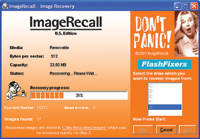
Rescue program searches for lost files.
|
|
Easy Handling
ImageRecall is easy to load and apply. Three steps are all it takes to
retrieve anything you've lost. It recovers photos saved in JPEG,
CRW, PNG, AVI, BMP, NEF, GIF, TIFF, RIFF, MP3, AVI and MOV formats. It
recovers files from CompactFlash, SmartMedia, Secure Digital, Memory Stick,
Microdrive, MultiMedia Card, xD Picture Card, and any other removable
media that appears as a letter drive. Only files erased by reformatting
on Fuji, Sony, or Olympus cameras are a problem, as their images are erased
permanently and cannot be recovered by ImageRecall or any other software.
The first step initiates recovery, the second displays the recovered images,
and the third saves them safely again wherever you choose. Simple as that.
|
| |
Relocated files are displayed for final recovery to new
storage media.
|
|
How It Works
How does ImageRecall find lost files, even ones that have been thrown
in the trash by accidental reinitialization of the storage media? Pretty
much the same way the FBI does when they grab a suspect's computer
and read all his incriminating data, even though he trashed it before
they arrived. When you "erase" your files by putting them
in the trash or initializing, they usually stay right where they were--they
just become invisible and await being written over by a later file. All
that's erased is their ID tags in the File Allocation Tables (FAT)--the
little flags that poke above the surface and let your computer (or camera)
see what and where they are. ImageRecall simply dives beneath the surface
like an underwater archaeologist and goes for the still-remaining bodies
of the files, and when it finds them it attaches a surface buoy so you
can identify and pull up the lost shipwrecks. If they've not been
down there too long, and the underwater environment hasn't been
too harsh, the salvage will be complete. If they weren't well connected
to begin with, or if you went ahead and took more pictures and wrote over
them, you might only pull up pieces at best.
That's why when you lose something; you should stop recording right
away and launch a rescue mission to avoid trampling your missing files.
You may not be able to recover everything, but ImageRecall claims a 95
percent success rate.
Do This
Of course, the best way to rescue your files is not to lose them in the
first place. Here are some tips to avoid an
accidental shipwreck:
· Always reformat the card in your camera each time after downloading
and saving the pictures on your computer.
· Always create a backup by saving your files from the memory card
to your computer. You might also create a second backup with a CD.
· Try not to let the memory card get too full before downloading
the pictures to your camera. Cards that get too full sometimes write over
the card headers.
· Always charge your batteries sufficiently before taking pictures.
Keep a set of fully charged spare batteries handy just in case.
· Do not remove the card from the camera too quickly while the camera
is still saving data to it. Wait a few moments until you're sure
the picture is completely written to the card.
· Wait a few seconds before shutting off the camera for the picture
to be written to the memory card. With the power shut off the camera may
stop writing to the card, causing a file corruption.
· Do not take pictures too close together beyond the manufacturer's
recommended interval. The camera will not be able to finish writing one
picture completely before starting on the next.
· Avoid large static charges, and be extra careful when handling
cards in dry, low humidity areas.
· Keep cards away from strong magnetic sources and extreme heat
and cold. Walk through airport x-rays and scanners are safe, but be careful
of the stronger x-ray equipment used to examine checked baggage.
· Don't remove the card from a card reader too quickly. Wait
until it has finished communicating with the hard drive and all files
on that card are closed.
· Edit and delete pictures on the memory card with your computer,
not with the camera. Too many file edits and picture deletes in the camera
can sometimes cause card problems.
· If a memory card problem occurs, stop using the card immediately.
Do not reformat the card or delete pictures. Proceed immediately to rescue.
· Be careful with the Delete All and Card Format options in the
camera. Depending on the camera, these operations are sometimes irreversible.
Don't let people unfamiliar with the camera navigate the menus.
If ImageRecall can't rescue your files, you can always send your
storage media to a service with more sophisticated gear to attempt the
task. Try FlashFixers (www.flashfixers.com),
who specialize in photos and are recommended by ImageRecall, or DriveSavers
(www.drivesavers.com),
OnTrack (www.ontrack.com),
or LC Technology (www.lc-tech.com).
ImageRecall weighs in with a price tag of $39.95, and it comes with a
bonus program called DataRecall, which allows you to do the same sort
of rescue work on non-image data files on your peripherals such as Word,
Excel, PowerPoint, PDF, and Zip files.
|