While there are film camera
systems that are designed specifically to shoot panoramic images, digital
photographers are currently without an equitable product. Making the
task even more difficult is the fact that many of the professional-level
digital SLR cameras still have a focal length multiplier, which in many
cases makes a 20mm lens behave more like a 30mm lens. Using a wider
lens (around 14mm) often isn't the answer, as generally speaking
most lenses in this category exhibit too much distortion of the image.
One way to achieve the effect of a wide angle lens or to create a panoramic
image is to take multiple shots of the same subject and digitally stitch
them together on the computer. Stitcher 3.5 is a professional stitching
program that does just this task. Stitcher 3.5 lets the user build high
quality panoramic images for use in print, film, web, or for use in
coordination with 3D software. Even if you are not into creating full
360Þ panoramic images, Stitcher's powerful rendering engine
allows you to stitch a few high-resolution files together and render
them as a single flat high-resolution image.
|
| |
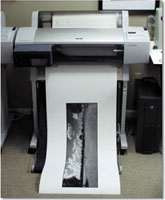
This
10x36" print on the Epson Stylus Pro 7600 contains
amazing detail even under the scrutiny of a loupe due
to the stitching of eight 6-megapixel files to create
this single high-resolution file.
Photos
© 2002, Cris Daniels, All Rights Reserved
|
|
How The Process Works
There are a few important factors in creating quality panoramic images
on a computer. Realviz recommends that for best results, that the photographer
uses a tripod and a panoramic pan head. Through my own testing, I found
that this was the only way to walk away from a scene knowing I had images
that were captured correctly for stitching. While hand holding the camera
is possible, there is also a much larger possibility that there will
be a few frames that won't stitch together perfectly. There also
may be some frames less sharp than others due to camera shake. So while
it isn't mandatory to use a tripod and panorama head, if you are
serious about getting the best images (with any panorama software) it
is a worthy investment. For this test I used a Bogen 3036 tripod and
a custom-built panorama head.
It is also quite important that the camera system that you are using
has manual controls for both focus and metering. I used three cameras
during this review, the Nikon Coolpix 950, a Fuji S1 Pro, and a Nikon
N90. Shooting panoramas with each camera is a little different, but
all of the cameras had the controls needed to turn off autoexposure
and autofocus systems so that images would show a seamless blend when
stitched.
|
System Requirements
Stitcher 3.5 runs on both Windows and Macintosh platforms. The Windows
version of Stitcher requires Windows 98SE, Me, 2000SP2, NT4, or XP.
The Macintosh version runs on either OS 9.1 or OS X v10.1 and up. The
recommended hardware requirements call for at least a 350MHz Pentium
II processor, or a G3 300MHz processor and 128MB RAM. Because Stitcher
3.5 is so calculation intensive, creating panoramic images is a much
easier and faster process when using a fast computer. The total time
it takes to assemble each panorama is completely dependent on the speed
of the host computer, so in this case it isn't possible to have
too much computer speed. Because Stitcher 3.5 runs in OS X for Macintosh,
I reviewed the program on a Dual 1GHz G4 Mac running OS X Jaguar.
|
| |
Panorama
from Nikon Coolpix 950 with wide angle adapter, f/7.41
at 1/189 sec, ISO 100.
|
|
The User Interface And
Options
The Stitcher 3.5 interface is simple and clean. Essentially there are
three main windows, the tool bar, a layout window where the panorama
is assembled, and lastly the "Image Strip" window that displays
thumbnail images of the files that you are going to use in the current
project. Beginning a project is as simple as importing images into the
"Image Strip" area. Modifications such as rotation can be
performed at this stage so that users do not need to open each image
in a separate editor prior to working with them in the Stitcher application.
Assembling the panoramic
image is a straightforward process. Images are dragged into the assembly
window, oriented properly, and the user presses the enter key on the
keyboard telling Stitcher to attach these two images. The whole process
repeats itself until the panorama is complete. There are options in
Stitcher to adjust the stitching camera properties, and to correct image
distortion caused by camera lenses. The corrections that Stitcher uses
to correct for a particular lens can be saved as a camera profile for
use on future panorama projects. This is convenient for photographers
because for each subsequent project that is shot with the same lens
the distortion figures for that particular lens have already been calculated
and need not be computed again.
|
| |
Panorama
from Fuji S1 Pro with 28mm lens, f/11 at 1/750 sec,
ISO 320. Converted to black and white in Photoshop.
|
|
Performance
The first panorama I built was using the Fuji S1 Pro. I mounted this
camera on a panorama head and had used a Nikon 28-105mm lens on the
camera. Although I used the lens at its 28mm setting, the focal length
multiplier of the S1 made the effective focal length roughly 44mm.
Prior to shooting the images, I metered the scene and chose an exposure
that would work for the entire panorama. Once I determined the correct
exposure, I white balanced the camera, manually focused, and shot
the series of images. The reason it is important to lock the exposure
settings and white balance is that the images will have problems stitching
if each image is exposed separately.
I built a variety of panoramic images to test Stitcher. Some were
360Þ panoramas, and some like the above scene were 180Þ
panoramas rendered specifically for print output (this print is 10x36"
at 240dpi). The resultant print contains extremely fine detail, certainly
more than is possible from a single image from the S1. Using a film
camera was much like using the Fuji, but scanning the images is a
bit more complicated because, like other panorama software that I've
used in the past, the images need to have the same pixel dimensions.
To achieve this, the user will need to have scanning software that
allows you to save the crop and exposure settings. This isn't
hard, but requires a bit more planning. Certainly, digital camera
files are easier to work with for these reasons.
|
| |
Stitcher
3.5 Rendering dialog box.
|
|
Other Features
Stitcher 3.5 is as flexible as it is powerful. The user can render
their images in many different formats and projection types. Panoramas
can be rendered with many different projection types including planar
(flat), cubical, cylindrical, and spherical output. Also supported
are QTVR (Quicktime), VRML, and Shockwave; all formats are based upon
viewing the panoramas in a separate program that allows users to navigate
the panorama. Because Stitcher also allows the user to specify "hot
spots" in the panorama, it is easy to create panoramas for a
variety of uses such as interactive tours. This is the same type of
technology currently used to create virtual tours of houses, which
is a very popular use for this type of software.
When rendering a panorama the user can specify a variety of parameters.
For my large panoramas that I intended to print, I rendered them at
their maximum image quality, and largest image size (in pixels). When
rendering a Quicktime movie, there are adjustable parameters for quality,
size, and other attributes that pertain to that particular file type.
A nice time saving feature of Stitcher 3.5 is the template feature,
which can speed up productivity tremendously. These templates allow
the photographer to reuse identical setup and shot parameters from
one project to the next. This is where a panoramic pan head is most
valuable. It will help ensure that the correct number of shots are
taken for the template, and that the overlap of the images is enough
to provide a quality stitch.
Summary
Stitcher 3.5 is the most powerful stitching program I've used
to date. With its advanced capabilities such as dealing with lens
distortion, Stitcher 3.5 can create some very high quality panoramic
images. The manual is well written, and also provides some good strategies
for picture taking. The ability to save the camera calibration parameters
and templates can help automate the process if the user has a consistent
workflow.
Stitcher 3.5 is a professional piece of software, and at $495 it carries
a professional price tag. This will put it out of the range for many
hobbyists, but based on the performance and results I would say that
the program delivers a good value even at the relatively high price.
I have not seen a competitive program that offers the comprehensive
feature-set Stitcher provides.
It would be proper to warn that rendering a large file takes the majority
of the computer's resources. If you have one computer, it is
safe to say that the computer will not be usable while a panorama
is rendering. Stitcher 3.5 should be of great interest to anyone serious
about panoramic photography. A no cost downloadable demo of Stitcher
is available at the Realviz web site at www.realviz.com.
|