| |
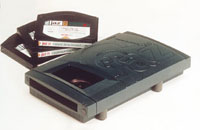
Along with the Zip, Iomega's Jaz drive is one of
the most popular forms of removable media for taking image
data to service bureaus, but as the cost of recordable
CD drives and media drop, CD-R is quickly becoming the
removable media of choice for many digital imagers.
|
|
Service bureau is a term
left over from the bad old days when few people could actually afford
to own a computer. Instead, many of us had to take our data--usually
in punched card form--to companies who, for a fee, would process the
data using their large main frame computers.
Today's service bureaus can digitize your photographs using scanners
or Kodak's Photo CD process. They can also turn digital images
back into analog form, producing prints, slides, or negatives from your
image files. A service bureau can take many forms. It can be a small
specialized facility that only provides Kodak Photo CD service or a
large commercial facility that offers a wide range of digital input
and output services. Some cater to the pre-press market and can provide
four-color separations directly from your Adobe Photoshop or PageMaker
digital files.
Any competent service bureau should be able to handle digital input
from Windows computers as well as Mac OS computers. If the company you
contact cannot handle the graphic files that your computer can create,
keep looking. If you live in a small town that does not have a local
service bureau, look in regional computer publications for those that
will work via mail order. Better yet, check the ads in Shutterbug, including
Photo Lab Showcase. The section "Service Bureaus Online"
contains a list of several companies that you can contact through the
World Wide Web.
Finding A Good Service Bureau. If you've never worked
with a service bureau before, the biggest question you might have is,
"How do I find a good one?" The answer is that it's
not much different than looking for and working with a good professional
photo lab. Here's a few tips:
· Compare. Talk to your friends and ask them if they know of a
company that provides the kind of services you're interested in
at prices you can afford. While price alone is not a major consideration,
it can be used in comparing facilities that offer a standard product
or service. For example, in my area I can pay 70 cents or $3 for a five
resolution Photo CD scan. Photo CD Pro scans from medium or large format
film range from $4 to $18. In each case, the quality of the imaging
services from the lowest cost Photo CD provider has been as good as
the supplier who had the highest price.
· Test. Take some representative digital files and divide them
into two groups. Send the first group to one service bureau and the
second to another. When the output comes back, evaluate the entire experience,
not just the quality of the output. Was it delivered when they told
you it would be? Is the price the same one that was quoted? After that,
look at the results. One Pro Photo CD service bureau I tested was unable
to provide the index print that slips into the cover of the CD's
case. "I couldn't get the color right," the technician
told me. If he couldn't get the color right on the index print,
I was concerned that he would not be able to get the color right on
the Photo CD scans, too.
· Evaluate. In the case of any kind of scanning services, open
the files and view them on your monitor. For other forms of output,
such as dye sublimation or large format ink jet prints, you should be
able to immediately see the quality of the finished print. Is it what
you expect--or better?
Once you've made a decision to use a certain service provider,
stick with them--through thick and thin. People who constantly change
service bureaus are never satisfied. Anyone can make a mistake. What
differentiates a good service bureau from a bad one is not just the
quality of their products, but how they treat you when they make a mistake.
What you need to find out is how quickly they correct these mistakes
and how they treat you during the process.
Portable Digital Images. The next question many people
have is, "what is the best way to deliver images to a service
bureau?" Like other questions about digital graphics, there is
no simple, single answer. The simplest way to transmit image files is
to send them by modem. Fast modems are available at a very modest cost
and no other method delivers your files right now. Some service bureaus
even provide free software for you to upload your files. The only disadvantage
of this approach is that, depending on the speed of your modem, it might
take several hours to transmit your files. On the other hand, you can
upload images during a weekend and they will be ready first thing Monday
morning.
Don't overlook removable media. These days, one
of the most popular removable formats is Iomega's Zip. With a
retail price of around $100, Iomega's Zip drive is affordable
and its cartridges are compact and inexpensive. An even better choice
is recordable CD-ROM. The prices for CD-R drives, while more than a
Zip drive are not out of line for a serious digital imager. As I was
completing this article, a rewritable CD-R drive can be purchased for
as low as $259. CD-R drives provide over six times as much storage space
as a Zip drive and have a lower cost per megabyte. Blank CD-R discs
cost under two dollars, while Zip cartridge prices run about $12 each.
What clinches it for me is that once you have written data to a CD-R
media, is almost impossible to add anything--like a virus--to the disc.
While most service bureaus are scrupulous in the attention to virus
protection, I'm always concerned when I send any kind of magnetic
media out of my office. A CD-R provides another level of protection,
not possible with magnetic media such as Iomega's Zip or Jaz.
What do you do when a service bureau doesn't support your favorite
removable media drive? I asked Cies-Sexton what they did. "If
a client has a device we don't support, some of them just bring
us their external hard drives. We plug them in and we can transfer stuff
on and off of it. As long as it doesn't take some strange driver,
it's not a big deal to hook another SCSI device."
It's A Two-Way Street. Communication is important in working with
service bureaus, but submitting your digital information in a proper
form is even more important. Especially if you don't want any
surprises when you get your, often expensive, output back. A study conducted
by the Graphics Arts Technical Foundation showed that 57 percent of
the files submitted to service bureaus needed additional work before
the file could be processed. I conducted an informal survey of a few
local service bureaus to discover other common problem areas. Here's
a look at some of those problems and how to avoid them.
Incorrect page settings or image ratio accounts for 7.8 percent of the

problem files. This can be a dilemma for photographers requesting 35mm
slide output. A 35mm slide has an aspect ratio of 1.5:1. If your original
image has a different ratio, you are forcing your service bureau to
make a decision. Do they deliver the image with black borders on two
edges of the slide to maintain the ratio of the image you sent or do
they enlarge the image to fill the 35mm frame? A good service bureau
will call, but even great labs get busy and phone calls can be forgotten.
What's worse, they could call you and your response is, "I
want to fill the frame." At that point, something has to be cropped.
Who is going to make that decision: the service bureau or you? If it's
you, they will have to send the file back to you for cropping, delaying
completion of the project further.
The best way to make sure that your image has the proper ratio is to
use your desktop publishing software's Show Rulers command to
actually see if your image has the proper dimensions. With image-editing
programs, check the Image Size dialog box. A typical dialog includes
two data sections: one displaying data for the original image and one
used to make changes to this data. Typical Image Size data includes
length, width, and resolution. Use the cropping tool to trim the photograph
into a shape that has the proper ratio. By doing it at this stage, you're
making sure that the image retains information and nothing important
is missing. You can't expect any service bureau to know what to
keep and what to eliminate, so it's up to you to make sure your
image is formatted correctly.
Missing Linked Files can be a problem when submitting an Adobe PageMaker
or Quark XPress file that contains multiple images that have not been
saved as part of the original files. The GATF survey showed that 5.3
percent of problem files had missing linked graphics. Having the ability
to link files instead of making them part of the original file can save
hard disk space while you're working, but you have to remember
to send all of those linked files to the service bureau. That's
where a proof print--if only ink jet output--helps the service bureau
and you, too. Use the proof as a check list and check off each item
to make sure they are included in the files you are submitting for output.
Some service bureaus require a proof print, and lack of a proof accounts

for 4.6 percent of their problems.
Cies-Sexton told me that "the next biggest problem is not receiving
all the stuff a service bureau needs to create output." This gets
worse if a file includes type. Missing or incorrect fonts account for
22.2 percent of problems. While service bureaus have many hundreds of
fonts in their systems, they may not have the Hobo Bold Italic you used.
I know. I use Adobe Skia for my promotional material. When working with
a new service bureau, I call and ask if they have it. If not, I make
sure I include a copy on disk when I submit my files. That's another
reason why it's a good idea to send a proof of what you expect
the output to look like. If you forget a font and the service bureau's
default is Courier, the quality control people will compare what you
sent with what was output and will call and ask, "Where's
the font?" Other obvious problems include scans supplied in the
wrong format (7.8 percent) and files defined with incorrect color space
(10.9 percent.)
Believe it or not, another thing service bureaus have to deal with is
clients who don't bring the most original generation of an image.
That, along with missing graphics, accounts for 4.5 percent of the problems.
A service bureau cannot read your mind. They don't know what material
you have in your office or studio. The quality of the material submitted
will be reflected in the quality of the output. As the old computer
saying goes "garbage in, garbage out." Nowhere is this more
true than working with service bureaus.
Service Bureaus Online
You can use the World Wide Web to search for service bureau printers,
which is how I found the companies listed below. The following list
contains contact information on some of the companies I found while
doing research for this article and their appearance here does not qualify
as an endorsement by me or Shutterbug. Visit the company's web
site to get information or call them about their policies and practices.
Since the Internet is ever changing, it's possible that an address
may have changed or been discontinued since the book was originally
published. Don't panic. Instead, go to an Internet portal site,
such as Yahoo! (www.yahoo.com)
or Excite (www.excite.com),
and enter some of the keywords associated with the missing web site
to find its current location.
Chrome Digital (www.chromedigital.com)
Cies-Sexton (www.cies.com)
eye for color (www.eyefourcolor.com)
Fine Arts Photographics (www.fineartsdigital.com)
The Presentation Center (www.prescenter.com)
Reed Photo Imaging (www.reedphoto.com)
Spectrum Select Imaging (www.spectrum-imaging.com)
Adobe Systems
345 Park Avenue
San Jose, CA 95110
(408) 536-6000
fax: (408) 537-6000
www.adobe.com
Cies-Sexton
1247 Santa Fe Dr.
Denver, CO 80204
(303) 534-4000
www.cies.com
Iomega Corp.
1821 W Iomega Way
Roy, UT 84067
(800) 697-8833
(801) 778-1000
fax: (801) 778-3748
www.iomega.com
Quark, Inc.
1800 Grant St.
Denver, CO 80203
(800) 788-7835
(303) 894-8888
fax: (303) 894-3399
Customer Service
PO Box 480790
Denver, CO 80248
www.quark.com