| |
Virex
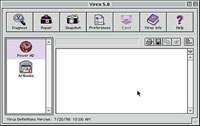
5.8 was manually run to check the contents of a 1GB Iomega
Jaz cartridge. The test took less than a few seconds and
reported that the cartridge was "clean." If
it was not, Virex would have caught and stomped the virus
dead.
|
|
Do You Have A Virus?
Although some viruses alert you to their presence, the most common ones
give few symptoms of their activity. Computer users can, however, be alert
for some activities that can tip you off to the possibility of infection.
Here are the 12 danger signs that you may have a computer virus:
1. Change in the size of a program.
2. Change in the file's date or time stamp.
3. A program or file icon changes.
4. Longer than normal program loading time.
5. Slower than normal system operation.
6. Indications of reduced memory or available disk space.
7. Error message about bad sectors on a floppy disk.
8. Odd or unusual error messages.
9. Unusual screen activity.
10. Failed program execution.
11. Failed system startups.
12. Unexpected writing activity on your hard disk.
Kinds Of Viruses. Like the real viruses that cause problems
with your body, there are many different types of viruses and knowing
some of the vocabulary can help protect you from possible infection.
All drives, hard or floppy, contain a boot sector containing information
about that disk's formatting, and can be infected by viruses called
Boot Sector Infectors. You get a boot sector virus by leaving an infected
diskette in a drive and starting the computer. When the boot sector program
is read and executed, the virus goes into memory and infects your hard
drive. One example is the notorious Michelangelo virus that was set to
destroy data on March 6th, Michelangelo's birthday. My friend Carl
was infected by this virus which he caught from a commercially available
software package.
File Infectors attach themselves to or replace .COM and .EXE files, although
in some cases they can also infect files with extensions of .SYS, .DRV,
.BIN, .OVL, and .OVY. Uninfected programs become infected when they are
executed with the virus in memory. In other cases they are infected when
they are opened or the virus infects all of the files in a directory.
The first sector of every hard drive contains the disk's Master
Boot Record and Partition Table. The Master Boot Record has a small program
called the Master Boot Program which looks up the values in the partition
table for the starting location of the bootable partition, and then tells
the system to go there and execute any code it finds. On floppy disks,
these same kind of viruses can infect the boot sectors. You can catch
a Master Boot Record virus by leaving an infected diskette in a drive
and starting the computer. When the boot sector program is read and executed,
the virus goes into memory and infects your hard drive.
A macro is a programmed series of commands that can perform a series of
actions and is triggered by a keystroke or combination of keystrokes.
Programs, like Microsoft's Word or Excel, allow users to create
macros that will help them accomplish repetitive tasks. Macro viruses
are built around the macro features found in Word and Excel and will attack
all of your Word and Excel files. Some are merely mischievous and turn
your documents into templates or display messages about the dangers of
nuclear proliferation, while others can be as damaging to your hard disk
as an H-bomb. Because Word and Excel files have the same file structure
for Macintosh and Windows, macro viruses can infect spreadsheets, documents,
and templates for both kinds of computers. That's one of the reasons
Microsoft's Office 98 for the Macintosh contains a feature that
allows you to disable macros when launching files that contain them. I
expect the see the same feature in the Windows version of Office 98 when
it is released.
A logic bomb is a virus that destroys data by reformatting your hard disk
or by inserting random bits into data files rendering them useless. Once
launched, a logic bomb does its damage right away, whereas a traditional
virus keeps on eating dots like Pac Man until there is nothing left.
Multi-partite Viruses are a combination of several of the viruses listed
and can infect both files and Master Book Records. These types of viruses
are rare, but their number is steadily growing.
A polymorphic virus changes its binary pattern each time it infects a
new file to prevent it from being identified. These are sometimes called
"stealth" viruses. One particular virulent example is Elvira,
which first appears as an on-screen poem. During the few seconds it takes
to read the 12 words of verse, Elvira's polymorphic structure slips
code onto your hard disk and can erase it in less time than it takes to
read the poem.
A Trojan horse is a virus that is attached to a real program that you
may have unsuspectingly downloaded. These kind of programs almost always
have intriguing sounding names. One of the most famous, was one that promised
to turn your CD-ROM drive into a CD-ROM recorder. This may be technically
impossible with a software upgrade, but trusting web surfers looking for
something for nothing, quickly found themselves infected. Trojan horses
can be also used to locate any of your passwords or may alter an existing
program, making it easier for the virus to gain access to it.
Worms are not just the type of people who create viruses but are also
a type of virus itself that replicates itself throughout your hard disk
and memory, using up all of the computer's resources and eventually
crashing the system. The AutoStart 9805 Worm, which can affect any PowerPC-based
Mac OS computer, is a stand-alone file that causes performance problems
and corrupts files. All files affected by the AutoStart Worm are irreparable.
If you want to get more deeply into the pathology of viruses, check out
two web sites devoted to the study and eradication of computer viruses:
The Virus Bulletin home page at www.virusbtn.com
and Doug Muth's AntiVirus Help Page at www.claws-and-paws.com/virus/index.html.
|
| |
Users
of any of Symantec's antivirus programs will want
to visit the Symantec AntiVirus Research Center, which includes
software updaters and useful information, such as an online
encyclopedia of viruses.
|
|
A Clean Room Strategy.
There are two major truths about computer viruses: Nobody sets out to
catch one and nobody thinks it can happen to them. You can make your computer
completely virus proof if you take a few simple steps:
1. Do not connect your computer to the Internet.
2. Never send or receive e-mail; especially with files attached.
3. The only floppy disks you use in your system are brand new, out of
the box.
4. Never use any floppy disk, Zip, or any removable media cartridge that
has been read or written to by any other person's computer.
5. Avoid shareware programs.
6. Don't use any floppy disks or CD-ROMs that are not part of a
commerical software package.
As you can see, the safest way to avoid getting a virus is similar to
how you can avoid the human kind: If you avoid all contact with people,
your chances of getting a virus are infinitesimal. If you avoid any kind
of digital contact with other people, your computer will be safe. The
problem is that neither choice is an option for most of us. According
to Network Associates, there are over 300 new viruses created each month,
which is why installing virus protection software is the best solution
for protecting your hard drive. All viruses have a "signature"
which is a binary pattern of the machine code of a particular virus. Antivirus
programs have libraries of virus signatures they use to detect and, in
most cases, cure known viruses.
Kill Bugs Fast. For the Apple Macintosh and compatible
computers, such as my Power Computing PowerTower, the best solution is
Virex from Dr Solomon's Software. Virex Protects against macro viruses,
one of the most common forms of infection, automatically scans all files
downloaded from the Internet, and will scan compressed files. You can
set the program's preferences to scan every floppy disk or removable
media disk inserted into your computer. There is some performance loss
you take while the software searches each disk for viruses, but it is
far less than you will encounter if a virus is present.
Virex provides other ways to diagnose viruses and Trojan horses: It can
manually scan volumes, files and folders, and provide reports of what
it finds. Virex provides a snapshot feature that allows files to be analyzed
for changes over time that may indicate a potentially dangerous unknown
infector. Once Virex detects an infected file, it is capable of eliminating
the threat by completely removing the virus programming code from the
file, or, in the case of a Trojan horse, deleting the offending file.
Where a virus has already caused damage to a file, Virex can usually repair
the damage and return it to working condition. Since viruses are constantly
being created, subscribing to an update service or downloading monthly
updates is important to keep your software working against the latest
viruses. Dr Solomon's offers a modestly priced update service that
automatically e-mails new virus updates and ships all future software
upgrades so you don't have to worry about whether your protection
is up-to-date. As an alternative, you can download monthly virus updates
from their web site at www.drsolomon.com/products/virex.
Using its "Bloodhound" technology, Norton AntiVirus for Macintosh
5.0 can detect and repair new and unknown macro viruses. Bloodhound analyzes
files for virus-like behaviors and allows for immediate repair of the
infected file. The program has an Auto Repair function that allows users
to repair a file containing a virus, without even opening the Norton AntiVirus
application itself. A Universal SafeZone acts as a virtual clean room
so any files copied or downloaded onto your hard disk can be scanned in
isolation and be declared safe before being used. Users can download the
latest virus definitions from the Symantec Anti-Virus Research center
on the Internet via the program's Live Update feature. This feature
can be scheduled to run automatically ensuring you are protected again
the latest virus threats. Users who have heard that the previousl version
ran a little slow, will be happy to learn that Version 5.0 is PowerPC
native and allows for faster scans. The program also supports the new
HFS+ hard disk format offered by the latest version of Mac OS 8.0. The
package also contains a bootable CD-ROM, so you can start from the CD
in the event that a virus has made it impossible to start your computer
from its hard drive.
If you are only slightly concerned about viruses, you may want to try
a freeware Mac OS virus protection program called Disinfectant. Unlike
commercially available programs, the program is only occasionally updated,
but may be adequate if you practice some of the "clean room"
strategies previously mentioned. You should be aware that Disinfectant
will not protect against Word or Excel macro viruses, but if you don't
use either of these programs, that kind of infection is not a problem
for you. A copy of Disinfectant is available from all of the usual freeware
sources, including www.shareware.com.
Windows On Viruses. The three McAfee VirusScan products
from Network Associates are designed to detect viruses from floppy disks,
Internet downloads, e-mail attachments, and network shared files. Since
current estimates are that 70 percent of all virus infections are being
transmitted by Internet dowload and e-mail attachments, McAfee VirusScan
scans all downloads and attachments to stop a virus before it infects

your system. The package includes an Emergency Disk creation utility that
lets you recover from a boot virus infection. The basic Virus Scan package
detects and removes viruses for all popular PC-based operating systems,
including DOS, O/S 2, Microsoft Windows 3.1 as well as Windows 95 and
NT. The Deluxe version includes a QuickBackup utility and two years of
free product updates. The Security Suite includes WebScanX which provides
protection from hostile Java and ActiveX applets on the Internet, while
letting useful ones continue to operate. While most applets are safe,
virus makers are using them to create mayhem on your system by deleting
files, stealing information, and crashing your system.
Symantec's Norton AntiVirus 5.0 for many different computer systems
including Windows 95/98, NT Workstations, NT Servers, as well as specialized
protection for Mircrosoft Exchange, Lotus Notes, and Internet E-mail Gateways.
Norton AntiVirus 4.0 is available for Windows 3.x and DOS systems. The
features found in Version 5.0 let you quarantine infected files in a safe
corner of your computer until you're able to repair them. This quarantine
area ensures that your other files stay clean and you won't accidentally
send infected files to anyone else. The Scan and Deliver wizard makes
it possible to send quarantined or other suspicious files to Symantec
for evaluation. The SARC staff will reply quickly with advice and any
needed virus definitions. Norton AntiVirus automatically protects you
against viruses as well as infected ActiveX and Java applets you might
encounter in the Net. Norton AntiVirus runs in the background to keep
your computer safe from viruses that might come in from e-mail attachments,
Internet downloads, floppy diskettes, software CDs, and even from a network.
The program can be scheduled to automatically retrieve new antivirus definitions
from SARC as often as once a week. Symantec's Bloodhound technology
sniffs out and eliminates any new viruses that might arise between virus
updates. You can download a 30-day trial version that lets you quarantine
an infected file and send it to Symantec for analysis.
While you can't get a virus from the e-mail itself, if you open
the attachment, you may have also opened Pandora's Box. You may
want to take a look at Panda Software's Panda Antivirus if you use
the Windows versions of Microsoft's Exchange or Outlook for e-mail
software. Despite the cute name, Panda Antivirus is designed to detect
and disinfect viruses before they are copied to your hard drive and is
well integrated with the Exchange/Outlook interface. Panda Antivirus analyzes
embedded OLE documents as well as compressed files in many different formats.

This program also works on files that have unlimited levels of compression
and for unlimited number of times. Panda Antivirus will intercept read
and write operations on both new and existing messages and stomp out any
viruses it finds. An evaluation copy can be downloaded from their web
site at http://www.pandasoftware.com.
Manufacturers/Distributors
Network Associates, Inc.
(Dr Solomon's Software)
3965 Freedom Circle
Santa Clara, CA 95054
(408) 988-3832
fax: (408) 970-9727
www.nai.com
Panda Software
580 Washington St.
San Francisco, CA 94111
(415) 392-5850
fax: (415) 392-6116
www.pandasoftware.com
Symantec Corporation
2500 Broadway, Suite 200
Santa Monica, CA 90404
(310) 453-4600
fax: (310) 453-0636
www.symantec.com
|