While most digital photographers
are familiar with JPEG and TIFF formats, the latest format to come down
the pike for digital cameras, known as "raw," as it deals
with the raw information right from the sensor, is something fairly
new. Simply stated: to gain maximum image quality, you should use the
digital camera's raw format. To work with raw files you need a
"raw converter" to create standard TIFF or JPEG files.
To no real surprise, not all raw
converters deliver the same benefits in the quality of the output and,
more importantly, a good raw file workflow. All current raw file formats
are proprietary. That is why every manufacturer features its own raw converter,
which works only with files from that manufacturer. Here are some of the
raw file converters now available: |
|
· Canon's File
Viewer Utility (free with the camera)
· Nikon's Capture 3.5.x ($150)
· Kodak's Photo Desk (free with the camera)
· Fuji's Raw File Converter EX (free with camera in the US)
· Sigma's Photo Pro (free with SD9)
· Olympus' Camedia Master (free with camera)
However, as a result of many excellent third-party raw converters, camera
owners have many more options. Among those are:
· Adobe's Camera Raw plug-in for Photoshop 7 ($99)
· Phase One's Capture One DSLR (Pro $499 and LE $99)
· Bibble ($99)
· BreezeBrowser (improved wrapper for the Canon SDK, $44.95)
· Yarc+ (improved wrapper for the Canon SDK, $54)
In order to make some judgments about how well each of these work we first
have to know what a raw converter can do or needs to do. Some features
are essential and need to be supported by any raw converter. Others can
also be done later in Photoshop or some plug-in. Finally, there are some
functional requirements a raw converter has to meet to be easy to use
in your daily workflow.
|
|
The Raw Workflow
Here is a diagram of the whole principle of raw file workflow.
The rest of this article will discuss which of these steps is the responsibility
of a raw converter. We will call a feature essential if no raw converter
should do without.
Raw Converter Responsibilities
There are actually two extreme schools of raw conversion strategies, and
all raw converters fall somewhere in between:
· Linear conversion: Performs only the interpolation,
exposure correction, and white/gray balance in the raw converter (maybe
some noise removal) and the rest in Photoshop using actions, plug-ins,
or automation.
· Full service conversion: Does all the jobs in
the raw converter. Photoshop is only used for final retouching (dust removal,
minor corrections).
Linear Conversion
We mention linear conversion here as the term is used quite often in the
context of raw converting. We do not feel the need to use linear conversion
with the raw converters of our choice. However, every raw converter needs
to master this step anyway.
The linear conversion only performs the raw interpolation, exposure, and
white balance. The result is a dangerously dark image.
This looks like a very poorly exposed file. But all(!) interpolated raw
files look like this if only the interpolation (Bayer Demosaicing) had
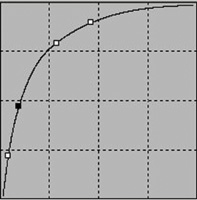
been performed. To bring this image to life a so-called "tone curve"
is applied.
This is not really the kind of curve one would use every day. In many
cases, this tone curve is actually part of a generic camera profile.
|
| |
Resulting
image after profile and tone curve have been applied.
|
|
Raw Converter Essentials
Interpolation (Bayer Demosaicing)--Essential: This
is the key responsibility of the raw converter. There are many differences
in the quality of raw interpolation (and many different algorithms):
· How many details are resolved (especially in the shadows)?
· Does the noise get amplified by pulling out too much detail?
· Stair casing in fine lines (some call this jaggies)?
The balance between detail and noise removal is a tough tradeoff every
raw converter has to face. In light of this, no raw converter will make
everybody happy. I prefer a clean image (at low ISO) and can live without
some micro detail. Overall, most available raw converters perform this
job well enough today.
Camera profiles and tone curves--Essential: A raw
converter should come with good generic camera profiles for all cameras
supported. A camera profile describes the color characteristics of a certain
camera type. Good profiles can be very subjective. The most accurate profiles
do not always deliver the most pleasing results.
A good tone curve should open the shadows without losing too much contrast
and exposing shadow noise. Some raw converters allow you to add your own
profiles (or to modify the delivered profiles). Also, with camera profiles
there are again two schools: some believe generic profiles do a good enough
job in most cases, while others feel that only camera specific profiles
deliver the best results.
We think we can live with good generic profiles as delivered by most of
today's raw converters (notably Adobe's Camera Raw and Phase
One's Capture One DSLR). But we expect in the future support for
scene specific profiles. The problem with camera and scene specific profiles
is that making a good profile is a challenging and complex task.
|
|
White balance--Essential:
Good white balance support is crucial for any useful raw converter.
There are two kinds of white balance correction techniques. One involves
obtaining gray balance by clicking on a neutral spot in the photo. The
other provides white balance correction controls (mostly in terms of presets
and/or color temperature) that you modify yourself.
Good white balance support is not a trivial task for any raw converter.
We expect today that a good raw converter can preview the white balance
correction in real-time (e.g., Nikon's Capture, Bibble, Adobe's
Camera Raw, Phase One's Capture One DSLR, Sigma's Photo Pro).
It should be noted that many raw converters have a single color temperature
slider (measured in Kelvin). These raw converters oversimplify the situation
of color cast. In many lighting conditions, especially outdoors, the color
cast cannot be described by a single slider. Adobe's Camera Raw
and now also Phase One's Capture One DSLR provide this slider by
allowing you to modify tint/tone as well.
Exposure--Essential: Good exposure compensation
is essential. The tools should be aided by a histogram or equivalent,
with under- and overexposure indicators (watch also for overexposure in
a single RGB channel). Overexposure is harder to recover than underexposure.
Once the values are clipped in the highlights (this can happen in each
RGB channel) there is no way to correct it. It is important that you control
your exposure to avoid overexposure at all times. Exposure controls are
standard with all raw converters we know.
Noise removal--Optional (some may be essential): Generally,
it is a good idea to remove the noise as early as possible before it is
amplified in subsequent steps. The noise removal routine can make use
of metadata like ISO and camera model. We expect that there will be major
improvements on noise removal over the next months and years. Currently
the best noise removal tools for high ISO images seem to exist as external
tools or Photoshop plug-ins. Noise removal normally also lowers the sharpness
of the image and that is why noise removal and sharpening are very much
interrelated.
Moiré--Optional: Sometimes noise and artifacts
are treated as the same. Noise is a result of the image capturing process
and shows up especially in the shadows. Artifacts are the result of the
Bayer pattern limitations and the interpolation process.
Moiré removal is especially important for cameras with a weak AA
(Anti-Aliasing) filter (e.g., Fuji's S2, Canon's 1D, Kodak's
760 without AA filter). Removing moiré can be difficult or even
impossible at times. We use a simple Photoshop action to remove minor
aliasing and hardly ever rely on the raw converter.
Contrast, brightness, saturation, color corrections, and sharpening--Optional:
These steps are usually best performed in Photoshop. However,
if the raw converter delivers these tools with good quality, then the
raw file workflow can be sped up. Adobe's Camera Raw and Phase One's
Capture One DSLR can do a really good job here. We recommend doing these
operations in Photoshop (especially sharpening).
|
|
Other Important Features
Mac and/or PC: Quite a few raw converters are only available for the PC
platform. This can be difficult for the Mac users. Adobe's Camera
Raw works identically on both systems. Phase One's Capture One DSLR
is only available in the pro version for the Mac.
User interface experience:
Good raw converters are very interactive (e.g., for white balance and
exposure corrections). Here a good user interface helps to better manage
your workflow. Adobe's Camera Raw, Nikon's Capture, Phase
One's Capture One DSLR, and also Sigma's Photo Pro sport good
user interfaces. We only mention these converters as the others don't
perform most operations in real-time, which makes their use not so pleasant.
Color management--Essential: It is hard to believe
that still some raw converters are not fully color management compliant.
Never, ever, try to judge any color with an application (or raw converter)
that does not support color management. Canon's File Viewer Utility
and Sigma's Photo Pro do not support monitor profiles. Every file
you get as output of the raw converter should be tagged with a working
space profile (choices of sRGB and Adobe RGB 1998 should be available
at a minimum). In some cases the Canon converter still does not tag the
converted files.
Histogram--Essential:
To help better judge exposure, the raw converter needs to display a histogram.
To fully judge proper contrast and color balance, a histogram that displays
all three RGB color channels is necessary. Fortunately histograms are
now common (not all show all three channels though).
Reasonable large preview--Essential: There is no
way to properly judge a file based on a small thumbnail. You need to have
a reasonably large preview to check basic sharpness, contrast, saturation,
and color. A raw converter, like Phase One's Capture One DSLR, can
get you quality previews, fast.
Real-time exposure and white balance correction support can greatly improve
the time spent in your raw workflow.
Batch capabilities--Essential: For some types of
photographic work, many photos can have the same white balance and exposure
corrections. In this situation, batch processing is a timesaver. Many
raw converters support batch processing. In Phase One's Capture
One DSLR LE the batch is limited to 20 files, however.
Good workflow integration--Essential: This is a
very subjective criterion. I describe it as: how the workflow "flows."
Why? Because with early raw converters and still some today the workflow
feels more like "bumping" through it. Workflow integration
is key for a raw converter. We think that today Phase One's Capture
One DSLR (fastest previews, background processing, and real-time corrections)
leads the pack, followed by Adobe's Camera Raw with its excellent
Photoshop integration.
Integration with raw image browser--Essential: It
is very important that the raw converter supports a good raw file browser.
Here most raw converters do a good job today.
Some Other Useful Features
Saving and recalling settings or setting groups (like white balance,
sharpening, etc.)--Essential: Very often, you want to apply
settings from one image to a group of other images. This feature should
be supported by a good raw converter.
Upsizing--Optional: For larger prints, there is
a need to upsize the image. If you aim for larger prints some raw converters
can do an excellent job upsizing the images at this early step.
Cropping--Optional: Cropping in the raw converter
can save some time in your workflow.
Summary
Here are the most important criteria for a good raw converter:
· Full support for color management
· Image quality (very subjective, though)
· Real-time exposure and white balance correction
· Fast and sufficiently large previews
We hope you get the picture that a good raw converter can be quite a complex
application. Don't expect one single winner here. The choice can
be different on an image by image basis. However, it's important
to find a raw converter that supports your workflow and makes your life
easier.
"Uwe Steinmueller is publisher of www.outbackphoto.com
and of numerous e-books on digital photography workflow".
|