


- REVIEWS
Camera Reviews 
More Reviews Mobile Reviews Photography Reviews - GALLERIES
- VIDEOS
- BUYER'S GUIDES
First Look
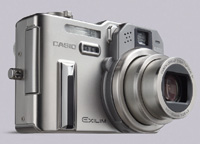
Casio's EXILIM Pro
6Mp, Creative Bracketing & Cool In Camera Controls
|
|||||||
To extend the Pro metaphor further, the camera allows you to choose aperture- or shutter-priority in 10 f/stop steps (including f/2.8-f/8 at the wide setting and f/4-f/11 in tele) and in a shutter speed range of 60 to 1/200 sec (in manual). You can shoot three shots per second in a burst of six shots and when you bracket any of the above-mentioned setups you just hold down the shutter release for a very quick three-shot sequence. Making adjustments is easy--you can work with the menu for size and quality or push the Ex key on the left side of the camera body to evoke preset white balance, ISO values (50-400), metering areas (evaluative to spot), and focusing areas. You can view through the LCD and get an amazing array of information with a clever setup that looks like a flight simulator control panel. We put this on for fun but the two other options (partial info or none but the focus point area) made for easier composing and viewing. The LCD screen is large in comparison to the body and clear in all but the harshest light. |
|||||||
The Pro overcomes any previous
concerns about start up and shutter lag. Start up is almost unnoticeable
at or under 2 seconds, and the picture gets made when you press the shutter
release with what Casio states is an 0.01 lag time (again, unnoticeable).
In a week's worth of shooting we had a bunch of fun with the camera,
tempted in many cases by the Best Shot mode and the instant setups this
yielded. |
|||||||
With an MSRP of $649.99, this
6-megapixel digicam (which, at the highest resolution, delivers files
just under 18MB) is both fun and simple to use. It must contain an amazing
image processor, as it offers many image options that can be created right
in camera that ordinarily would take some computer time with most other
digicam files. A decided plus for us was the inclusion of a charger for
the lithium ion battery that lasted well through the week and up to 300
images, many with flash. |
|||||||
|
|
||||||







| ||
|
||
- Log in or register to post comments




















 FEATURED VIDEO



Get the Latest Photo Tips, News & Reviews from Shutterbug!






| Camera Reviews Other Reviews | |
Mobile Reviews Photography Reviews Columns | |
News | |
Features | |
How-To | |
Resources |
 © 2024 Shutterbug
AVTech Media Americas Inc., USA
All rights reserved