


- REVIEWS
Camera Reviews 
More Reviews Mobile Reviews Photography Reviews - GALLERIES
- VIDEOS
- BUYER'S GUIDES

Digital Innovations
The Best Things In Life Are Free; Who Says?
Photos © 2004 Joe Farace, All Rights Reserved
"Creative work is play. It is free speculation using materials of
one's chosen form."
--Stephen Nachmanovitch
The GIMP (GNU Image Manipulation Program) is a free open source photo retouching and image authoring program. While some of its fans claim it's just as good as Adobe Photoshop, it's not. It is, however, hands-down the best free image-editing program available and better than many programs that cost $100 or more. GIMP was originally a Linux-based product, but now is also available for Microsoft Windows and Mac OS X, which is built upon a UNIX framework.
 |
|
|
Before installing the GIMP, Windows users must first download and install the GTK runtime environment and Mac OS X Panther users have to install X11. (It's on the OS X CD.) The official website of the GIMP (www.gimp.org) contains all of the information about downloading these files along with the scoop on installing and using the GIMP with these operating systems. This comprehensive site includes the source code and serves as a distribution point for the latest releases and provides information about the GIMP community. If you are a Mac OS user on a dial-up connection and the thought of downloading 40MB of data sounds unappealing, the MacGIMP Project (www.macgimp.org) sells a CD for less than $50. Windows users will need a broadband friend.
 |
|
|
Plug-In Of The Month
Alien Skin Software's (www.alienskin.com)
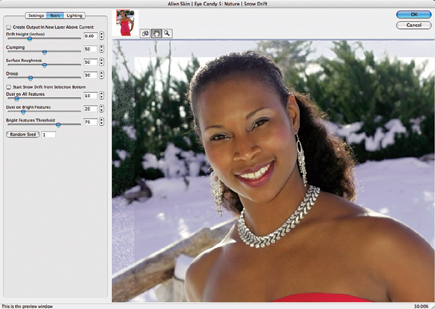
Eye Candy 5: Nature is a set of Photoshop compatible plug-ins that simulate
natural phenomenon. Corona creates solar flares, gradient glows, and wispy auroras
while Drip melts images, melding colors and rendering "oozing drops"
from selections. Fire creates incendiary effects ranging from blue flames to
rocket exhaust and Icicles drips translucent icicles from any selection and
works great with the Snow Drift filter that piles snow on text and lightly dusts
images with snow or frost. Ripples produces refractive ripples around any shape,
as well as reflective waves. Rust tarnishes and corrodes images and text with
rust, moss, and mold. Smoke simulates anything from voluminous clouds of smoke
to murky haze. Squint mimics poor or wet vision, defocuses images, and adds
highlights and halos. Water Drops splashes images with a variety of drops, and
spills. Nature works with 16-bit images, so transitions are smoother, with less
banding and photographs print with more accurate color. Its street price is
$99 and a free demo can be downloaded from Alien Skin Software's website.
 |
|
|
What's Happening In The Hood?
Hoodman Corporation (www.hoodmanusa.com)
now offers protective LCD caps for Nikon's D70 and D100 and Fuji's
S2 that clip on just like OEM caps. The Canon Rebel cap mounts by slipping the
cap over the eyepiece brackets and uses a peel and stick adhesive mounting system
allowing the same cap to fit Canon's EOS 10D, 20D, D30, D60, -1D, and
-1Ds cameras. The Hoodman FlipUp protects your LCD screen from damage and improves
outdoor LCD screen performance at the same time for just $29.95.
 |
|
|
They Are Pixel Geniuses
PixelGenius' PhotoKit Color (www.pixelgenius.com)
is a Photoshop compatible automated plug-in that applies color correction, color
balancing, and creative color effects to your photographs. PhotoKit Color's
image enhancements are easy to use. Choose PhotoKit Color (File>Automate>PhotoKit
Color) and a simple dialog box lets you select each tool set. Once you pick
the desired effect, PhotoKit Color does all the work. All effects are applied
as separate layers so you can make further adjustments, adapting each effect
to suit your taste. You can enhance specific colors in your photographs or make
skin tones less red or lighter. The Blue Enhance effect darkens a blue sky and
enhances cloud contrast and RSA Gray Balance automatically removes color casts.
PhotoKit Color includes a comprehensive and indispensable set of color tools
for both Mac OS and Windows versions of Photoshop 7.0 and costs $99.95.
| |||||||||
|

| ||||||||
- Log in or register to post comments






































 FEATURED VIDEO



Get the Latest Photo Tips, News & Reviews from Shutterbug!






| Camera Reviews Other Reviews | |
Mobile Reviews Photography Reviews Columns | |
News | |
Features | |
How-To | |
Resources |
 © 2024 Shutterbug
AVTech Media Americas Inc., USA
All rights reserved