| |
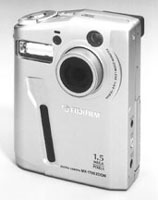
Fuji's
pocket-sized MX-1700 delivers 1.5Mp resolution in a package
the size of a deck of cards.
|
|
"Who would believe
that so small a space could contain the image of all the universe?"--Leonardo
da Vinci's comments on the Camera Obscura

Like many digital imagers,
I'm occasionally frustrated by problems with software and hardware
with my Macintosh and Windows computers. When this happens, I try to
put it in perspective and remember how Mathew Brady and company photographed
the American Civil War. These intrepid photographers used horse-drawn
wagons (not minivans) to carry large format cameras, chemicals, and
glass plates across a country that had few accurate maps, fewer roads,
and no auto club to call when a wheel fell off. When Brady's photographers
got ready to make a photograph, they had to coat a glass plate with
emulsion, stick it in a camera, make the exposure, then process it before
the plate dried. If the image was exposed properly--using only the lens
cap as a shutter--they would have to deal with the likely prospects
of these hard fought negatives being cracked or broken on the trip back
to Washington. All this was going on during a shooting war when both
sides' artillery liked to use the wagons for target practice.
Even back then, it seems, nobody liked the media. A tough life, sure,
and frustrating too, but William Henry Jackson used the same techniques
to photograph the American West long before Ansel Adams knew what a
camera was. Think about all of this the next time your computer crashes
and you're feeling sorry for yourself.
LCDs On My Mind. I've become a fan of LCD monitors.
In addition to the AcerView F51 connected to my G3 PowerMac, I've
been testing a Panasonic PanaFlat LC50SG with my Windows computer. This
is more than just a monitor. The "S" in the serial number
tells you it's wired for sound. There are speakers located in
the lower right and left-hand corner of the monitor's dark gray
housing. That's what the "G" stands for. Traditionalists
can get a monitor without sound and in the light gray that Apple Computer
calls "platinum," but the dark gray housing seemed to enhance
the experience when working with digital photographs in Photoshop and
other image-editing programs. There's much to like about the PanaFlat
LC50SG. In addition to its 1024x768 resolution and .297 dot pitch, it
has a USB (Universal Serial Bus) hub, allowing you to connect up to
four devices. Instead of having to crawl around the back of the computer
looking for a connection--you never know what's lurking back there--it's
conveniently located in the monitor's base. Unlike other LCD screens
I've used, including Acer's and Apple's, there's
no separate power transformer to deal with. The power cable connects
to the back of the monitor and goes straight to your power strip without
detour. Setup was simple with an Auto-Size function that's part
of the on-screen menu controls and I was up and running in less than
10 minutes. The only hitch was that I couldn't find the power
switch. I even looked in the Owners Manual to find where Panasonic had
hidden it. I eventually found the switch tucked into a recessed area
behind the right-hand edge of the screen. For more information on Panasonic
displays, visit their web site at: www.panasonic.com/office/display/disp.html.
Big Monitors, Little Prices. While I may be infatuated
with LCD monitors, I also know a bargain when I see one. During the
mid-1990s 17" monitors started replacing 15" monitors as
the standard screen for desktop computers. Now 19" monitors are
rapidly replacing 17" ones, especially in graphics and digital
imaging applications. One of the biggest problems with 19" monitors
is not just their physical size, but also their big price tags. For
bargain hunters, MGC Technologies is offering a 19" monitor for
Mac OS and Windows computers for $389. Until now, the lowest price I'd
seen for any 19" monitor was $459, with most priced much higher.
The MGC-9107 has a maximum screen resolution of 1600x1200 pixels with
an 85Hz refresh rate. It has a dot pitch of .26mm. Dot pitch is the
distance between the red (center) dot of two adjoining pixel triads.
The smaller this number is, the sharper the picture will be. A good
monitor has a dot pitch of .28mm. Anything larger and the quality suffers,
any distance smaller and the quality improves. The monitor base houses
a multiple outlet USB hub, allowing digital cameras, digital film card
readers, printers, and scanners to be connected without dragging the
computer out and plugging cables into its back. The MGC-9107 has an
on-screen menu that allows you to fine-tune the screen's brightness
and contrast, and since the monitor is plug-and-play it should work
with whatever graphics card is already installed in your computer. To
locate the nearest retail outlet for the MGC-9107, call the company
at (877) 428-9642 or visit their web site at: www.mgcusa.com.
New Fuji Digital Cameras. While we were still in the
'90s, Fuji announced the MX-1700 digital camera that combines
1.5 megapixel resolution with a new aspherical zoom lens. Measuring
3.1x4.75x1.25" the camera is roughly the same size as a deck of
cards and fits easily in a shirt pocket or purse. The CCD imaging chip
produces images at 1280x1024 resolution or the ubiquitous 640x480, and
the zoom lens delivers a 35mm equivalency of 35-114mm. The MX-1700 also
has a 4x digital zoom and digital 2x telephoto mode. The camera is equipped
with an optical viewfinderas well as a 2" color LCD preview panel.
The built-in electronic flash has a slow-synch mode for fill or nighttime
flash operation. The new camera uses SmartMedia for storage. Depending
on the compression selected (fine, normal, or basic), the 8MB Wheat
Thin-sized SmartMedia will store 11, 23, or 44 images. The camera includes
the new standard Digital Print Order Format (DPOF) for attaching print
ordering instructions to the image's files for commercial digital
output. Lithium ion batteries are provided and should deliver up to
250 shots with the LCD preview panel turned off and 80 with the screen
turned on. Price of the camera is $599.
Fuji also introduced the MX-1200, an under $300 camera designed for
the photographer who wants to try digital imaging without spending lots
of money. The camera can create images with a resolution of 1280x960
and has a (35mm equivalent) 38mm lens with macro capabilities. A 2x
digital telephone mode is also available. The MX-1200 has a 1.6"
color LCD preview panel and an optical viewfinder. A 4MB SmartMedia
card is bundled and allows you to make up to 23 images at the camera's
highest resolution setting. More information about both of these cameras
can be found by calling (800) 800-3854 or visiting the company's
web site at: www.fujifilm.com.
The Computer In Your Camera Bag. Laptops may be fine
for many applications, but for many photographers the future of on-location
computing is clearly with handheld computers, such as Casio's
Cassiopeia (www.casio-usa.com/hpc/),
that use the Windows CE operating system. Since the revitalized Apple
Computer deep-sixed the Newton, Windows CE seems to be the choice for
many mobile computing users. Sierra Imaging has launched Image Expert
CE software to act as a communications interface between your digital
camera and the rest of the world. The program lets you acquire images
from supported cameras and is compatible with any digital camera that
stores images in JPEG or BMP formats. You can create albums to store
those images and move images from one album to another just by dragging
the thumbnails. These images can be displayed on your handheld device's
screen, zoom, and even annotate images with voice or text. The program
lets you send the images as e-mail or transmit them via IrDA (Infrared
Direct Access) to another computer. Image Expert CE costs $39.95, and
you can download a free demo from the company's web site at: www.sierraimaging.com.
A Photoshop Bargain. When I am speaking to groups of
photographers about digital imaging, one of the most common questions
I'm asked is, "I can't afford Photoshop. What are
some inexpensive alternatives?" I tried to answer this question
in the October issue with my story called "Digital Imaging on
a Budget" that showcased several programs that cost less than
$100. This month I'd like to add another program to that list:
Adobe Photoshop LE. The concept of a limited edition version of Photo-shop
is not new and for many years Photoshop LE was bundled with printers
and scanners, but was never offered for separate sale until now. For
$99 you get Photoshop Lite, a program that provides many of the features
of the latest version of Photoshop but which lacks some of its appeal
to print and web designers. Photoshop LE offers the essential tools
for correcting and enhancing photos, compositing multiple images, creating
original artwork with a variety of special effects, and outputting to
desktop printers and common web file formats. So you'll find all
of the tweaking controls, like Variations, that make Photoshop such
a powerful image editor along with all of the standard plug-ins and
support for third-party plug-ins. What's missing? For a direct
comparison of features, check out the chart "Adobe Photo-shop
LE vs. Version 5.5." Registered PhotoDeluxe users can upgrade
to Photoshop LE for $79 direct from Adobe and North American Photoshop
LE users can upgrade to the full version of Photoshop 5.5 for $499.
For more information call (800) 492-3623 or visit www.adobe.com/prodindex/photoshop/main.html.
Plug-In Of The Month. Once again the Photoshop compatible
plug-in of the month is from Andromeda Software. The Cutline Filter
is Andromeda's new multi-platform, Photoshop compatible screening
and woodcut effect plug-in. This plug-in emulates the engraved effect
that was popularized by the Wall Street Journal and Barnes & Noble
advertisements. Andromeda developed a combination line/dot screen that
replaces the gray tones in a photograph or illustration with black and
white lines that are crosshatched in the shadow areas as the lines become
thicker or breaks up into dots in the highlight areas as the lines become
thinner. The result is a digital engraving effect that emulates classic
Old World engraving techniques. The Cutline Filter has a Stamper Tool
that lets you change the engraving direction to emphasize the dimensionality
or contour of the object being "engraved." The filter engraves
selected parts of a gray scale photograph or illustration in 10 to 35
lpi (lines per inch) and offers wavy and straight lines and ellipses,
making it easy to create an image with the effect. You can visit Andromeda
Software on the World Wide Web at: www.andromeda.com
for detailed information on all of their products or download a demo
of the Cutline Filter.
New Epson Printers And Paper. While some printer companies
have danced around implementing FireWire (IEEE 1394, for you pur-ists),
Epson jumped into the fray by offering FireWire options for their new
900G and Stylus Pro 5000 color ink jet printers. Obviously aimed at
PowerMac G3 users but compatible with Windows computers, the 900G is
housed is a translucent case with "blueberry" cover. The
four-color printer delivers variable droplet size down to three picoliters
and outputs images at 1440x720 resolution. The 900G has a USB connection
for Windows and Macintosh computers and Epson offers an optional ($199)
IEEE 1394 Interface card for FireWire connectivity. The 900G can output
pages at 12 per minute and has an estimated street price of $429. Epson
also announced Matte Paper Heavy-weight, a new ink jet paper with a
flat matte finish for photographic quality output. The new paper has
the same look and feel as a traditional photographic print and its heavyweight
base is designed to handle heavily saturated color images. Matte Paper
Heavyweight will be available in three sizes: 8.5x11, 11.7x16.5, and
13x19 for users of printers capable of larger-sized output, such as
Epson's Stylus Photo 1200 or Stylus Pro 5000. For information
about these or any of Epson's other products call (800) 463-7766
or visit their web site at: www.epson.com.
Another new FireWire (optional) printer is Epson's Stylus
Pro 5000. Previously aimed at graphics professionals, Epson
has lowered the printer's price to $2995 and removed the expensive
Fiery LC RIP (Raster Image Processor) as standard equipment. With the
RIP, the Stylus Pro 5000 now costs $7495, down from its original $10,000
price tag. As you might expect for these kind of prices, the Stylus
Pro 5000 is not your normal $199 desktop ink jet printer. It uses a
unique Dual Density Droplet print head to produce output at 1440x720
resolution with a 11 picoliter dot size. In addition, Epson's
proprietary ASIC (Application Specific Integrated Circuit) hardware
is designed to ensure predictable color accuracy from one print to the
next. The Stylus Pro 5000 offers connectivity via built-in USB, parallel,
and serial ports along with optional FireWire and Ethernet connections.
I recently received one of these printers for testing and hope to share
some impressions on its use and output quality in a future column. For
information about Epson's professional graphics products visit
their web site at: http://prographics.epson.com.
A Complete Digital Imaging System? Hardly a week goes
by without someone asking me to design a digital imaging system for
them. I'm not a consultant, so I give these mostly professional
photographers the following advice. Unless you are a sophisticated computer
user, don't shop around for individual hardware and software solutions,
then try to assemble them into a system by yourself. Why? What happens
when the brand-new computer you bought won't work with the printer
you purchased from someone else? The computer company tells you that
it's the printer's fault and vice versa. After a month or
so of this kind of finger pointing, the photographer longs for the simple
joys of film. The best solution is to buy your complete system from
a single source. One company's name that has come up in my discussions
with professional photographers around the country is Desktop Darkroom.
They specialize in converting pros to digital imaging and offer hardware
along with on-site training and a year of telephone and diagnostic support.
The majority of their customers are general service photo studios, but
they also work with specialists who photograph high school seniors and
youth activities, such as sports, dances, and school photography. If
this describes what you do, give them a call at (904) 398-9934 or visit
their web site at: www.desktopdarkroom.com.