| |
|
Each day the author takes a three-mile walk that takes
him along Bromley Creek. Many days, he brings a camera
with him and on this snowy November morning, he brought
along an Olympus E-10 digital SLR set in SHQ mode which
produces a 2240x1680 resolution JPEG file that was used
to capture this image.
Photos © 2000, Joe Farace, All Rights Reserved
|
|
Proving that in digital imaging,
like the rest of photography "there are no absolutes," I've been
forced to re-examine my original contention that there are just three
major phases of digital imaging. To my original trifecta of image capture,
manipulation, and output, I would like to add presentation as the fourth
phase. I see image presentation as a broad classification that includes
everything from online framing to sharing images on the World Wide Web.
Over the next few months, I'll revisit each of these phases and
present some perspectives on the state of the art of digital imaging
software and hardware. This issue I'll start with image capture.
To readers of Rohn Engh's
new book sellphotos.com (www.photosource.com)
my next statement will not come as much of a shock, but it may be for
the rest of you who consider me to be this digital guy. People who ask
"what kind of digital camera do you own?" are often surprised by my
answer. While I'm currently testing digicams from Agfa, Olympus,
and Toshiba, I don't own a digital camera. If you read the captions
on my images that appear here and in our sister publication eDigitalPhoto.com,
you know that many of my digital images originate on film and were digi-tized
using scanners or Kodak's Photo CD process for my eventual use
in the digital darkroom.
Over the years, I have used
dozens, maybe hundreds of different digital cameras, but until last
year I never found one I wanted to purchase for my own. For point-and-shoot
use, I found the Canon Digital ELPH--it's only 1/8 of an inch
thicker than an ELPH II Advanced Photo System film camera--and Nikon's
CoolPix 990 to be great cameras. It was handling the Canon D30 (not
to be confused with the Euro-labeled EOS 30 a.k.a. Elan 7E) and Olympus'
E-10 SLR that really grabbed me. I like the D30 because of its film
camera-like handling and ability to use all of my existing Canon lenses,
and I was impressed by the E-10 because of its 4 megapixel resolution,
solid professional construction, and modest price.
|
|
It shouldn't matter to
you what kind of camera I use, because my photographic needs are different
than yours. You should start your own personal search for the perfect
digital camera by asking yourself a few questions:
How are you going to use the camera? Any 3 megapixel camera is
going to deliver image resolution good enough for great-looking 8x10 ink
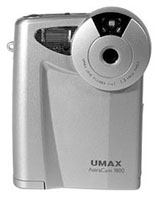
jet prints. Inexpensive cameras such as the $199 UMAX AstraCam 1800 will
produce 5x7 quality images and more quality than you can use for the web.
What's your budget? While techies tend to drool over the
newest, fastest, highest resolution digital cameras, the truth is that
these cutting-edge tools are almost always more expensive than mature
technology. When people ask me for specific recommendations, my answer
is always that "I hate to spend other people's money."
Take A Test Drive
Most stores will let you shoot a few images. Bring your own or borrow
a CompactFlash or SmartMedia card from a friend to shoot a few test images,
and then take them home to play with on your own computer system to see
how you like the image quality.
Use the reviews in Shutterbug
and eDigitalPhoto.com to narrow your search for cameras that fit the way
you like to work. Most importantly, make up your own mind about the camera's
ergonomics and image quality.
Taking these few steps will
minimize and maybe even eliminate the buyer's remorse that can occur
within a few weeks of buying a new digital camera, when you learn the
same manufacturer is shipping a new model that has higher resolution,
more features, and costs less. If you're an informed shopper, this
digital reality won't get you depressed.
As you mull all this over,
here are some recent innovations that caught my eye.
Image Capture With Big Resolution
And A Low Price
UMAX Technologies' new AstraCam 1800 digital camera offers 1.3 megapixel
image resolution for less than $200. The AstraCam 1800 produces an optical
resolution at 1280x960, with software interpolation to 1600x1200. Output
is in JPEG format and image storage is on a bundled 4MB SmartMedia card.
Other features include Universal Serial Bus (USB) connectivity, three-mode
automatic flash, and automatic white balance. The camera is compatible
with Windows 98, 2000, Me, or Mac OS 8.6 or later. For further information,
contact UMAX at (510) 651-4000 or visit their web site at: www.umax.com.
Fuji Digital Back
Fuji announced it will be the exclusive US distributor of the new Luma
Digital Camera Back that's being manufactured to Fuji specifications
by Mosaic Imaging. The Luma back is designed for use with the Fujifilm
GX-680 III and other medium format cameras. The Luma back has a full format
24x36mm CCD chip with 3072x2048 pixel resolution that's capable
of capturing 12 f/stops of dynamic range using 14 bits of date per color
channel. The Luma back is a one-shot back that can capture one image every
1.5 sec. It's compatible with standard studio lighting including
electronic flash, tungsten, HMI, and daylight. The back has an ISO rating
of 25 but is programmable up to 200. It uses a FireWire (IEEE1394) connection
to Macintosh computers and has a live video option that enables photographers
to view up to 5 fps with auxiliary monitors. For more information, visit
Fuji's web site at: www.fujifilm.com.
|
| |
|
Ulead's Photo Explorer 7.0 Pro digital asset management
program has built-in image-editing functions or you can
also click on an image file and send it to Ulead's
PhotoImpact 6.0 to take advantage of that program's
more extensive capabilities. |
|
Photo Explorer 7.0 Pro
Ulead Systems, the company that produces PhotoImpact 6.0, announced a
new Windows-only media asset management program for acquiring, organizing,
converting, and sharing image, video, and other kinds of digital media
files. Photo Explorer 7.0 Pro has the best user interfaces I've
seen on any digital asset management program. It lets you preview images,
video, and audio content. You can add keywords and captions to each image
so you can search and find that photograph you made of Crystal Lake in
Rocky Mountain National Park 10 years ago.
The program has a Wizard-like
interface to help you capture images from your digital camera. You can
also capture video clips from DV camcorders that use FireWire connections
as well as USB monitor-top video cameras. Single frame snapshots can be
made from a live video source. The software can trim video clips and convert
them into other video formats, as well as share video clips by e-mail
or post them on the web. You can also create a slide show integrating
audio, video, and image files. MP3 music files can be imbedded within
each photo of the show. Slide shows can be saved as EXE files or converted
into a web page.
Photo Explorer 7.0 Pro also
has some image-editing capabilities. You can adjust brightness and contrast,
hue and saturation, sharpness and blur, as well as remove redeye. You
can change one image then batch apply all of your corrections to multiple
images made under the same conditions. The program's printing features
let you display and print multiple images on a single sheet of paper and
print them either as wallet-sized or a mix of different sized prints.
What surprised me most was the $29.95 price tag. Users of PhotoImpact
or other Ulead products can upgrade for under $10. For more information
visit the company's web site at: www.ulead.com.
Plug-In Of The Month
You gotta love those people from Alien Skin Software. They continue to
develop cool plug-ins. Eye Candy 4000 is their best set of Photoshop compatible
plug-ins to date. Eye Candy 4000 includes five new filters (Wood, Marble,
Melt, Drip, and Corona) but the rest of the Eye Candy 3.0 filters have
been revamped. They are now easier to use and allow you to accomplish
more with them. The Chrome filter, for example, now uses reflection maps
to create more realistic metal effects, while Shadowlab and Star offer
new preview controls. Smoke and Fire have been improved with new features
that help users create quick and easy, and sophisticated graphic effects.
The package contains 23 special effects filters, including Smoke, Chrome,
Shadowlab, Bevel Boss, Glass, Fur, Jiggle, Cutout, Motion Trail, Water
Drops, Gradient, Glow Weave, Swirl, HSB Noise, Star, Squint, and Antimatter.
Eye Candy 4000 supports RGB, CMYK, and other image modes.
|
| |
|
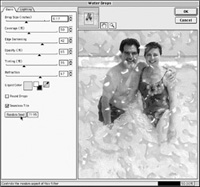
A photograph in Cancun of the author and his wife Mary was
made with a single-use amphibious Agfa 35mm camera using
an Agfa SnapScan Touch scanner to produce the digital images
that was the source for Alien Skin's Water Drops filter
that's part of its Eye Candy 4000 package of plug-ins.
In addition to round water drops, you can create random
splash effects and an Eyedropper tool allowed the author
to match the digital splash to the color of the actual Caribbean
waters. |
|
Eye Candy 4000 has a simple,
intuitive interface with clear, understandable controls along with preview
windows that show underlying layers. The Dialog box is resizable and you
can make it as big as you want. You don't have to be a plug-in expert
to create cool effects. Alien Skin's programmers have provided hundreds
of presets that let you instantly create complex looking effects. The
estimated street price is $169, with upgrades to registered users of Eye
Candy 3.0 priced at $69. Eye Candy 4000 is compatible with Adobe Photoshop
4.0 or later; ImageReady 1.0 or later; Paint Shop Pro 5.0 or later; Deneba
Canvas 6 or later; and Corel Photo-Paint 8 or later. For online delivery,
visit www.alienskin.com.
New Ink Jet Printers
Epson America announced a new $99 four-color ink jet printer that's
designed to match the new colors and designs in Apple's new line
of iMacs and PowerMac G4 computers. The Stylus Color 777i features 2880dpi
resolution and four-picoliter droplet size for photo quality output, but
can also print up to 8 pages per minute (ppm) in black text printing and
up to 6 ppm for text and color graphics. The printer features a contoured
industrial design with stylish "ice" exterior case and indigo lid. Additional
colored lids are available in ruby, sage, graphite, and purple for $9.95
each. Epson has engineered the printer software for greater saturation
and better shadow and highlight detail and printing photo-realistic images
is standard without having to buy additional ink cartridges. The printer
is easy to set up and operate using on-screen, animated Fix-It Flix that
help users troubleshoot without having to refer to a manual. The Stylus
Color 777i uses Epson's new Intelligent Ink cartridge technology
that enables users to remove and replace a cartridge that may be low on
ink in order to complete larger print jobs. Later on, the original cartridge
can be reinstalled for smaller jobs. This new printer is compatible with
both Macintosh and Windows platforms and has USB and parallel connectivity.
It includes a software bundle that features Epson Film Factory for collecting
and organizing digital photos, Trellix Web (Windows only) for producing
personalized web sites, and Corel's PrintHouse 2000 for publishing
and image editing. For more information, visit their web site at: www.epson.com.
|
| |
|
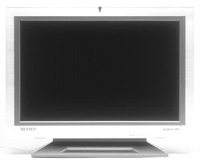
Samsung's 240T 24" digital LCD monitor raises the
bar on the size of big, great looking displays for professional
graphics users. |
|
Ixla On The Web
Ixla recently introduced their newest product, ixla Web Easy Millennium
3.0, a do-it-yourself web design studio in a box. The product, which is
available for Microsoft Windows, lets you create personal or professional
web sites within minutes. A library of templates makes it easy to give
your new site a professionally designed look. Ixla Web Easy Millennium
incorporates Dynamic HTML (DHTML) technology, allowing the user to drag
and drop interactive objects directly into their site without programming
knowledge. Additional features include e-commerce functions such as credit
card processing and links to affiliate marketing programs, where users
can earn money from visitors to their web site. The product supports news
and weather links, audio, video, Shockwave, and QuickTime, while letting
you design 3D worlds containing your own photographs. A free introductory
version, called ixla Web Easy Millennium Express, will be available through
CD distributions and online downloads. For future updates of ixla Web
Easy Millennium Express, visit www.ixla.com.
Let's Get Real Big
If you were impressed with Apple's 22" Cinema Display LCD screen
(and I was) you'll be knocked out by Samsung's 24" digital
LCD monitor. The SyncMaster 240T has 1920x1200 resolution and an extra-wide
170 viewing angle. Unlike all of the LCD panels out there, digital screens
are useful for graphics use.
Samsung targeted this model
squarely at the professional. The screen is so large it eliminates the
need to use two monitors--one to display the image, the other to show
tool palettes. The monitor has a one button calibration system for screen
geometry, contrast, brightness, and clock phase, but can be controlled
via a remote control. The monitor has an optional USB hub with two upstream
ports and four downstream ports. It's compliant with the TCO (Tjanstemannens
Central Organisation) emission standards and EPA Energy Star standards
for reduced power consumption. Like all Samsung monitors, it has a three
year parts and labor guaranty. Given the Apple Cinema Display's
price tag of $4000, the street price for the 240T is a not so surprising
$7999. For more information, visit their web site at: www.samsungmonitor.com.
|