| |
Unlike some brands of ink jet papers, packages of Adorama's
family of Pro Jet paper are delivered in photo paper-like
black boxes.
Photos © 2003 Joe Farace, All Rights Reserved
|
|
"I think there is a
world market for maybe five computers," Thomas Watson, chairman
IBM, 1943
Tom Watson's statement
shows that predicting the future of computing is more a matter of perspective
than you might have otherwise thought. You should always keep in mind
that the statements that I--or anybody else--in this business
makes have to be kept in perspective from when those predictions are
made. Change is especially rapid in digital imaging because the devices
and software are less complex than other computing tools. It's
easier to design and build a digital camera than a new computer or operating
system, and it's easier to upgrade or improve a plug-in than introduce
new image-editing software.
Part of what I see as my job for this column is to help keep you informed
about new hardware and software solutions that help make your digital
imaging projects easier and more fun. The other part is to help you
make some sense of technical issues that may seem simple on the surface,
but can cause problems where there really shouldn't be any. Take
the Universal Serial Bus connection, found on most new computers as
an example.
|
| |
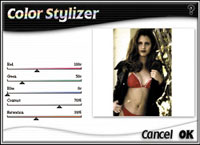
Color Stylizer is one of nik Color Efex! most powerful filters
and provides individual control over an image's red,
green, or blue values as well as its contrast and saturation.
|
|
The USB standard is not really
new. It was originally created in 1995 by a consortium that included Compaq,
DEC, IBM, Intel, Microsoft, NEC, and Northern Telecom, but it took the
introduction of Windows 98 and Apple's iMac for this connectivity
standard to become popular. Most new computers have two USB ports and
these are quickly filled by your keyboard and a printer. What happens
when you want to add a scanner, SmartMedia card reader, and external floppy
or Iomega Zip drive? The simplest solution is to add a "hub"
that takes one of the computer's USB ports and multiplies it by
four or more. One of the best models I've found is the 4-Port Hub
available from Belkin Components (www.belkin.com),
a company known for the quality of its cables, surge protectors, uninterrupted
power supplies, and all the other unsung components that let your computer
compute. It adds four USB ports and is stackable allowing more and even
different kinds of ports to be added. But there were problems lurking
in River City.
When setting up, I plugged my keyboard into one of the Power Macintosh
G3 internal ports and the Belkin Hub into the other. Then I plugged four
devices, including two printers, a scanner, and an Imation SuperDisk into
the 4-Port Hub. After making these connections I tried to start the computer
but it would not boot. It just sat there spinning its hard drive and never
launching the system software. If I unplugged the Belkin hub before I
started, everything worked perfectly. Then I could add the hub after the
computer had started up--something impossible with a SCSI device.
All of this unplugging and plugging was annoying so I called Belkin and
asked, "What gives?"
They told me that they had "heard of a problem with the hub and
the iMac DV SE unit when trying to start with a removable media disk,
such as an Iomega Zip drive plugged in." After troubleshooting with
a customer who plugged and unplugged each USB product connected to the
hub, Belkin found the Zip drive to be the source of the problem. Belkin
told me that "we now have confirmation from Iomega that there is
an Apple firmware problem with USB Hubs and Iomega drives." Apple
is working on a firmware fix for this problem which should be available
on their web site (www.apple.com)
by the time you read this. As I was finishing this month's column,
this upgrade was not available. Instead, I plugged the Imation drive into
one of the USB ports on my G3 and my MacAlly keyboard into the Belkin
hub. When I did, everything worked perfectly. Firmware upgrades? Who needs
'em.
|
| |
Autoodel.
This photograph of model Kimberly Goetz was made on Kodak
color negative film then digitized with their Picture CD
process. The image was manipulated by using nik Color Efex!
Color Stylizer filter to desaturate its color and boost
the photograph's contrast slightly. The image was
further enhanced with Auto F/X Photo/Graphic Edges plug-in.
(Original photo in color)
|
|
Plug-In Of The Month.
nik Color Efex! is a collection of 34 digital filters that provide
color and light effects to images when used with Adobe Photoshop, Corel
PHOTO-PAINT, Ulead PhotoImpact, or any program that accepts Photoshop
compatible plug-ins. The package includes a Sunshine filter, which allows
users to add the illusion of sunlight to their images and control the
way it is applied. The Midnight filter creates the digital equivalent
of the cinematic "day- for-night" technique, and controls
lighting effects through the application of color. My favorites from the
package are Color Stylizer and Monday Morning. Both provide the ability
to produce soft, desaturated color and using both filters has greatly
effected the photographs that appear in my new portfolio. If you've
been looking for ways to create the dreamy, grainy images seen in David
Hamilton's work, you'll love Monday Morning. Four sliders
allow you to vary the intensity of an image's Grain, Brightness,
Smear, and Color. nik Color Efex! contains blue, sepia, and violet versions
of the Monday Morning filter for even more variations on that theme. Color
Stylizer lets you manipulate an image's color intensity by separately
manipulating the red, blue, or green attributes as well as controlling
Contrast and Saturation. These two filters alone are worth the package's
suggested retail price of $139.95. While using the nik Color Efex! filters,
you can view any of your adjustments in a preview window, and online help
screens are provided within each individual filter illustrating sample
effects. A professional version of this plug-in is planned, and I'll
keep you posted as to its availability. For more information about Color
Efex! or any other nik plug-in, visit their web site at: www.tech-nik.com.
|
| |
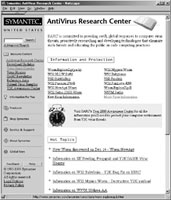
Symantec's Research Center is the place to regularly
download the latest updates to protect your computer as
well as read about viruses in general or a specific one.
There is even an Encyclopedia listing all of the various
viruses and hoaxes that the SRC has uncovered over the years.
|
|
New Low Priced Printer.
I've always been impressed by the output of Epson's low cost
printers, like the $179 Stylus Color 740i. Just when I thought that photo
quality ink jet printers couldn't get less expensive, along comes
a new product that makes me rethink that concept. Epson's new Stylus
Color 670 produces photo quality output along with sharp black and white
text, yet has an estimated retail price of $99 after a $30 manufacturer's
rebate. The four-color Stylus Color 670 has a maximum printable area of
8.26x10.76" and outputs black text at 5 pages per minute (ppm) and
color text and graphics at 3.5 ppm. Photo quality output should be excellent
because the Stylus Color 670 produces a 7 picoliter (a million millionth
of a liter) ink drop size. The printer has parallel and USB connections
so it will work with any Windows computer and those Mac OS machines with
USB ports, such as the iMac and G3/G4 series. My guess is that they eliminated
the serial port normally found on Epson printers to keep the price low.
For information about these or any of Epson's other products call
(800) 463-7766 or visit their web site at: www.epson.com.
Paper For Your Ink Jet Printer. Lately, I've been
printing many of my personal digital images using Epson's Stylus
Pro 5000 using Adorama's Pro Jet ink jet papers. They are available
in a wide range of sizes, all the way from 4x6 up to 11x17 and 13x19.
Just as important, Pro Jet paper is available in many different surfaces
including Glossy Film, Coated Velour, Double-Sided Matte, Canvas, Photo
Quality Ink jet Paper, and Medium Weight Glossy Paper. Using the printer's
default settings for "Photo Paper" produced impressive results
with all of the Pro Jet papers I've tried so far. When printing
gray scale images using colored ink, the Coated Velour produces sensuous
Agfa Portriga-like results on the heavy stock. Their Glossy Film is just
the ticket for producing eye-popping color images and the Double-Sided
Matte was no slouch in the color department either, providing a smooth,
soft matte finish. Pro Jet paper is available in 20, 50, and 100 sheet
packages depending on paper size and finish type and the prices represent
quite a bargain. For more information about Adorama's ink jet papers,
call (800) 223-2500 or visit their web site at: www.adoramacamera.com.
|
| |
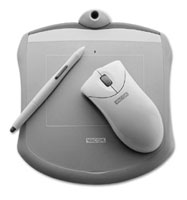
Wacom's Graphite tablet with scrolling mouse and pressure
sensitive pen is $99 USB peripheral is now available in
all five standard iMac colors as well as the standard color.
|
|
Mouses, Pens, And
Tablets. If you haven't already worked with a graphics
tablet for your digital imaging projects, I recommend you give it a try.
One of the more affordable ones currently available is the Wacom Graphire
system. This package combines a USB (Universal Serial Bus) tablet with
a 4x5 work area, a cordless pen, and a mouse. Because it has no ball like
a conventional model, the Graphire cordless mouse--which also has
a scrolling wheel--tracks more smoothly than other models you may
have used. The pen is the latest version of Wacom's original cordless
model. It does not require a battery and features a built-in "eraser"
as well as the ability to sense 512 pressure levels. The pen has Wacom's
DuoSwitch, a programmable double-sided switch that can be set to function
as a double mouse click, a right or left click, along with other functions.
A software bundle includes MetaCreations' Painter Classic, Wacom's
PenTools, and ParaGraph's PenOffice SE handwriting software (for
Windows only). Graphire is available for the Macintosh in the five basic
iMac colors--but not the new "graphite" found on the
iMac SE and Power Macintosh G4--as well as a more conservative office
gray for the traditionalist. With a $99 price tag, I don't know
of a better way to try a graphics tablet for your own work. If you've
been thinking about a graphics tablet, give yourself a test: try signing
your name with a mouse. You can learn more about Wacom's graphics
tablets from their web site at: www.wacom.com.
DuoScan HiD. The newest member of Agfa's family
of scanners is the DuoScan HiD which has an optical resolution of 1000x2000dpi,
42-bit color depth and uses Agfa's TwinPlate technology allowing
it to scan your choice of prints or film. The DuoScan HiD is designed
for professionals, such as photographers, illustrators, stock agencies,
and commercial printers, who need to capture color detail within a wide
density range. With its 14 color depth and an impressive dynamic range
of 3.7, the DuoScan HiD scanner captures a high level of image quality,
especially in the darkest areas of negatives or positive slides where
detail is difficult to capture. It also captures even the most difficult
colors such as deep reds and blues with remarkable accuracy. The DuoScan
HiD has suggested price of $2450. Product and company information can
be found on Agfa's homepage on the World Wide Web at: www.agfaus.com/dtp.
Do You Speak Fluent Windows? One of the problems when
working cross platform between Mac OS and Windows computers is understanding
the lingo. When traveling in foreign lands it always helps to have a translation
book, which is the purpose of Crossing Platforms (ISBN 1-56592-539-4)
by Adam Engst and David Pogue. I urge you to look past the horrible cover
and boring internal design and read the text. The authors have used a
dictionary-like approach to make a most useful reference book. The first
half provides bilingual education aimed at Macintosh users who need to
know more about Microsoft Windows. The second half is for Windows users
who need to understand the Mac OS. The book includes two top 10 lists
for the "Ten Most Important Windows Differences" and the "Ten
Most Important Macintosh Differences" that are marred by an error
in the Macintosh list. It stated that "The Mac OS never removes
files from the trash automatically, as Windows does in the recycling bin."
Perhaps this was true at one time, but not in my recent memory. I even
checked with computer guru and legendary camera repairman Vern Prime,
who agreed with me. Having written enough books to know that some kind
of small error seems almost inevitable, I looked past this minor glitch
and found Crossing Platforms to be invaluable for those of us who must
keep one foot--and one computer--in both windows and Macintosh
camps. For more information about the book, including a table of contents,
index, and samples see www.oreilly.com.
Indispensable Software. I'm often asked what's
the most important program a pixographer can have in their digital imaging
toolkit. Although you may be surprised at my answers, here are the programs
I couldn't live without:
· Norton Utilities. Symantec's Norton Utilities
for the Macintosh--and Windows--has saved me from so many hard
disk and system problems that I couldn't begin to count them. Norton
Utilities is really a collection of various utilities, the most important
of which is Disk Doctor. One of the big problems with hard disks is that
small errors build up over time and using Disk Doctor to repair them on
a regular basis will minimize the problem of the "big one"
taking your entire system down the tubes. Owning a computer without owning
a copy of Norton Utilities is like taking a car on a long trip without
a spare tire. You may not want to use it, but you're glad it's
there.
· Retrospect. Dantz Development's back-up
software, along with a well planned back-up strategy, has saved me from
major disaster at least three times when my hard disk bit the bullet.
It's also been a useful tool helping me resurrect small bits of
software like Extensions and Controls panels when I have upgraded my system
software. Retrospect has an interface that's so easy to use that
even the most novice backer-upper will be ready to back up their hard
disk for the first time without fear. Visit their web site at: www.dantz.com.
· Norton Anti-Virus. Nobody wants to catch the
flu or a computer virus, but you're playing with fire every time
you download an e-mail attachment or work with someone else's floppy
disk or removable media cartridge. Installing virus protection software
and making sure that you update it regularly with the latest virus definitions
is your best protection. The latest version of both Norton Utilities for
the Macintosh and Norton Anti-Virus include a Live Update feature that
skips your browser and uses your Internet connection directly to the Symantec
web site and download the latest version of the program along with the
latest virus definitions to make sure that you're up-to-date. Check
out their web site at: www.symantec.com.
There's not a plug-in or digital imaging program in the entire bunch,
but without them I would be able to use Adobe Photoshop and such killer
plug-ins as nik Color Efex!
|