| |
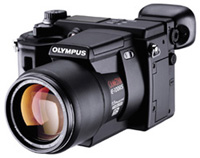
| The
Olympus E-100RS has an image resolution is 1368x1024 and
the built-in zoom lens has a 35mm equivalent focal length
of 35-380mm with maximum apertures of f/2.8-f/3.5.
Photos © 2000, Joe Farace, All Rights Reserved
|
|
It is expected that 13.9
billion amateur digital images were created during 2000 in the US alone.--InfoTrends
Research Group.
One question I'm often asked
by friends, colleagues, and readers is, "Which digital camera should
I buy?" The criteria I use to evaluate any of the digital cameras I
test are the same characteristics that any good camera--digital or otherwise--should
have, including lens quality and ergonomics. But digicams have several
unique characteristics that need to be evaluated as well. Image quality
is high on my list because a camera's main function is to create photographs,
but there's more to it than just output resolution. All of the capture
components including lens, imaging chip, and internal software combine
to produce the final photograph.
The amount of compression
that's applied to an image is also important. Less compression yields
the best quality images, and no compression is even better. Less compression
also means fewer images can be stored. Although storage is less important
than image quality it is still a consideration. Unlike film, storage
is reusable, but it is not cheap. These days, most cameras use CompactFlash
or SmartMedia cards and some, like recent models from Oly-mpus, allow
you to use both CompactFlash and SmartMedia in the same camera. Sony's
floppy disk-based camera was a clever design, but is ultimately limited
by the media's capacity, which may be why they introduced the innovative,
but proprietary Memory Stick. Their new camera that uses small recordable
CD-ROM discs goes a long way to solve the problem.
|
| |
|
While spring may be just around the corner where you live,
April is one of the snowiest months in Colorado. This playground
in the author's neighborhood was captured with an Olympus
E-100RS digicam set in HQ mode. |
|
The LCD preview panel is indispensable
for evaluating images made by digital cameras. Since many also have optical
viewfinders, you can use the LCD panel as an image management tool. Not
every photograph you make is a keeper, so you can extend the camera's
storage capacity by periodically reviewing and erasing any images that
are not up to your standards. Since you only keep the ones you like best,
the storage capacity is effectively multiplied. Ergonomics is also an
important part of my evaluation process, because how a camera looks and
how much its controls function like a film-based camera help minimize
the learning curve.
Olympus Digicam
For the past few weeks I've been testing an Olympus ES-100RS (Rapid Shot)
camera that's designed specifically for photographing action. Not only
does it capture images at up to 15 fps, but its pre-capture mode starts
making (and re-making) images when you partially depress the shutter release,
so you never miss that decisive moment. As I write this I'm waiting for
the motor racing season to start, but I hope to try the sequence capture
feature at a post-season NFL game. Image resolution is 1368x1024 and the
non-interchangeable zoom lens has a 35mm equivalent focal length of 35-380mm
with maximum apertures of f/2.8-f/3.5. Other professional features include
auto-bracketing and an electronic viewfinder providing true WYSIWYG previews.
The LCD eyepiece image quality may leave something to be desired, but
photographs viewed on the ES-100RS's LCD preview panel are dazzling. Like
its big brother the E-10, the E-100RS has dual memory card slots and accepts
both CompactFlash and SmartMedia cards, although it comes with a puny
8MB SmartMedia card. The retail price is under $1500. You can find more
information about the E-100RS and E-10 on the company's web site at: www.olympus.com.
|
| |
|
Microtek Lab is now bundling its MN-100 digital camera with
its ScanMaker 4600 flat-bed scanner. The scanner has 2400x1200dpi
resolution, 42-bit color depth, and includes free online
storage for an unlimited number of photos and albums.
|
|
Rescuing Lost Digicam Images
DriveSavers Data Recovery specializes in recovering lost data and has
a success rate over 90 percent. The company can recover data in as little
as 24 hours from all operating systems and storage media including hard
drives, floppies, CD-ROM, removable cartridges, and now, digital cameras.
DriveSavers offers data recovery for digital film, including SmartMedia,
CompactFlash, and Sony Memory Sticks, as well as the floppies and mini-hard
drives some cameras use for data storage. All major digital camera manufacturers
including Kodak, Olympus, and Nikon recommend DriveSavers' Digital Film
Recovery Service. Scott Gaidano, president of DriveSavers told me that
"so far we've saved images of an African Safari, athletes at the Sydney
Olympics, movie sets, accident scenes, surgical procedures, weddings,
honeymoons, vacations from all over the world, and even official photos
of the President of the US." The company has developed proprietary hardware
techniques and custom software utilities to address the specific challenges
of digital film recovery. DriveSavers can recover images from digital
film that have been lost due to camera or battery failure, accidental
format or deletion, and corruption caused by hardware or software malfunction.
For more information visit www.drivesavers.com
or call (800) 440-1904.
More On Image Capture
While you can capture digital images with a digital camera, scanners let
you capture images that are currently in slide, negative or print form.
Don't let budget restraints stop you from owning a flat-bed scanner. Now
is the time to get yourself one of these inexpensive USB based models
from companies such as Agfa or Epson. The 1200x600dpi Agfa SnapScan Touch
that's currently connected to my Power Macintosh G3 computer costs less
than $100 yet produces results that are sufficient for many low-end professional
applications. Need to scan film? The 2400x1200dpi Epson Perfection 1200U
Photo Scanner costs under $300 and not only scans prints but will digitize
slides and negatives up to 4x5 with its bundled transparency adapter.
Both of these work with everything from an iMac to Sony's VAIO Digital
Studio series of Windows-based computers.
|
| |
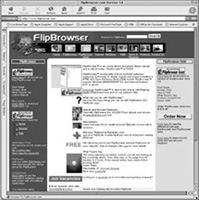
You
can also download the free version of FlipBrowser as well
as the more enhanced FlipBrowser Gold from E-Book's web
site at: www.flipbrowser.com
|
|
Microtek Lab is now bundling
a MN-100 digital camera with its ScanMaker 4600 flat-bed scanners. The
scanner has 2400x1200dpi resolution, 42-bit color depth, and includes
free online storage for an unlimited number of photos and web-based photo
albums. With the optional Microtek Media Adapter, you can also scan negatives
or slides in a 7x7" scan area and up to nine 35mm slides at one time.
The MN-100 digital camera has a 100,000 pixel CMOS imaging chip. In Webcam
mode it can capture video clips at 30 fps as well as audio. The package
includes a bunch of useful software and sells for $189.99, or you can
get it without the camera for $159.99. You can find more information at:
www.microtekusa.com.
Protect Those Cameras
Targus, Inc. is a company that makes an interesting line of high quality
computer and mobile computing cases. Recently they announced the availability
of three lines of carrying cases called Pro Black, Sport, and Casual for
digital cameras and camcorders. All feature high-density foam surrounding
their main compartments while the interior walls and dividers are covered
with a soft plush lining called Sport Prolene. The exteriors are covered
in 420-denier twill nylon for protection against wear. Each has a storage
area for memory cards and the larger cases have accessory storage compartments
for batteries, power adapters, and connector cables. Targus cases feature
a Neoprene comfort stretch strap that's designed to reduce shoulder and
neck strain and the smaller models include belt loop straps. The digital
camera cases range in price from $11.99 to $49.99. More information can
be found by calling (877) 482-7487 or visiting www.targus.com.
I Could Write A Book
I have heard about lots of photo sharing web sites but one of the most
interesting is PrintLife. Here's the deal: If we are truly in the era
of the digital darkroom, we are also in the era of the digital shoebox,
where far too many images get tucked away on CDs or web sites that have
fewer hits than a homepage dedicated to the easily forgettable East German
Trabant automobile. I agree with PrintLife's CEO Meg Weston who thinks
consumers want to "create something truly special with their images."
What PrintLife offers is the ability to print your photographs in a bound,
hardcover book that contains up to 48 digital images, including captions,
and is printed in full-color on glossy coated stock. The introductory
price is $24.99 but judging from the sample I looked at, even at the standard
price of $29.99 represents a good value. In addition to just adding images,

PrintLife's software lets you create customized page layouts using multiple

images and different kinds of backgrounds. Sorry Macheads, the software
is currently designed to be used only with Windows 95/98/ NT4/2000, and
presumably ME, but I would hope that seeing the armies of iMac users out
there that PrintLife will see the error of their ways and offer a Mac
OS version soon. For more information, visit their web site at: www.printlife.com.
OK, for all of the Trabby aficionados
out there who I may have offended, I'm sure that sites such as The UK
Trabant Owners Home Page (www.icbl.hw.ac.uk/~cjs/trabby.html)
get tons of hit--or maybe not.
Even More Book News
People love to share photos, but are sometimes limited in how they can
present them electronically. E-Book Systems' has created a new product
called FlipBrowser Gold that allows you to share your photos in a digital
photo album on the Internet. FlipBrowser Gold is an online sharing tool
that will open a folder of image files and automatically compile them
into a FlipBook with a thumbnail overview and table of contents. You can
manually re-order the pages by drag and drop, upload the complete FlipBook
to the web for sharing and even e-mail your friends to inform them of
the location of the online FlipBook. You can also choose to have your
book listed on www.flip library.com for search and retrieval by the general
public. FlipBrowser Gold can also be used as an e-book or what the company
calls "flipbook" viewer. You can view photo albums, product catalogs and
manuals. Any of these will be viewable electronically as if you're looking
at a traditional book with a cover page, flipping pages and bookmarks.
FlipBrowser Gold also acts as an Internet browser. Web pages are automatically
compiled into 3D page flipping form like a real book. Every page is remembered
and you can have quick access to previously viewed web pages without using
the Back or Forward buttons. E-Book Systems' patented page flipping technology
is incorporated into this new product. FlipBrowser Gold costs $19.95 and
is available at: www.flipbrowser.com.
Taking Care Of Ink Jet Prints
If you've been reading this column as well as David B. Brooks' "Digital
Help," you know there's a bit of controversy surrounding Epson's Pre-mium
Glossy paper. Like Brooks, I've never personally experienced the color
shifts that some people have seen, but Epson admits that if you are unable
to limit your print's exposure to airborne contaminants and light, they
may discolor. The degree of discoloration depends on the environment and
how many contaminants they're exposed to. In addition to reformulating
the paper, Epson recently passed along to me some tips on taking care
of your Premium Glossy ink jet prints.
- Allow your prints to dry
thoroughly for 24 hours before framing. Avoid framing a print when humidity
is high because condensation may form behind the glass. Avoid hanging
framed prints in direct sunlight.
- If you want to store your
prints in a stack, allow them to dry individually for at least 15 minutes,
then place a sheet of plain paper (Epson supplies sheets with their
Glossy Film) between the individual sheets in a stack. Before removing
the separator sheets, allow a full day for the prints to dry.
- Keep unprotected prints
away from sources of ozone, such as computer monitors, television, air
cleaners, or other sources of high voltage electricity.
- When storing prints in
photo albums, use acid-free, archival sleeves.
Epson also makes a few suggestions
that are similar to admonitions in 35mm camera manuals that tell you not
to use the camera underwater, but since there are always some people who
will try anything, here's a few more caveats.
- Do not use a hair dryer
to dry your prints.
- Don't display or store
your prints outdoors.
- Don't store your prints
where they are exposed to chemicals, such as in a darkroom.
|