


- REVIEWS
Camera Reviews 
More Reviews Mobile Reviews Photography Reviews - GALLERIES
- VIDEOS
- BUYER'S GUIDES

Digital Innovations
Be Careful What You Wish For
What I Want And Don't Want In My Next Digicam! Page 2
Here's the prescription from your Doctor: Take two plug-ins and call me in the morning.
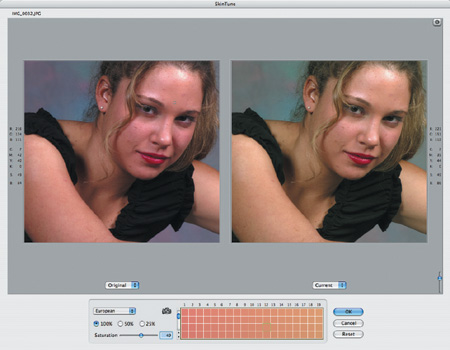
If there is anything that drives people crazy when working with fashion, portrait, or wedding images, it's correcting skin tone. SkinTune is a Photoshop compatible plug-in that was specifically designed for correcting skin color. PhotoTune Software (www.phototune.com) compiled a series of skin tone libraries for different nationalities, including African, Asian, European, Latin, and Middle Eastern. Each library contains approximately 45,000 different colors that encompass the entire flesh tone spectrum for that particular library. After opening an image in Photoshop, select SkinTune from the Filter menu and after two mouse clicks it will find the nearest acceptable skin color from the library and automatically correct your image. After SkinTune does its magic, you can tweak the final image by using the built-in tools to adjust hue, brightness, and saturation, and (here's the kicker) all these adjustments stay within the boundaries of the library so you can't accidentally introduce stray colors. SkinTune is available for Mac OS and Windows computers. Download a demo version and try it yourself.
 |
|
|
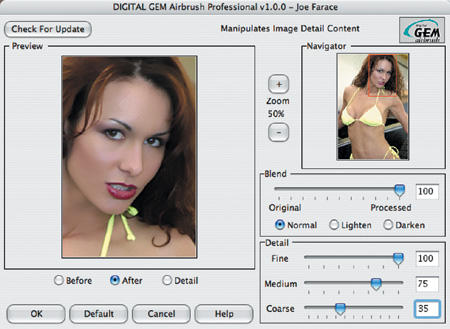
The Kodak (www.kodak.com) Austin Development Center's (a.k.a. Applied Science Fiction) Digital GEM Airbrush Professional is a quick yet powerful way of smoothing skin without blurring detail or important facial features. The plug-in automatically produces air brush/retouching effects, without having to resort to masking or manual softening. Digital GEM Airbrush Professional smoothes surfaces by reducing harsh shadows and highlights, minimizing skin imperfections while preserving details like hair, eyelashes, and eyebrows. Sliders let you customize the smoothing effects or intensity amounts ranging from fine, medium, and coarse to maintain the character of your subject's face. You can apply the result to a duplicate Layer (Layer>Duplicate Layer) and then use the Layer's Opacity settings to allow some of the original image to show through. Digital GEM Airbrush Professional has a Blend setting that allows you to blend the original and modified images, but that is on a single file. Using Layers leaves the original image untouched and you can always change the opacity at any time in the future and even remove it.
 |
|
|
Profiles In Software
DxO Optics Pro (www.DxOPRO.com)
software eliminates blur, distortion, chromatic aberration, and vignetting,
not just for your digital camera but for the specific lens you're using,
too. It's designed for advanced amateur and professional photographers
and likes to think of itself as a "software corrective lens" for
your digital SLR. Corrections are based on a DxO Profile that is specific to
each lens and camera model used. Distortion, for example, can be lowered below
a residual 0.02 percent. DxO Optics Pro can correct irregular, variable aberrations
and the correction for blur takes astigmatism into account. The software automatically
integrates relevant capture settings including aperture, focal length, and focus
distance, using EXIF data to fine-tune the correction to the exact shooting
conditions.
 |
|
|
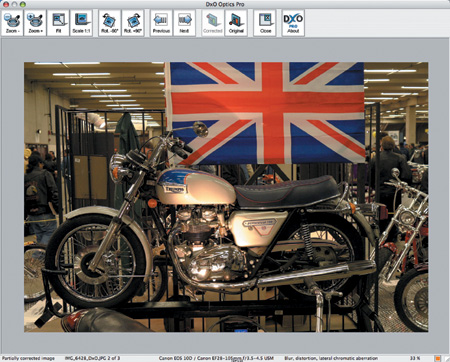
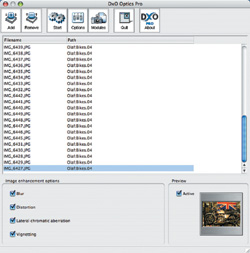
DxO Optics Pro consists of the DxO Optics Pro Correction Engine that is a stand-alone Macintosh or Windows based application and a set of DxO Profiles characterizing the optical properties of body/lens combinations. The DxO Optics Pro Engine is available for Windows and Macintosh platforms. The first DxO Profiles include: Canon EOS-1Ds, 1D, 1D Mark II, 10D, D60, Digital Rebel, and a selection of lenses; Nikon D100, D1X, D2H, D70, and a selection of lenses; Fuji FinePix S2 Pro; Olympus E-1; Pentax *ist D; and Kodak DCS Pro 14n. DxO Optics Pro corrections are fully automatic, with few if any user interactions required, allowing for batch processing to make it a big time saver. Based on my experience I'm impressed.
 |
|
|
| |||||||||
|

| ||||||||
- Log in or register to post comments


































 FEATURED VIDEO



Get the Latest Photo Tips, News & Reviews from Shutterbug!






| Camera Reviews Other Reviews | |
Mobile Reviews Photography Reviews Columns | |
News | |
Features | |
How-To | |
Resources |
 © 2024 Shutterbug
AVTech Media Americas Inc., USA
All rights reserved