| |
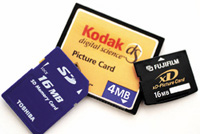
Last
man standing. When the format wars are over, it's
all gonna boil down to little memory cards like these
and CompactFlash. Proving that timing is everything,
note the large capacity Kodak 4MB card that was actually
useful at one time. The Sony Memory Stick? Can you spell
"Betamax"? Image captured with Canon EOS
D60 and SanDisk 16MB CompactFlash card.
|
|
"The nicest thing
about standards is that there are so many of them to choose from."--Ken
Olsen, founder of DEC
While it seems like every day brings yet another new memory card format
for digital camera users, I'd like to make a few predictions.
Sooner or later, we're gonna get sick of it, and tell the manufacturers
"enough is enough." Dick Bowers, a student at Shutterbug's
2002 Miami Digital Photo Workshop Series, recently e-mailed me: "My
Fuji F601 uses SmartMedia cards. Is it extinct?" I don't
think the camera is going to be extinct any time soon, but the SmartMedia
it uses is already on the endangered species list. All of the newer
cameras from companies that formerly embraced the Wheat Thin-like SmartMedia
cards are rapidly moving to the tiny xD Picture Cards and the trend
is for consumer-oriented cameras to use smaller and smaller media, such
as the SecureDigital (SD) and MultiMediaCard (MMC).
SD and MMC not small enough for you? The new Reduced Size MultiMediaCard
(RS-MMC--yet another memory card acronym) measures only 0.9x0.7x0.06"
or about half the size of the already petite MMC card. Hitachi is currently
selling these cards in Japan and is expected to announce their availability
in the US early this year. The pre-Consumer Electronics Show buzz is
that Sony is planning to announce a new Memory Stick format--the
Duo--that may not be compatible with all of their older devices.
Or as fellow pundit, Peter Burian said, "New Memory Stick to forget
older devices." The Memory Stick Duo will have capacities to 1GB
and the ability to handle high-performance functions such as streaming
video playback. While Sony claims that 376 companies use the current
Memory Stick format, I can only think of a handful on non-Sony devices
that do so. Who knows? More importantly, who cares?
Where does all this leave the ever-popular CompactFlash format? (See
sidebar: CompactFlash For Lunch.) There are just too many of these puppies
out there used by the pros and, so far anyway, all of the professional
digital SLRs use CompactFlash, although Kodak is hedging its bets with


the DCS Pro 14c by providing slots for both CF and SD, just in case
you're in Botswana and want to pick up an SD card at the nearest
7-11.
|
| |
|
I used Extensis' PhotoFrame to add artistic edges
to this photograph of Kylene. Effects added included: outer
shadow on the photograph, inner glow, and a new background
color. All three colors were selected directly from the
image, using the PhotoFrame's Eye Dropper tool to
keep them in color harmony with the image. |
|
Plug-In Of The Month
Extensis' PhotoFrame (www.extensis.com/photoframe/)
was always one of my favorite plug-ins for adding creative borders and
edge effects to digital images. I liked the large, easy to navigate interface
and the newest version, PhotoFrame 2.5, offers a major increase in performance
while supporting Adobe Photoshop 7 under Mac OS X. OS 9.2 die-hards, like
myself, won't be disappointed, since the plug-in works just as well
and more importantly just as fast for us, too. PhotoFrame 2.5 includes
more than 2000 different frame files and lets you design stunning border
and edge effects, and the interface encourages you to experiment with
all of the latest artistic edge effects, colors, blend modes, shadows,
textures, and bevels to create an almost infinite number of borders. Some
of the new frame families in this Version 2.5 include Acid Burn, Junkyard,
and Paper Maché. There are also more than 100 variations of the
film-like Emulsion family that mimics a number of different kinds of camera
edges. With a suggested retail price of $199.95 for the full product,
Mac OS and Windows versions of PhotoFrame 2.5 are available for download
from the Extensis web site with upgrades varying from $49.95 to $79.95
depending on your previous versions. Extensis is now a subsidiary of Celartem
Technology USA Inc. (www.celartem.com),
which in turn is wholly owned by Celartem Technology Inc.
|
| |
|
As you can see by this warning panel that appears during
cartridge replacement with the Windows XP driver from the
Stylus Photo 820, Epson clearly warns against refilling
their ink cartridges. That doesn't mean you can't,
and many people "do" refill them, but it also
means that if you do, don't expect any warranty sympathy. |
|
A Chip Off The Old Block
When Epson decided to put chips in their printer's ink cartridges,
the conspiracy theorists went crazy. Rather than an X-Files alien plot,
the chips let the driver software report the status of how much ink remained
in the cartridges. If you're running low on black ink, the driver
lets you know. But people who like to refill their ink cartridges felt
cheated; they wanted to keep reusing them. MediaStreet.com is a company
that's always coming up with clever ink and media options for serious
ink jet printer users and have introduced the James Bondian "T007:
Chips Never Die" to solve this thorny problem. The Universal Chip
Resetter will reset the chips in an OEM ink cartridge so that it reads
full, allowing it to be refilled and reused, saving money and more junk
from ending up in the county landfill. It programs all popular cartridge
types in 5 sec. The Universal Chip Resetter costs $25.99 and requires
a 9v battery, and "batteries are not included." For a list
of compatible Epson ink jet printers, visit MediaStreet.com's web
site, www.mediastreet.com.
|
| |
|
Since May is National Photo Month, I'd like to designate
May 21st as "Take Your Camera to Work Day."
Specifically, take your digital camera to work and make
friends. |
|
Take Your Camera To Work
Day
There was a time when May was widely celebrated as National Photo Month.
You'll be glad to know that you can still e-mail animated NPM greeting
cards from www.greetsomeone.com/may/
photo.htm, but I'd like to propose something completely different.
By the power invested in me by nobody in particular, I'd like to
declare May 21st as Take Your Camera to Work Day. Specifically, take your
digital camera to work and make pictures of your coworkers and give them
a CD; make wallpaper of your company building and pass it around the network;
or take pictures on your lunch hour of the nice person who sells ice cream
on the corner. Use digital photography as the true international language.
I hope to set up a web site where images made on May 21st can be uploaded,
so stand by for an announcement and URL next month. Oh yeah, in case you
wondered how I picked the date--it's my birthday.
|
| |
|
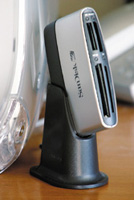
SanDisk's ImageMate 6 in 1 card reader has four slots
that can handle CompactFlash, SmartMedia, Memory Stick,
SecureDigital, and MultiMediaCard. The ImageMate 6 in 1
card reader supports both CompactFlash Type I and II cards,
but not the IBM Microdrive. |
|
CompactFlash For Lunch?
The madness of memory cards is not just limited to the card formats, but
also to card readers. At a recent model shoot in Phoenix I captured more
than 4GB of images but with only a few high-capacity CompactFlash cards,
and spent lots of time downloading images to my laptop with a USB-based
card reader. The smart photographers brought FireWire CompactFlash readers
which whipped right through their 256MB cards, while I was standing there
looking at the scenery, which to tell the truth, was pretty awesome. When
I got back home, SanDisk (www.sandisk.com)
sent me their new ImageMate 6 in 1 card reader to test and images from
CompactFlash cards loaded instantly through its fast USB 2.0 connection.
The reader has four slots and can handle CompactFlash, the now mostly
useless SmartMedia, as well as Memory Stick, SecureDigital, and MultiMediaCard.
The ImageMate 6 in 1 card reader supports both CompactFlash Type I and
II cards, but does not support IBM Microdrives even though they use a
Type II form factor. Because the Microdrive is a rotating electromechanical
device, it takes more power than a CompactFlash card, so SanDisk won't
guarantee that a non-CompactFlash device, like the Microdrive, will work
in the ImageMate 6 in 1. If you're using a card reader and want
to use 1GB Microdrives, which are available at good prices from many sources,
including d-Store (www.d-store.com),
make sure the reader can read it, not eat it.
|