| |
The final fanciful version is cute, but only for fun.
For serious work I like to try and recreate a natural
look wherever possible.
Photos © 1999, Jay Abend, All Rights Reserved
|
|
Even if you have vowed to
never get involved in the digital imaging revolution, you've got
to admit that you probably are amazed at some of the seamless things
that can be done with photo editing programs like Adobe Photoshop.
I'm a fully digital kind of guy these days. My studio houses four
different high-resolution digital cameras, a Leafscan 45 film scanner,
and a Umax PowerLook III flat-bed. I've got a bunch of Epson ink
jet printers, Tektronix color lasers and dye sub printers, and any number
of fancy software packages. It's been a very expensive trip, but
in my line of work that level of investment is necessary. At home I
have a simpler setup--an inexpensive Pentium PC, a used Epson Photo
printer, and a $49 scanner I bought at a wholesale club. Believe it
or not, I get pretty good results from this little setup.
This proves that in many cases a skilled operator can get great results
from modest equipment. If your friends have ever marveled at the quality
of your still photography, then you probably have the kind of visual
sense required to do really fine work on the computer. While there are
any number of editing programs, plug-ins and packages designed to automatically
enhance your pictures, a few simple techniques will ensure great digital
pictures with consistency. We'll start with the most basic and
obvious things and work our way up.
|
| |
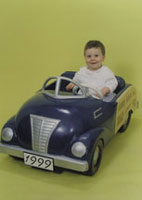
Here's the raw image as scanned by my Umax PowerLook
III--flat, lifeless, and way too yellow (no fault of the
scanner, that's what the original looked like). Unfortunately,
the expression on little Jordan Andrew Cagan is priceless,
so Mom and Dad looked to me to save it.
|
|
Choose Your Weapon.
Which image-editing program to purchase? If you ever wanted to get into
the graphic arts business for real, then you're pretty much chained
to the industry stalwart, Adobe Photoshop. It's the biggest, most
expensive, and the most pervasive in the graphic arts industry.
If you're just looking to do professional quality work at home,
you can do very nicely with any number of other image-editing packages.
I also own Jasc Photo Paint 5.0 and Corel PHOTO-PAINT 9. Both are full-featured
complete packages available at a bargain price. Corel's PHOTO-PAINT
in particular is a robust package that can do everything Photoshop can
and then some, but migrating your skills from one program to another can
be difficult.
On less powerful systems I've done really good work on modest packages
like Adobe's PhotoDeluxe and Ulead's PhotoImpact. While they
don't support the high-end features of programs like Photoshop,
for images intended for ink jet printer output or for personal web usage,
they're perfect.
You'll need a handful of plug-ins or enhancement programs to do
any serious work. While Photoshop 5.5 has added excellent masking tools,
I still like Extensis' Mask Pro 2.0. A favorite of many production
oriented pros. Many image-editing programs support the Photoshop plug-in
system, so you'll be able to use those plug-ins even if you don't
pop for Photoshop.
Choose Your Medium. There are any number of ways to present
your digital images, from the web to Powerpoint presentations to high-resolution
photo prints. While color management software like Apple's Color-sync
help you get repeatable color results, you've also got to know some
of the rules of the road when it comes to reproduction. First of all,
there is no color management software that can exactly portray on the
monitor what your image will look like on paper.
|
| |
I
still like Extensis Mask Pro 2.0 even though Photoshop has
added masking tools in Version 5.5. Here I've used
the magic brush tool to remove the sickly yellow background
behind the boy. Once he is separated to his own layer, I'll
use levels, Curves and Color Balance to give him a normal
flesh tone to match my reference image.
|
|
Do you remember the exact day
when you could actually "see" the final image in your head
before you even brought the camera up to your eye? Well, you've
got to develop that same sense of visualization with the digital medium.
I've found that small images intended for web usage can be almost
absurdly high contrast, since the dynamic range of a computer monitor
is far less than that of a photo print or magazine page. Once you've
run enough color prints through your printer you'll begin to understand
the tendencies of your printer and alter both your shooting and editing
style. Since all point-and-shoot digital cameras do substantial enhancing
in the camera, you've got to try and always capture as much raw
information as possible. Once you've achieved a pure white or a
pure black in the digital world, there is no more information, so it's
super important to keep your exposure in the safety zone. I use a point-and-shoot
camera that has a very neutral color balance and doesn't do a lot
of in camera processing. While some have complained about the lack of
"punch" in the images, I like the ability to fix it myself
later, without the camera introducing extra noise or maybe even clipping
the black or white points without my knowledge. Once you know how your
camera and final output device responds, you can make those decisions
during the shoot.
Getting In Balance. Probably the toughest thing to do in the
subjective world of photography is establish an objective Caucasian flesh
tone. Certainly we've all had the color prints from the commercial
lab that exhibit green, pink, or blue flesh tones. If you're a color
darkroom buff then you've learned this lesson the hard way--flesh
tones that look OK in your darkroom may not look so "right"
in the living room. Whether your original is a digital file or a piece
of film ready for your scanner, getting the colors right is really the
most important thing.
|
| |
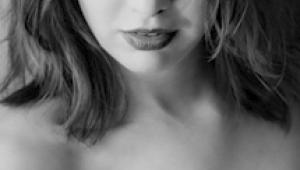
I like to keep a reference portrait on my hard drive, and
keep it open while editing. Since I know that this image
prints well on my Epson printer, I can use it as a reference
with confidence.
|
|
Luckily for digital imagers,
you can establish a pretty foolproof "standard' right in your
computer. I keep a handful of very small files saved in the "Stan-dards"
folder on my Macintosh. I keep a bright sunny outdoors scene, a handful
of headshots in different light sources, and a couple of product shots.
I have found that even with all of my experience my eye can get fooled
by the monitor, room lighting, subject matter, etc. I'm almost embarrassed
to admit how many times I've delivered beautifully packaged CDs
of images to clients who then had to increase the contrast in order to
bring up the black or whatever. It's a subjective world we live
in, so I like to establish standards. Here's how: take the photos
that have pleased you the most when output, you know, the shots of your

kids that printed up beautifully, the still life shots that looked great,

you choose. Then shrink them down so that they only take up a few inches
of screen real estate. On a 1280x960 monitor that's about 320x240
pixels. I save them as JPEG images and name them "Portrait 1,"
"High Key Product 2," etc. When I'm editing an image,
I pull up the sample and let it sit next to my image while I'm working.
I match the flesh tones and overall gamma of the scene, so I know that
I'm working in a color environment that has proven to work in the
past.
Output Is Everything. The bottom line is simply that
the proof is in the print. If you can't get your perfect images
to print perfectly then your efforts are all for naught. I use Epson Photo
printers for most of my personal work. Lately I've switched everything
over to my Epson 1200 printer. I've had to revamp my color management
profiles to get predictable output, but now I feel comfortable with it.
While the printer is producing what I'm looking for as far as sharpness,
color saturation, and photo quality, I've learned that when it comes
to photo output, "it's the paper." Photo quality papers
are most definitely not all the same.
I've had incredibly good luck with Epson's proprietary papers
as well as papers intended for the dye-based Canon bubble jet printers.
I also use Konica Photo IJ paper.
Don't Get Fancy. Have you ever noticed how some
music from the 1950s, '60s, and '70s still sounds good today,
while other music sounds awfully dated? The secret is that artists whose
work endures tend to do things very simply, eschewing popular studio effects
and lyrical trends of the era. If you would like your digital photography
to have the staying power of the Beatles music rather than the Strawberry
Alarm Clock, strip everything down to the bare bones.
It's pretty tough to lay off of some of this eye candy. (In fact
it's hard for me to lay off of Eye Candy 3.0, a popular special
effects package.) There are pages in Photography sourcebook filled with
seamless photo-manipulations of pigs with wings, flying executives, and
women with three eyeballs. Not my cup of tea. While I'm not opposed
to a little trickery, like my fanciful reworking of the little boy in
the car, I've found that smooth and natural photo editing produces
the best results.
Every digital photo buff has to have a few wild packages, like Xenofex
or Kai's Power Tools, but using their powerful effects sparingly
will usually produce images that still look OK in a year or two or even
10. Of course a little fanciful fun won't kill you, as evidenced
by my surreal rework of the boy in the car photo, but too much digital
trickery will usually degrade the impact of a photo.
It doesn't matter if you use a megabucks megapixel digital camera
or a $49 wholesale club flat-bed scanner, if you can develop a set of
digital editing skills that parallel your film photography skills, you'll
consistently produce excellent quality work. For my personal work I shoot
a combination of film and digital with a variety of cameras. In general
I've found that images with correct color balance, snappy contrast,
and just reasonable sharpness can look every bit as good as photos from
professional color labs. Even the pros know that photographs are highly
subjective, and what looks good to me may not look good to you. Since
we are so accustomed to the high level of photographic quality provided
by modem films and inexpensive minilabs, even high-end digital equipment
has a high standard to live up to.
|