| |
Flags
flap and pavilion turns with your photos on display.
|
|
What if you had to make an
exciting movie but the one thing you wasn't able to do was actually
film it? Dialog, music, OK--but no footage. None. That's
something the likes of historical film director Ken Burns has had to
do many times in his dramatic documentaries on the Civil War, early
New York, and lots more. With nothing but good writing, a great band,
and a lot of old still photos and drawings, he has made history come
alive through judicious movement and intercutting of motionless pictures.
|
| |
Opening
screen is simple, user-friendly.
|
|
That's
also a common problem for all still photographers whether amateur or pro--how
do you show off your work in the most exciting and dynamic manner? How
do you connect your best material and make it sing, dance, and tell a
story--move it, shake it, bring it to life? Those questions and more
may have been answered by the folks at Micro Research II in the form of
their surprisingly upbeat and versatile 3D-Album software (www.3d-album.com).
There are a number of programs out that enable you to organize still pix
into albums or slide shows, starting with the venerable but often sleep-inducing
PowerPoint, but 3D-Album really has wings that take you a mile high on
a budget ($39.95)--and with virtually no learning curve.
|
 |
Select
among many presentation templates to set photos in motion.
|
|
2D To 3D
What it does is really simple: It creates 3D objects out of your pictures
and then moves them around through space (or moves the viewer through
their space) by combining them with geometric objects (cubes, spheres,
cylinders) or by painting them onto objects that are themselves fluid,
like curtains, screens, waving flags, wet undulating surfaces, and so
on. Then the picture-objects are flung about through background space
in selective but often dizzying and dazzling arrays to the tune of whatever
music you want for the soundtrack, overlaid by titles and/or voiceover
to help tell your story. Basically, it takes your photos and turns them
into a lush, animated movie.
The nice thing about it is that you don't have to organize, cut,
and splice like you would in most video editors. No storyboard, no time
line, no shot-by-shot segues to take up your time and then have to render
before you can see what mistakes you've made. That's because,
after all, it's just stills, stills, stills--and the movie
part makes itself. And at the end, you can have your show as an application
(.exe) that can be shipped to another computer on a CD, a screen saver,
an HTML for dropping into a website, or a Zip or self-expandable file
for e-mail.
|
| |
Organize
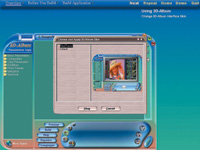
screen lets you order photos, add sounds, edit colors.
|
|
Simple Procedure
Here's a breakdown, stepwise:
1. Click on the "Organize" button at the
lower left-center portion of the interface and select any folder from
your hard drive that contains the images that you want to appear in your
slide show. Once you have selected your folder, you will see all the images
appear in the Organize box. You can arrange the order by dragging and
dropping the images in the order you prefer, or you can select to randomize
them. From this same "Organize" box you can select to add
text or voiceover.
2. Select a "Presentation Style" under different
categories. The application contains many 3D animation presentation styles
for displaying your photos. After you have chosen a photo folder, you
can view them in different presentation styles by choosing a style from
the left side of the interface. Click on the style categories to see the
available styles in each category. Click on the style that you would like
to see and you will immediately see your images in that style template
in the preview window. Click on the "Play" button to preview
your presentations in full screen mode. Press "Esc" on your
keyboard to return to the program interface.
3. Select the music for the album. By clicking on the
musical note icon on the lower right-hand side of the interface you can
select a music folder from your local drive. MP3, WMA, WAV, or MIDI files
can be used to play with your presentation. You can select one song from
the folder or select the folder itself and play every song in the folder.
Fundamentally, that's it, then you save it in the format of your
choice. The reason you don't have to have time lines or storyboards
is because you take care of putting the pieces together by altering the
speed of the overall presentation template, just how fast your images
change and the 3D objects move as you go along. You can make your images
appear on the walls and flags of a splendid palace as you race through,
or on the walls of a museum as you leisurely stroll through. Or you can
spin and fly through a windy, clouded sky until you bounce off a mountain
and into the sea, or whatever else the particular template involves. Instead
of making a movie from scratch, you are re-mixing one that's already
been made with your own pictures and sounds at your own pace.
|
| |
Solid
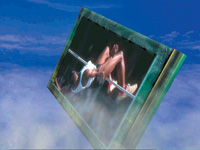
3D versions of photos spin and hurtle through space.
|
|
Inside A Game
If there is any really good way of verbally describing how this works,
it's kind of like you have entered a really good high-res video
game in which the still and moving decor is comprised of your own photography
and images. Also like a video game, it could become boring if you're
moving through the same grounds over and over again. But this is where
3D-Album shows another strength: these folks provide a whole lot of visually
striking environments and routines, and they have new ones constantly
becoming available for download from their website, to the extent that
you may have trouble keeping up with them. And there's even a feature
where you can bundle and mix and match various presentation styles and
formats into a single folder to touch all the bases.
This clever program also has some delightful and almost bizarre touches,
which are both helpful and delightful. One particularly noteworthy one
is its "Languages" feature. That's a pull-down menu
that shows a long list of languages keyed by national flag buttons. Hit
the Chinese flag, for instance, and the entire program--all its buttons,
instructions, and labels instantly turn into Chinese characters. Hit another,
and it's all German, and so on. These folks are definitely into
the new world order, and with panache.
Whether you want to make a slick formal presentation, a simple personal
picture album, or an Xtreme photo fantasy, you'll find enough variety
here to do it all, and to do it with ease. And you can even use their
other clever and also inexpensive program Visviva Animation Capture ($24.95)
to turn your shows into DVDs.
|